Can We Connect Multiple Bluetooth Devices to a Wireless CarPlay Adapter?
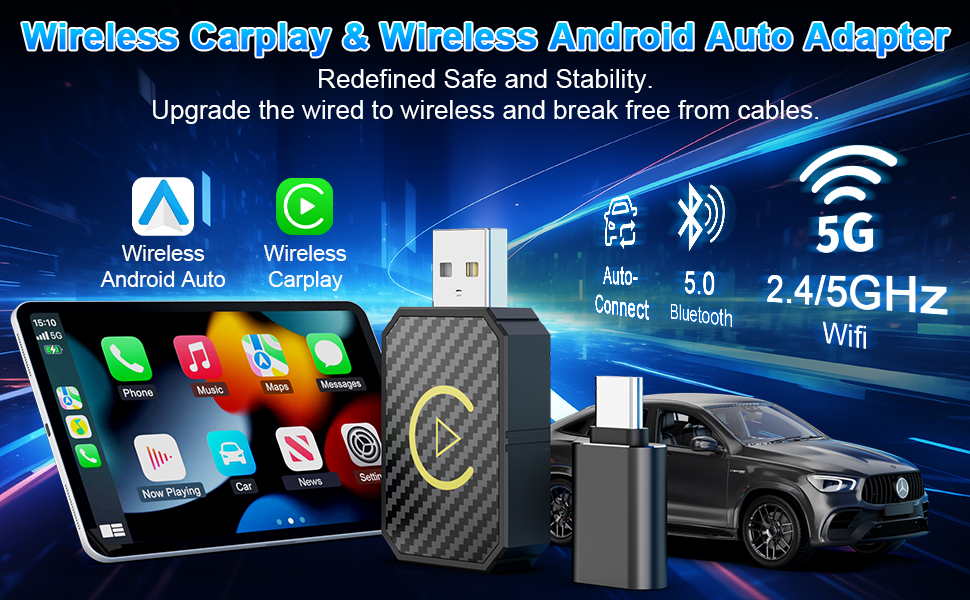
Most wireless CarPlay adapters cannot actively connect multiple Bluetooth devices for CarPlay at the same time. They usually maintain one primary iPhone connection for CarPlay, while your car may handle separate Bluetooth connections for other functions.
For drivers in the United States who use Apple CarPlay in daily commutes, road trips, or family vehicles, understanding Bluetooth connections can prevent common pairing problems. A wireless CarPlay adapter replaces the physical USB connection between an iPhone and a compatible vehicle system, but it does not work like a general-purpose Bluetooth hub that can manage unlimited devices.
A wireless CarPlay adapter typically creates a dedicated wireless link between one iPhone and the vehicle’s CarPlay system. Some adapters allow quick switching between saved phones, but simultaneous CarPlay connections from multiple iPhones are generally not supported. Additional Bluetooth devices such as headphones or another smartphone may need to connect directly to the vehicle or separately supported systems.
Source: amazon.com
How Bluetooth Works With a Wireless CarPlay Adapter
A wireless CarPlay adapter uses Bluetooth mainly during the connection process. After the initial Bluetooth handshake, many adapters use a faster wireless connection such as Wi-Fi to transfer CarPlay data, including navigation, music, messages, and app information.
Because CarPlay requires a dedicated communication channel between the iPhone and the adapter, the adapter usually prioritizes one phone session instead of acting as a multi-device Bluetooth receiver.
Source: amazon.co.uk
Primary iPhone connection
The adapter normally creates one active CarPlay session with one iPhone at a time.
Saved device memory
Many adapters can remember multiple previously paired phones, allowing different drivers to connect when needed.
Separate vehicle Bluetooth
Some vehicles can connect another phone through the built-in Bluetooth system while the adapter handles CarPlay.
Can Two iPhones Use Wireless CarPlay at the Same Time?
In most vehicles, two iPhones cannot actively use wireless CarPlay through one adapter at the same time. The adapter generally selects one available phone and establishes a single CarPlay session.
Driver switching
A second driver can usually disconnect the first phone and connect their own compatible iPhone.
Family vehicles
Vehicles shared by multiple people should store each driver’s phone separately and connect the intended device before driving.
When Can Multiple Bluetooth Devices Be Connected?
Multiple Bluetooth connections may be possible when the vehicle, not the CarPlay adapter, manages additional devices. Modern infotainment systems may allow separate profiles for phones, audio devices, or passengers.
The exact behavior depends on the car manufacturer, infotainment software, adapter model, and whether the devices are using Bluetooth, Wi-Fi, or USB connections.
Source: amazon.co.uk
Car Bluetooth plus CarPlay adapter
Some vehicles allow the adapter to handle CarPlay while the vehicle’s Bluetooth system manages another connected device.
Multiple paired phones
Many systems store multiple phones but only activate one for calls, media, or CarPlay at a time.
Passenger devices
A passenger’s headphones or separate Bluetooth accessories may work independently if supported by the device.
Example Connection Setup
A common setup in a family vehicle may include one driver’s iPhone connected through the wireless CarPlay adapter, while another phone remains paired with the vehicle for limited features. However, both phones usually cannot control CarPlay simultaneously.
Driver phone
Provides navigation, apps, messages, and CarPlay controls.
Secondary phone
May remain available for Bluetooth calls or may need to wait until the primary phone disconnects.
How to Connect and Switch Between Multiple Phones
If a wireless CarPlay adapter supports multiple saved devices, switching phones usually requires disconnecting the current phone and allowing the preferred device to connect. The process varies by adapter brand and vehicle system.
Before switching, make sure Bluetooth and Wi-Fi are enabled on the desired iPhone and that other previously connected phones are not automatically taking priority.
Source: manuals.plus
Step 1: Disconnect the current phone
Turn off Bluetooth or Wi-Fi temporarily on the active iPhone if the adapter automatically reconnects to it.
Step 2: Connect the preferred iPhone
Select the adapter from the Bluetooth menu and complete the CarPlay connection process.
Step 3: Save connection preferences
Use adapter settings or vehicle profiles if available to reduce repeated pairing steps.
Signs the Connection Has Worked
A successful connection usually shows the CarPlay interface on the vehicle display, allows access to supported apps, and enables hands-free controls through the car system.
CarPlay appears on screen
The vehicle display loads the Apple CarPlay interface.
Audio works correctly
Music, calls, and navigation instructions play through the vehicle speakers.
Common Problems When Connecting Multiple Devices
Connection conflicts are common when several phones have previously paired with the adapter or vehicle. The device that connects first may take priority, preventing another phone from starting a CarPlay session.
Source: amazon.com
Wrong phone connects automatically
Disable Bluetooth or Wi-Fi on unused phones or remove old pairings if necessary.
CarPlay keeps disconnecting
Check adapter firmware, vehicle compatibility, and wireless interference.
No audio from the correct phone
Confirm whether audio routing is controlled by the adapter or the vehicle infotainment system.
What to Check Before Buying an Adapter
Drivers who need multiple phones should review the adapter’s documented specifications before purchasing. Features such as multi-user memory, automatic switching, and Android Auto support differ between models.
Supported devices
Check whether the adapter supports your iPhone model, iOS version, and vehicle system.
Connection limits
Look for information about simultaneous connections versus stored pairings.
Limitations and Important Exceptions
Wireless CarPlay adapters are designed to provide a wireless connection between a compatible vehicle and smartphone, not to replace a full multi-device Bluetooth management system.
Some premium vehicles include advanced infotainment systems that support multiple connected devices differently. The final capability depends on the specific vehicle and adapter combination.
Source: amazon.com
Adapter limitations
A small adapter may only support one active CarPlay user because of hardware and software design.
Vehicle differences
Two vehicles using the same adapter model may behave differently because their infotainment systems handle connections differently.
Avoid Unsafe Setup Changes While Driving
Pairing devices, changing Bluetooth settings, and troubleshooting connections should be completed while parked. Drivers should avoid interacting with phone settings while the vehicle is moving.
Prepare before driving
Connect the correct phone before starting your trip.
Frequently Asked Questions
Q
Can a wireless CarPlay adapter connect two phones at the same time?
Most wireless CarPlay adapters cannot provide two simultaneous CarPlay sessions. They usually allow one active iPhone connection while storing multiple paired devices.
Q
Can multiple phones be paired with a wireless CarPlay adapter?
Many adapters can remember more than one phone, but only one phone typically connects for CarPlay at a time.
Q
Can another Bluetooth device connect while using wireless CarPlay?
In some vehicles, another Bluetooth device may connect through the vehicle system, but this depends on the car’s infotainment features and connection priorities.
Q
Why does my wireless CarPlay adapter connect to the wrong phone?
The adapter may automatically reconnect to the first available paired phone. Turning off Bluetooth or Wi-Fi on unused phones can help the desired device connect.
Q
How many Bluetooth devices can a wireless CarPlay adapter remember?
The number varies by adapter model. Check the manufacturer’s documentation because stored device limits and active connection limits are different.
✦ Wrapping Up
Conclusion
A wireless CarPlay adapter is usually designed for one active CarPlay connection at a time, even if it can remember multiple Bluetooth-paired phones. The ability to connect additional devices depends on whether the adapter or the vehicle manages those connections.
For households with multiple drivers, the best approach is to choose an adapter with clear multi-device pairing support and understand that switching users is different from using multiple CarPlay sessions simultaneously.
💡 Key Takeaway
Before buying or troubleshooting a wireless CarPlay adapter, check whether you need multiple saved phones or true simultaneous connections because most adapters only support one active CarPlay user.
Tyron Torres is an automotive diagnostics writer and hands-on vehicle maintenance enthusiast with years of experience troubleshooting brake systems, suspension issues, and everyday car performance problems. He specializes in breaking down complex mechanical issues into simple, practical guides that drivers can use to quickly identify and fix common vehicle faults.