The best OBD2 scanner for Hyundai is the LAUNCH Creader Elite V3.0 for full-system Hyundai diagnostics.
A check engine light can appear on your Hyundai without warning. You may also need to check ABS, airbag, TPMS, or service codes before visiting a repair shop. A basic code reader can help, but Hyundai owners often need more than engine data. I compared eight popular scanners for ease of use, Hyundai coverage, live data, reset tools, price, and daily value. The list below includes simple readers, Bluetooth tools, and advanced scanners for home mechanics.
See the differences between my top picks at a glance.
| Scanner | Best For | Hyundai Coverage | Connection | Main Strength | Buy |
|---|---|---|---|---|---|
| LAUNCH Creader Elite V3.0 | Advanced DIY users | Kia and Hyundai focused | Wired | Full systems and bi-directional tools | View on Amazon |
| FOXWELL NT530 | Hyundai service work | Kia and Hyundai focused | Wired | All systems and maintenance resets | View on Amazon |
| BlueDriver Bluetooth Scanner | Phone-based diagnosis | Enhanced systems vary by model | Bluetooth | Repair reports and no subscription | View on Amazon |
| FOXWELL NT301 | Live engine data | OBD-II engine systems | Wired | Clear live data display | View on Amazon |
| ANCEL AD410 | Simple code reading | OBD-II engine systems | Wired | Easy check-engine diagnosis | View on Amazon |
| BlueDriver Bluetooth Edition | iPhone and Android users | Enhanced systems vary by model | Bluetooth | Easy app reports | View on Amazon |
| VDIAGTOOL VD10 | Basic home use | Standard OBD-II | Wired | Code reading and clearing | View on Amazon |
| Bluetooth 5.4 OBD2 Scanner | Mobile app users | Standard OBD-II | Bluetooth | Live data and phone access | View on Amazon |
LAUNCH Creader Elite V3.0 for Hyundai

The LAUNCH Creader Elite V3.0 stands out because it targets Kia and Hyundai vehicles. It goes beyond the engine computer and can scan multiple vehicle systems. That matters when a Hyundai shows an ABS, airbag, transmission, or body control fault.
This scanner also lists bi-directional functions and reset tools. These functions can let a capable user test selected parts or complete certain service tasks. Coverage can vary by year, trim, and control unit, so I always check the vehicle list before purchase. Its wired design also avoids phone pairing problems during a scan.
Pros:
- Designed with Kia and Hyundai coverage in mind
- Scans more than the basic engine system
- Offers bi-directional functions for supported tests
- Includes several maintenance reset functions
- Uses a stable wired connection
- Lifetime update claim adds long-term value
Cons:
- Advanced tools require some diagnostic knowledge
- Not every function works on every Hyundai model
- Larger feature sets may feel excessive for simple code checks
What Amazon Buyers Are Saying
Buyer feedback for scanners in this class often praises broad system access and Hyundai-focused menus. Users also like avoiding a repair shop for common service tasks. The most common concerns involve learning the menu system and checking exact vehicle support before ordering. Results can differ by model year, so buyers should treat the fitment list as essential.
My Recommendation
I recommend the Creader Elite V3.0 for Hyundai owners who want serious home diagnostic power. It is my top pick when full-system access matters more than the lowest price. It is not the best choice for someone who only wants to erase a check engine code.
FOXWELL NT530 for Kia and Hyundai

The FOXWELL NT530 is another strong choice for Hyundai and Kia owners. Its feature list includes all-system diagnosis and many service functions. It also names useful tasks such as ABS bleeding, airbag work, SAS, TPMS, throttle, electronic parking brake, oil, and crankshaft position resets.
This tool suits owners who maintain their cars at home. The wired scanner does not depend on an app or mobile signal. It may save time when a warning light involves a system that a low-cost engine reader cannot reach. Still, advanced functions need care, and support depends on the exact vehicle.
Pros:
- Hyundai and Kia coverage is a central feature
- Supports all-system scanning on compatible vehicles
- Includes many useful maintenance service tools
- Can help with ABS, SRS, TPMS, and brake-related work
- Wired operation stays reliable in the garage
- Useful for owners who service more than one Hyundai
Cons:
- Some functions may require extra vehicle-specific support
- The menu can take time to learn
- Advanced features may not suit casual users
What Amazon Buyers Are Saying
Common buyer comments focus on the broad system access and the value of having service tools at home. Users who work on brakes or warning lights tend to find the deeper coverage useful. Complaints usually center on update steps, menu learning, or features that do not apply to a particular trim. Buyers should confirm the latest vehicle coverage before relying on one function.
My Recommendation
The NT530 is worth buying if you want a Hyundai-focused service scanner at home. I prefer it for owners who plan to work on several systems, not just the engine. It offers strong value, but basic users may prefer a simpler reader.
BlueDriver Bluetooth OBD2 Scanner
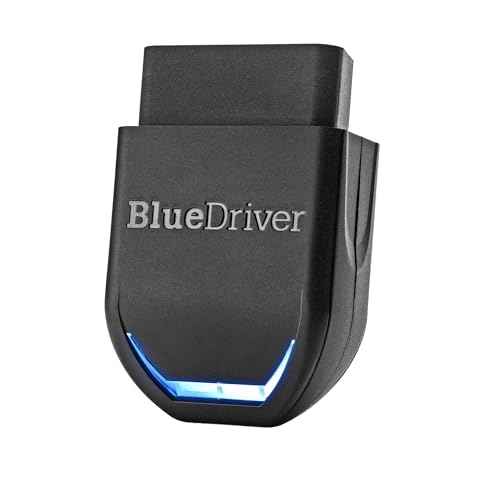
BlueDriver takes a different approach. It plugs into the Hyundai diagnostic port and sends data to an iPhone or Android device. The app presents codes, live data, and repair reports in a way that feels familiar to most phone users.
The listed coverage includes ABS, SRS, and TPMS, but enhanced functions depend on the vehicle and app support. BlueDriver also advertises no subscription, which helps control long-term cost. I like this scanner for drivers who want clear explanations instead of a small handheld screen.
Pros:
- Works with both iPhone and Android devices
- Repair reports can make codes easier to understand
- No ongoing subscription is advertised
- Compact design stores easily in a glove box
- Useful live data view for supported vehicles
- Simple phone interface suits many first-time users
Cons:
- Requires a compatible phone or tablet
- Enhanced Hyundai coverage can vary by model year
- Bluetooth setup adds one more step than a wired reader
What Amazon Buyers Are Saying
Buyers often like the app layout, repair information, and small adapter size. Many find it more helpful than a basic code reader because the app gives context around the fault. Some users report pairing or connection concerns, while others want more advanced control functions. Those comments show why app-based convenience and professional-level access are not the same thing.
My Recommendation
BlueDriver is a smart choice for Hyundai owners who prefer phone-based reports. It is especially useful for check engine diagnosis and supported enhanced codes. I would not choose it over a dedicated Hyundai service tool for advanced bidirectional work.
FOXWELL NT301 OBD2 Scanner

The FOXWELL NT301 is a practical wired reader for check engine work. Its key feature is live data, which lets you watch sensor values while the engine runs. That can help you see patterns instead of relying on one stored code.
This is a standard OBD-II tool, so it is not a full Hyundai system scanner. It focuses on engine and emissions data on compatible vehicles. The built-in screen makes it useful when you do not want to use a phone.
Pros:
- Shows live engine data on its own display
- Wired connection avoids wireless pairing
- Useful for check engine light diagnosis
- Compact design fits home tool storage
- Good match for users learning basic scan data
- Does not need a separate app or phone
Cons:
- Limited compared with full-system Hyundai scanners
- Does not replace a dedicated ABS or SRS tool
- Live data may feel technical to new users
What Amazon Buyers Are Saying
Customers commonly value the clear display, quick code reading, and live data screen. The wired design also receives praise from users who want a tool that works without setup. Some buyers expect wider system coverage and feel limited when the tool cannot access non-engine modules. That is a coverage issue, not a flaw in its basic OBD-II purpose.
My Recommendation
I recommend the NT301 for owners who want live engine data at a reasonable cost. It is a strong middle choice for check engine work. Choose a Hyundai-specific full-system scanner if your warning light involves airbags, ABS, or other modules.
ANCEL AD410 Enhanced OBD2 Scanner

The ANCEL AD410 keeps things simple. It reads and clears engine fault codes on OBD-II vehicles, including many Hyundai models sold in the United States. Its color screen and direct controls make it easy to start a scan without a phone.
This scanner suits a driver who wants to learn why the check engine light came on. It can also help check readiness information before an emissions test. It does not offer the deep Hyundai module access found in the LAUNCH or FOXWELL NT530.
Pros:
- Simple design for first-time users
- Reads and clears standard engine codes
- Works without a smartphone
- Useful for basic emissions readiness checks
- Portable wired format is easy to store
- Good fit for routine home checks
Cons:
- Limited to standard OBD-II functions
- Not intended for full ABS or SRS diagnosis
- May not satisfy advanced Hyundai repair needs
What Amazon Buyers Are Saying
Amazon buyers often mention the easy setup, readable screen, and useful basic code functions. Many see it as a handy tool for deciding whether a check engine issue needs quick service. Common limits include the lack of deeper module access and the need to look up some codes separately. Those limits match its role as an entry-level scanner.
My Recommendation
The AD410 is worth buying for basic Hyundai engine checks. I would choose it for a household tool kit or a driver who wants a simple answer before visiting a mechanic. It is not the best OBD2 scanner for Hyundai if you need service resets or full-system tests.
BlueDriver Bluetooth OBD2 Scanner Edition

This BlueDriver listing offers the same useful phone-based concept for Hyundai drivers. The adapter connects with the app, then presents code information and selected live data on a larger screen. That can make a scan easier to follow than a small handheld display.
BlueDriver can access enhanced codes on supported makes and models. I stress the word “supported” because no Bluetooth scanner can promise identical coverage across every Hyundai year. The no-subscription approach also makes it appealing for occasional home use.
Pros:
- Works with common iPhone and Android platforms
- Easy-to-read app reports
- Compact adapter is simple to carry
- Supports selected enhanced Hyundai functions
- No separate handheld screen to learn
- No subscription is advertised for normal use
Cons:
- Phone compatibility matters before purchase
- Advanced access varies by Hyundai model
- Wireless connection may not suit every user
What Amazon Buyers Are Saying
Buyers often like the fast setup and the way the app turns codes into useful repair information. The small size also works well for drivers who keep a scanner in the car. Some reviews mention connection issues or different results between vehicles. I see this as a reminder to update the app and confirm enhanced coverage before ordering.
My Recommendation
This BlueDriver edition makes sense for mobile users who want clear reports and supported enhanced codes. It is more useful than a basic reader for many drivers, but it does not replace a professional Hyundai scan tool. I rate it highly for convenience and normal check engine work.
VDIAGTOOL VD10 OBD2 Code Reader
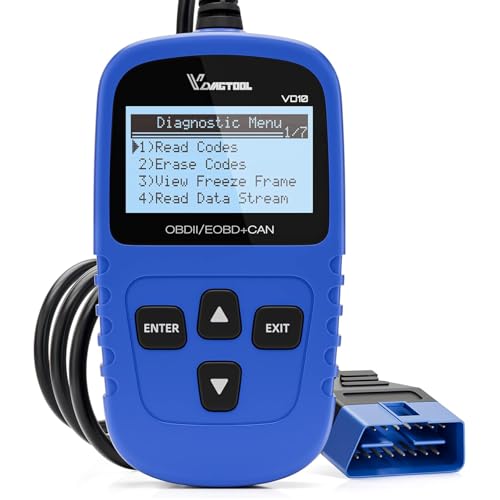
The VDIAGTOOL VD10 is a straightforward code reader for cars and trucks from 1996 and newer. It reads standard OBD-II faults, clears supported codes, and offers a CAN scan function. The built-in format makes it suitable for drivers who do not want an app.
This tool can turn off the engine light after a repair, but clearing a code does not fix the cause. It also shows I/M readiness data, which helps before an emissions inspection. Hyundai owners should view it as a basic engine scanner, not a full vehicle diagnostic tool.
Pros:
- Supports standard OBD-II vehicles from 1996 and newer
- Reads and clears common engine codes
- Includes I/M readiness information
- Works with cars and some trucks
- Simple wired operation needs no phone
- Useful as an inexpensive backup tool
Cons:
- Limited access to Hyundai body modules
- Not designed for advanced service resets
- Basic users still need to research code causes
What Amazon Buyers Are Saying
Customers tend to like the direct operation and the ability to check a warning light at home. The readiness feature also helps drivers prepare for an inspection. The main complaint from some buyers is that a basic reader cannot scan ABS, SRS, or other systems. That limitation is expected from this product type.
My Recommendation
I recommend the VD10 for low-cost standard OBD-II checks. It is a sensible choice for a second car, an older Hyundai, or a small emergency tool kit. Buy a deeper scanner if you want more than engine and emissions information.
Bluetooth 5.4 OBD2 Scanner with App
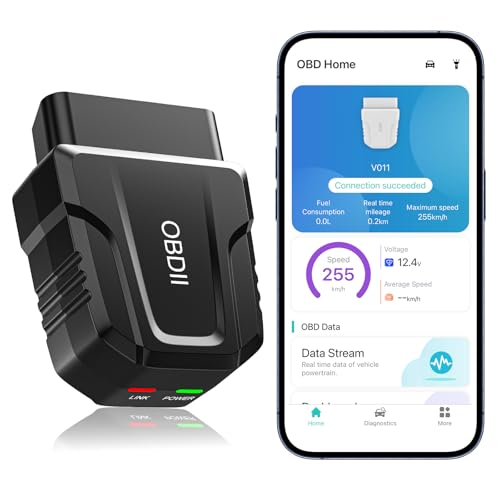
This Bluetooth 5.4 scanner is built for drivers who want to use an iOS or Android device. It can read check engine codes, show live data, clear errors, and run listed performance tests through its app. The phone screen gives more room for graphs and data than many small handheld scanners.
Its main appeal is ease of access and modern wireless use. However, Bluetooth speed does not automatically mean Hyundai-specific module coverage. I would treat this unit as a standard OBD-II scanner unless the app clearly confirms support for a specific Hyundai function.
Pros:
- Works with iOS and Android devices
- Bluetooth 5.4 offers a modern wireless connection
- Supports live data through the app
- Can clear supported engine errors
- Phone display helps with charts and readings
- Small adapter is easy to store
Cons:
- App quality affects the full user experience
- Standard OBD-II access may limit Hyundai coverage
- Requires a compatible phone during each scan
What Amazon Buyers Are Saying
Buyers commonly like the small size, wireless setup, and ability to view live data on a phone. Many see it as a useful first tool for a check engine light. Complaints often relate to app permissions, pairing, or unclear coverage. I suggest testing the app and reading the supported vehicle notes before purchase.
My Recommendation
This is a good budget option for phone users who need standard OBD-II functions. It offers useful data for routine checks, but it is not my first choice for Hyundai ABS, SRS, or service resets. Pick it when wireless convenience matters most.
How to Choose the Best OBD2 Scanner for Hyundai
Choosing the best OBD2 scanner for Hyundai starts with the warning lights you want to read. It also depends on your model year, repair skill, and budget. A basic OBD-II reader can handle engine codes. A Hyundai-focused scan tool can reach more control units and perform more service tasks.
1. Match the Scanner to Hyundai System Coverage
First, decide whether you need engine-only or full-system access. Standard OBD-II usually covers powertrain and emissions faults. It may not reach Hyundai ABS, SRS, TPMS, transmission, body, or parking brake modules.
If your Hyundai has an airbag or ABS light, choose a scanner that clearly lists those systems. The LAUNCH Creader Elite V3.0 and FOXWELL NT530 are better matches for this work. Always check the year, engine, trim, and module list. “Works with Hyundai” does not mean every feature works on every Hyundai.
2. Look for Live Data, Resets, and Active Tests
Live data helps you watch engine readings while the car runs. It can show sensor changes and help you compare a fault with real conditions. The FOXWELL NT301 makes this its main strength, while BlueDriver presents data through a phone app.
Reset tools need more care. Oil, EPB, SAS, TPMS, and battery-related functions can differ by car. Bi-directional tests can command a supported part to operate. These features are useful, but they do not replace safe repair steps or a service manual.
3. Balance Ease of Use, Updates, and Cost
A wired reader starts quickly and does not need pairing. A Bluetooth model gives you a larger phone screen and easy storage. Pick the format you will use when the warning light appears.
Also check update rules and app support. Some tools need a computer or Wi-Fi for updates. Some offer lifetime updates, while others may charge later. A low purchase price can lose value if the tool cannot support your Hyundai system. For most owners, the best OBD2 scanner for Hyundai is the one that covers the needed module without adding features you will never use.
Final Verdict: Which Should You Buy?
The LAUNCH Creader Elite V3.0 is my top pick and the best OBD2 scanner for Hyundai owners who want full-system access, service resets, and advanced tools. Choose BlueDriver for simple phone reports, or ANCEL AD410 for basic engine codes.
Check your exact Hyundai coverage before ordering. The right scanner can save a diagnostic fee, but it cannot replace safe repairs or trained advice.
FAQs Of best OBD2 scanner for Hyundai
What is the best OBD2 scanner for Hyundai vehicles?
The LAUNCH Creader Elite V3.0 is the best overall choice for broad Hyundai and Kia coverage. BlueDriver is better for easy phone reports, while ANCEL AD410 suits basic engine codes.
Can an OBD2 scanner read Hyundai ABS and airbag codes?
Only scanners with enhanced or full-system coverage can read those modules. A standard engine code reader may not access Hyundai ABS or SRS systems.
Will every Hyundai function work with a full-system scanner?
No. Support can vary by model year, trim, engine, and control module. Check the product coverage list before buying.
Is a Bluetooth OBD2 scanner better than a wired scanner?
Bluetooth scanners offer phone access and easy storage. Wired scanners usually start faster and avoid pairing issues. The better choice depends on your preferred workflow.
Can I clear a Hyundai check engine light with an OBD2 scanner?
Most standard OBD-II scanners can clear supported engine codes. Clear the code only after finding and repairing the cause, or the light may return.