The iCarsoft VOL V2.0 is the best OBD2 scanner for Volvo owners who need deep system diagnosis.
A Volvo can show a warning light for many reasons. A basic code reader may find an engine code, but it may not read the ABS, SRS, transmission, or service systems. That makes fault finding slow and costly. I reviewed six popular scanners for different Volvo needs, from simple check-engine checks to full-system work and heavy-duty truck diagnosis. The right choice depends on your Volvo model, the systems you want to scan, and whether you prefer a handheld tool or a phone app.
See the differences between my top picks at a glance.
iCarsoft i906 Volvo/Saab OBD2 Scanner

The iCarsoft i906 targets Volvo and Saab vehicles rather than treating every car the same. It can read several key systems, including the engine, ABS, and SRS. That wider reach makes it more useful than a low-cost engine-only reader for many Volvo owners. Its wired design also avoids pairing problems and app setup.
This scanner suits a driver who wants a dedicated handheld tool for home checks. It can help narrow down warning-light faults before you visit a repair shop. Still, coverage can vary by model year and control module, so I would check the vehicle list before buying. It is an especially practical choice for owners of older Volvo cars and Saab models.
Pros:
- Designed for Volvo and Saab applications
- Reads engine, ABS, and SRS systems
- Handheld design needs no phone or app
- Useful for home fault checks
- Wired connection stays stable during a scan
- More capable than a basic engine code reader
Cons:
- Coverage may differ by Volvo model and year
- Does not replace factory-level Volvo software
- Wired use offers less freedom than Bluetooth
What Amazon Buyers Are Saying
Amazon buyer feedback for this type of iCarsoft scanner often centers on its simple plug-in use and its ability to reach more than the engine computer. Buyers who want a dedicated tool tend to value the clear focus on Volvo and Saab vehicles. Some users also note that the tool feels more useful for older cars than a generic reader.
The main concerns usually involve model coverage, menu learning, and limits on advanced functions. Results can differ when a Volvo uses a control module that the scanner does not support. I recommend treating the compatibility list as essential rather than assuming every Volvo system will respond.
My Recommendation
I recommend the i906 for a Volvo owner who wants basic multi-system access at a reasonable level. It is not the newest or deepest option here, but it remains a sensible choice for older Volvo and Saab vehicles. Its brand focus gives it an edge over many generic readers.
iCarsoft VOL V2.0 Volvo/SAAB Scanner

The iCarsoft VOL V2.0 is the strongest Volvo-focused pick in this review. It supports engine, ABS, SRS, and transmission diagnosis, so it reaches systems that often trigger expensive repair visits. The listing also highlights nine service reset functions, CAN-FD support, and lifetime free updates. Those features give it a strong mix of current functions and long-term value.
I like this model for owners who want more than code reading. A broader system scan can show whether a warning comes from the engine or another module. The tool remains wired, which keeps the process direct and stable. Before purchase, confirm that your exact Volvo year and system list match the current product details.
Pros:
- Built around Volvo and Saab diagnosis
- Supports engine, ABS, SRS, and transmission systems
- Includes nine listed service reset functions
- Supports CAN-FD according to the product listing
- Lifetime free updates add long-term value
- Useful for owners who perform regular maintenance
Cons:
- Costs more than a basic OBD-II reader
- Advanced features may vary by model year
- Wired operation is less convenient for quick phone checks
What Amazon Buyers Are Saying
Buyer interest in the VOL V2.0 focuses on its Volvo-specific design and wider system coverage. Users who need ABS, airbag, or transmission data often prefer this style of tool over a generic check-engine scanner. The promise of free updates also appeals to owners who plan to keep the scanner for years.
As with any vehicle-specific scanner, buyers may report different results across different Volvo platforms. Some functions may work on one model but not another. The safest approach is to match the tool to your model year, engine, and required service function before ordering.
My Recommendation
This is my top choice for most Volvo car owners. It offers the best balance of brand support, system coverage, service features, and future usefulness in this group. If you want the best OBD2 scanner for Volvo and do not need a heavy-duty truck tool, this is the model I would buy first.
ANCEL AD410 Basic OBD2 Scanner

The ANCEL AD410 is a simple OBD-II code reader for drivers who mainly want to check an engine warning light. It is listed for OBD-II vehicles from 1996 onward, which covers many Volvo cars sold in the United States. It focuses on standard engine fault diagnosis rather than deep access to Volvo body systems. That narrow purpose keeps the controls and learning curve simple.
This scanner makes sense as a first tool for a careful owner. You can use it to read and clear supported engine codes after understanding the cause. It can also help you decide whether a problem needs quick attention. It is not the right pick if your Volvo shows an ABS, SRS, transmission, or other non-engine warning.
Pros:
- Simple design for first-time users
- Supports standard OBD-II vehicles listed from 1996 onward
- Useful for check-engine light diagnosis
- Wired connection needs no battery pairing
- Compact enough for glove-box storage
- Good fit for basic home checks
Cons:
- Not a Volvo-specific full-system scanner
- Limited use for ABS, SRS, and transmission faults
- May not meet the needs of advanced Volvo repair work
What Amazon Buyers Are Saying
Amazon buyers commonly look at the AD410 for its low-complexity design and direct connection. Basic code reading is the main reason people choose it. Users who only want to understand a check-engine light often value a tool that does not require a phone, account, or wireless setup.
The most important limitation is also clear in the buyer use case: this is not a complete Volvo diagnostic platform. Some owners expect more system access than a standard OBD-II reader can provide. I would choose it only when engine codes are the main goal.
My Recommendation
The AD410 is worth buying for low-cost engine checks, but it is not the best OBD2 scanner for Volvo when you need ABS or airbag diagnosis. It works best as a simple backup tool. For broader Volvo work, spend more on a brand-focused or multi-system scanner.
FOXWELL NT604 Elite Multi-System Scanner

The FOXWELL NT604 Elite is a wider multi-system scanner for cars and trucks. Its listed coverage includes ABS, SRS, transmission, and engine systems. It also offers live data, which lets you watch sensor values while the vehicle runs or during a road test. That can help an experienced user see whether a sensor reading changes in a useful way.
This tool suits a Volvo owner who wants more than a code number but does not need a Volvo-only interface. Live data can support better diagnosis, yet it also needs some knowledge. A code points to a system, not always a failed part. Check the supported vehicle list before purchase, since functions can differ between vehicles.
Pros:
- Supports several major vehicle systems
- Includes ABS and SRS functions
- Lists transmission diagnosis support
- Provides live data for deeper checks
- Works across cars and trucks
- Useful for owners of more than one vehicle brand
Cons:
- Not designed only for Volvo vehicles
- Live data can confuse new users
- Advanced functions depend on vehicle coverage
What Amazon Buyers Are Saying
Buyer feedback around the NT604 Elite tends to value its broader system reach. Users who own several vehicles may like having one wired tool for engine, ABS, SRS, and transmission checks. Live data is another reason buyers consider it, especially when a simple stored code does not explain a fault.
Some users may find the menus and data screens take time to learn. That is normal for a scanner with more functions than a basic reader. Buyers also need to understand that “multi-system” does not mean every feature works on every Volvo model.
My Recommendation
I recommend the NT604 Elite for a hands-on owner or small home garage that works on several vehicles. It is a strong generic alternative to a Volvo-focused scanner. Choose it over the AD410 when ABS, SRS, transmission data, and live readings matter.
BlueDriver Bluetooth OBD2 Scanner
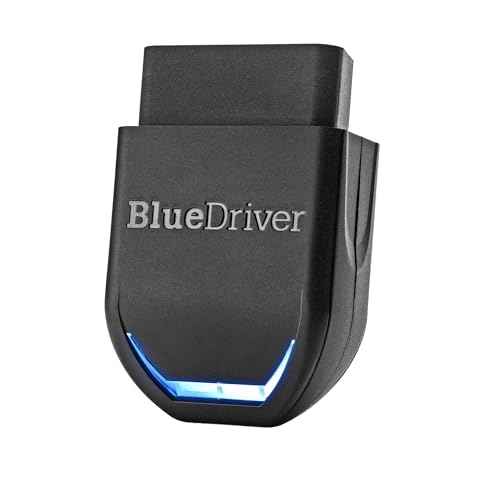
BlueDriver takes a different approach from the wired scanners in this review. You plug the Bluetooth sensor into the Volvo, then use a compatible iPhone or Android device. The app presents scan results and repair reports in a more familiar phone-based format. The listing also identifies ABS, SRS, and TPMS support, along with no subscription.
This design works well for drivers who prefer a clean app and do not want another screen in the garage. The phone can make reports easier to save and review. Wireless use also makes it convenient for quick checks. Still, app functions and enhanced Volvo coverage may depend on the exact vehicle, so I would verify compatibility before relying on it for a specific module.
Pros:
- Works with iPhone and Android devices
- Bluetooth connection avoids a long cable
- No subscription is listed for normal use
- Offers repair reports through the app
- Lists ABS, SRS, and TPMS support
- Convenient for drivers who prefer phone control
Cons:
- Requires a compatible phone or tablet
- App-based functions may change over time
- Enhanced coverage can vary by Volvo model
What Amazon Buyers Are Saying
Amazon buyers often like BlueDriver because it turns a phone into the display and report center. The wireless design appeals to people who want less cable clutter. Repair reports can also help users move from a raw code to a clearer idea of possible causes.
The most common concern with any app scanner involves connection and compatibility. A phone setting, operating system, or vehicle module can affect the experience. Buyers who want a tool that works without a phone may prefer one of the wired iCarsoft or FOXWELL options.
My Recommendation
BlueDriver is a good choice for mobile-first Volvo owners. It is convenient and informative, but it is not automatically the best OBD2 scanner for Volvo for every repair task. Pick it when app reports, Bluetooth use, and easy storage matter more than a dedicated handheld screen.
ANCEL HD601 Heavy-Duty Volvo Scanner

The ANCEL HD601 serves a different market from the passenger-car scanners above. It is a heavy-duty diagnostic tool for commercial vehicles and lists support for Cummins, Detroit, Volvo, Paccar, and Caterpillar applications. It combines HDOBD and standard OBD2 functions. That makes it more relevant to a Volvo truck, diesel fleet vehicle, or commercial garage than to a normal Volvo sedan.
The extra size and truck focus may be unnecessary for a passenger car. However, a Volvo truck owner needs a tool built for heavy-duty systems rather than a small car code reader. Confirm connector type, engine family, and vehicle coverage before buying. Commercial users should also compare the tool with the exact fault systems they service most often.
Pros:
- Designed for heavy-duty vehicle diagnosis
- Lists Volvo truck support
- Supports several major diesel and truck brands
- Combines HDOBD and standard OBD2 functions
- Better suited to fleet and commercial use
- Can cover cars and trucks according to the listing
Cons:
- Too specialized for many passenger Volvo owners
- Truck coverage needs careful connector and model checks
- May offer more capability than a casual driver needs
What Amazon Buyers Are Saying
Buyer interest in the HD601 centers on heavy-duty coverage and multi-brand use. Commercial users often want one tool that can serve more than one truck make. The Volvo listing support is important for owners and technicians who work with Volvo commercial vehicles.
The main buying concern is fit. A truck scanner must match the vehicle connector, engine, and control systems. Passenger-car owners may also find the tool less convenient than a small OBD-II reader. I would reserve this model for trucks, diesel equipment, and serious commercial use.
My Recommendation
The HD601 is the right specialist pick for a Volvo truck or commercial diesel vehicle. It is not a sensible first choice for a Volvo XC60, S60, or similar passenger car. If your work involves heavy-duty Volvo vehicles, its truck focus makes it far more suitable than a standard car scanner.
FOXWELL NT301 OBD2 Live Data Scanner

The FOXWELL NT301 is a professional-style basic OBD-II code reader with live data. It focuses on check-engine diagnosis rather than Volvo-specific body systems. Live data lets you view selected sensor information while the vehicle operates. That can help a user or mechanic compare readings and spot changes linked to an engine issue.
This scanner is a useful middle ground between the AD410 and a full multi-system unit. It gives more information than a simple code reader, yet it does not promise broad ABS, SRS, or transmission coverage. I would choose it for engine troubleshooting on a compatible Volvo. It makes less sense for a driver whose main warning light comes from the airbag or brake system.
Pros:
- Includes live data for engine checks
- Useful for check-engine light diagnosis
- Handheld wired design needs no app
- Can support more informed engine troubleshooting
- Compact for home garage use
- Suitable for users who want more than stored codes
Cons:
- Not a Volvo-specific diagnostic platform
- Limited for ABS, SRS, and transmission work
- Live data takes some knowledge to read correctly
What Amazon Buyers Are Saying
Amazon buyers commonly consider the NT301 for its live-data feature and straightforward handheld format. Users who want to see engine readings often find it more useful than a reader that only displays stored codes. The wired setup also appeals to people who want a tool that works without a phone.
The main limitation remains system coverage. A Volvo owner may expect a scanner to read every warning light, but this model focuses on standard engine diagnosis. Buyers should match their needs to that purpose and avoid choosing it for a known ABS or SRS fault.
My Recommendation
The NT301 is a solid engine-focused option. It is more informative than the AD410 because of live data, but it is not the best OBD2 scanner for Volvo if you need deep multi-system access. I recommend it for engine work, learning, and basic home diagnostics.
How to Choose the Best OBD2 Scanner for Volvo
Choosing the best OBD2 scanner for Volvo starts with the warning light you need to investigate. A standard OBD-II reader mainly handles emissions and engine data. Volvo cars also use separate modules for systems such as ABS, SRS, body control, and transmission. The right scanner must match both your vehicle and the fault you want to find.
1. Match the Scanner to Your Volvo Model and Year
Do not assume that every scanner works the same on every Volvo. A 1996-and-newer OBD-II label usually refers to standard emissions functions, not full access to every module. Newer Volvo vehicles may use different networks and communication systems than older models.
Check the product coverage list before you order. Look for your exact model, year, engine, and system. If you own a Volvo truck, check the commercial vehicle details too. A truck scanner and a passenger-car scanner serve different needs, even when both use the Volvo name.
2. Decide Which Systems You Need to Read
For a simple check-engine light, the ANCEL AD410 or FOXWELL NT301 may be enough. The NT301 adds live data, which can help with engine troubleshooting. These tools are not the best choice for an ABS or airbag warning.
For wider car coverage, consider the iCarsoft VOL V2.0, iCarsoft i906, FOXWELL NT604 Elite, or BlueDriver. Check whether the scanner supports ABS, SRS, transmission, TPMS, and service functions for your car. A scanner that reads the code is useful. A scanner that also shows live data or reset options can save more time.
3. Compare Updates, Ease of Use, and Long-Term Value
A wired scanner is ready to use without a phone or wireless setup. It suits a garage and works well when you want a dedicated screen. Bluetooth tools offer easier storage and phone reports, but they depend on an app and compatible device.
Updates also matter. The iCarsoft VOL V2.0 lists lifetime free updates, which may improve its value over time. Still, read the update terms and current coverage before purchase. Finally, do not buy the most advanced tool if you only need engine codes. Buy the features that match your Volvo and your repair plans.
Final Verdict: Which Should You Buy?
The iCarsoft VOL V2.0 is my top pick for most owners. It offers strong Volvo focus, broad system coverage, service functions, and update value. Choose the ANCEL HD601 for Volvo trucks, or BlueDriver for phone-based checks.
The best OBD2 scanner for Volvo should match your model and warning light. Verify coverage before ordering, then use any code as a guide—not a final diagnosis.
FAQs Of best OBD2 scanner for Volvo
What is the best OBD2 scanner for Volvo cars?
The iCarsoft VOL V2.0 is the best overall choice for many Volvo car owners. It supports several key systems and lists service reset functions. Always confirm coverage for your exact model year.
Can a basic OBD2 scanner read Volvo ABS and SRS codes?
Usually, a basic engine-only reader cannot read ABS or SRS codes. Choose a multi-system scanner that clearly lists ABS and SRS support for your Volvo.
Is BlueDriver compatible with Volvo vehicles?
BlueDriver supports many OBD-II vehicles and lists enhanced functions for selected systems. Check the current app coverage for your exact Volvo before buying.
What scanner should I use for a Volvo truck?
The ANCEL HD601 is the most suitable option in this review for Volvo commercial trucks. Confirm the connector, engine, and vehicle coverage before purchase.
Do Volvo scanners work on every model year?
No. Standard engine functions may work across many OBD-II vehicles, but enhanced system access can vary by model year, engine, and control module. Check the manufacturer’s coverage list.