The best wireless CarPlay adapter for multiple phones is fast, stable, easy to switch, and simple to install.
You know the routine: one driver plugs in an iPhone, then another person needs the same cable for directions, calls, or music. A good wireless CarPlay adapter removes that small daily hassle. It turns your car’s wired CarPlay port into a wireless link, so the driver can keep the phone in a pocket or bag. For shared cars and busy families, the best wireless CarPlay adapter for multiple phones should reconnect quickly, remember phones, and avoid lag. I reviewed five strong options with those needs in mind.
Jemluse Wireless CarPlay Adapter

The Jemluse wireless CarPlay adapter is designed for drivers who want to change from a wired setup to a wireless one without adding a large device to the dash. Its gray body looks neat beside a USB port, and the compact shape should help keep the cable area tidy. The listing highlights support for iPhones running iOS 10 or later. That makes it a useful choice for many older and newer iPhone models.
What makes this model stand out is its focus on multi-user connection. In a shared vehicle, I prefer an adapter that does not make every passenger repeat the setup process. Once the phone and car work together, wireless CarPlay can handle maps, calls, music, messages, and Siri from the vehicle screen. As with any adapter, the car must already support factory wired Apple CarPlay; a USB port used only for charging will not be enough.
Pros:
- Designed for shared use with multiple iPhones
- Supports iOS 10 and later, according to the product listing
- Converts compatible wired CarPlay to a wireless connection
- Compact gray design helps reduce cable clutter
- Useful for maps, calls, music, and voice commands
- Good fit for family cars and vehicles with several drivers
Cons:
- It is intended for Apple CarPlay rather than Android Auto
- It requires a vehicle with working wired CarPlay
- Connection behavior may vary by car stereo and iPhone model
My Recommendation
I recommend the Jemluse to iPhone households that share one car. It is especially useful when two or more drivers want wireless access without swapping a cable each time. The multi-user focus gives it a clear advantage over basic single-phone adapters. If your main goal is the best wireless CarPlay adapter for multiple phones and every driver uses an iPhone, this is one of the most logical options to try.
Before ordering, check your car’s manual or test wired CarPlay with the iPhone you plan to use. If the wired system works, the Jemluse offers a clean path to wireless use. Its value is strongest for families, couples, and work vehicles where convenience matters every day.
Yizro Wireless CarPlay and Android Auto Adapter

The Yizro adapter takes a broader approach than an iPhone-only dongle. Its product title lists support for both iPhone and Android devices, which can be valuable in a mixed household. One driver may use Apple CarPlay while another prefers Android Auto. Instead of buying separate adapters, a two-system model can keep the car’s setup simple.
I see this type of adapter as a strong match for families, rideshare drivers, and couples with different phones. It can also reduce arguments over who gets the wireless connection first. Still, compatibility deserves careful attention. The car must support the wired version of the phone platform you want to use, and the exact Android phone, iPhone, vehicle, and stereo combination can affect performance.
Pros:
- Supports both Apple CarPlay and Android Auto use cases
- Useful for households with mixed phone brands
- Can reduce the need for separate adapters
- Better fit for cars used by many different drivers
- Helps keep the dashboard free from long phone cables
- Offers more platform flexibility than an iPhone-only model
Cons:
- Dual-platform setup may require more careful first-time pairing
- Not every car supports wireless conversion in the same way
- Android compatibility can vary by phone software and vehicle
My Recommendation
The Yizro is best for a shared vehicle with both iPhone and Android users. If one person uses an iPhone and another uses a Samsung, Google Pixel, or similar Android phone, this flexibility can be worth more than a small speed difference. It is also a practical choice for a business car with changing drivers.
I would place this model near the top of a mixed-device buying list. It may be the best wireless CarPlay adapter for multiple phones when “multiple” means different operating systems, not only several iPhones. Confirm that your vehicle has factory wired CarPlay or wired Android Auto before buying, then follow the setup guide closely for the smoothest result.
Wireless CarPlay Adapter with Auto-Switch
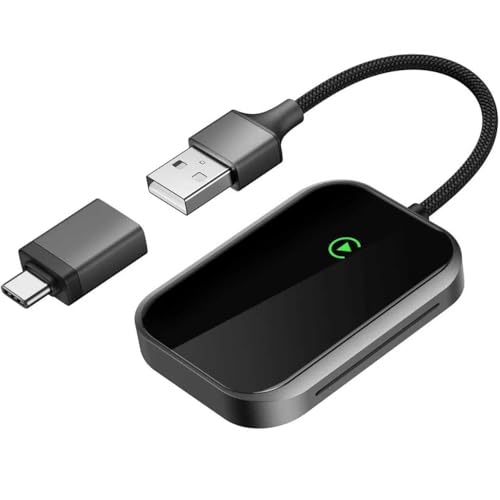
This adapter targets iPhone owners who want quick switching in a shared car. Its title calls out auto-switching for multiple iPhones, plus Bluetooth pairing and support for iOS 10 and later. Those details matter because the best multi-phone adapter should not force a driver to delete a previous phone every morning. A simple connection process makes the device feel less like a gadget and more like part of the car.
The auto-switch feature is the main reason to consider it. In real life, the phone that connects first may not always be the phone you want to use. Placement, Bluetooth settings, and the last connected device can affect which iPhone takes control. I suggest storing only regular drivers in the car’s connection list and turning off Bluetooth on a passenger phone when you do not want it to connect.
Pros:
- Auto-switch feature is built for multiple iPhones
- Supports iOS 10 and newer versions, according to the listing
- Bluetooth connection helps eliminate the daily cable routine
- Useful for families with two or more Apple users
- Fast connection can make short trips easier
- Supports common CarPlay tasks such as navigation and calls
Cons:
- It is focused on iPhone and Apple CarPlay users
- Auto-switching may need phone settings to work as expected
- It cannot add CarPlay to a car that lacks wired CarPlay
My Recommendation
I would choose this model for a couple or family where several people carry iPhones. The auto-switch function addresses the most annoying part of shared wireless CarPlay: deciding which phone connects. It may be the best wireless CarPlay adapter for multiple phones if all regular drivers use Apple devices and want a quick handoff.
This adapter also makes sense for drivers who take many short trips. Plugging in a phone for a five-minute drive feels like a small task, but small tasks add up. Check your vehicle’s wired CarPlay support first, and expect to spend a few minutes managing Bluetooth and Wi-Fi permissions during setup. After that, the daily experience should be much cleaner.
2026 Wireless 2-in-1 CarPlay Adapter
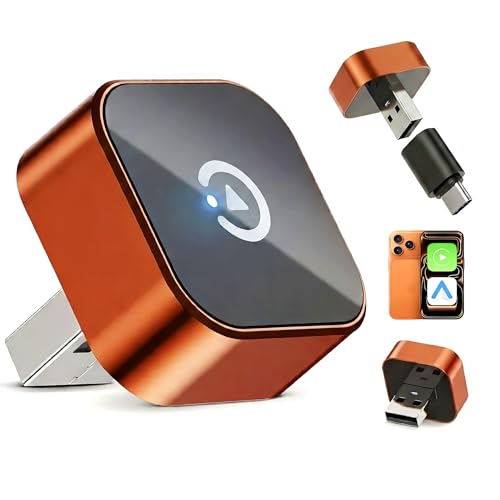
The 2026 wireless 2-in-1 adapter is aimed at drivers who want both Apple CarPlay and Android Auto in one small dongle. Its listing highlights plug-and-play use, low latency, auto reconnect, and compatibility with OEM wired systems. That combination gives it a strong feature list for a car with several drivers. It also avoids the need to keep two different adapters in the center console.
I like the auto-reconnect idea for daily commuting. When a device remembers the correct phone, the morning drive feels smooth instead of rushed. Low latency is also useful because delays can make map controls and audio feel out of step. However, “plug and play” does not mean every vehicle needs no setup; the first connection may still require Bluetooth, Wi-Fi, or permission steps.
Pros:
- Supports both wireless CarPlay and wireless Android Auto
- Useful for mixed iPhone and Android households
- Auto-reconnect can simplify daily driving
- Low-latency design should help keep controls responsive
- Works with compatible OEM wired systems
- One adapter can serve several drivers and phone types
Cons:
- Requires a compatible factory wired CarPlay or Android Auto system
- More features may mean a slightly longer first-time setup
- Results can differ between vehicle brands and phone models
My Recommendation
This is my pick for a mixed-phone family that wants one flexible adapter. It is also a smart choice for a work vehicle where drivers may carry different operating systems. The 2-in-1 design gives it a wider audience than Apple-only products. For many buyers, it could be the best wireless CarPlay adapter for multiple phones because it handles both major phone platforms.
I would consider this model when long-term flexibility matters. A family may use iPhones today and add an Android phone later, so dual support can protect the purchase. Verify that your car has OEM wired CarPlay or Android Auto, and use the included cable rather than a damaged or power-only cable. Good power and a clear initial pairing process are key to stable use.
Luckyish Wireless CarPlay Adapter

The Luckyish adapter is a small Apple CarPlay receiver for drivers who want a simple wireless upgrade. The listing describes it as a latest-upgrade model with plug-and-play use, a tiny body, and support for cars from 2016 and newer. The exact year is not enough to confirm compatibility, but the model may suit owners of older vehicles that already include wired CarPlay. Its black finish should blend into most center consoles.
A compact adapter has a quiet advantage: it stays out of the way. Large accessories can hang from the dash, catch on a hand, or make the console look messy. The Luckyish design is better for someone who values a low-profile setup. It is an iPhone-focused choice, so Android users should look elsewhere.
Pros:
- Small design helps keep the console neat
- Converts compatible wired Apple CarPlay to wireless use
- Plug-and-play setup is friendly for first-time buyers
- Works with navigation, calls, music, and Siri
- Useful for many older compatible vehicles
- Good choice for drivers who want a discreet accessory
Cons:
- Designed for iPhone users rather than Android users
- Vehicle compatibility should be confirmed before purchase
- Small size may make the adapter easier to misplace
My Recommendation
The Luckyish is best for an iPhone owner who wants a tiny, low-profile adapter. It fits drivers who do not need advanced dual-platform support but still want wireless maps and media. If your main needs are a clean console and a simple connection, this can be a sensible budget-style option. It may not have the broadest feature set, but simple tools often make the easiest daily companions.
I would choose it for a personal vehicle with one or two regular iPhone users. For a large family with many phones, an auto-switch or dual-platform model may be more convenient. Still, for the best wireless CarPlay adapter for multiple phones in a compact form, the Luckyish deserves attention when all users have compatible iPhones.
Best Features at a Glance
| Best for | Why |
|---|---|
| Multiple iPhone users | Jemluse and the auto-switch model focus on shared Apple CarPlay use. |
| Mixed iPhone and Android families | Yizro and the 2-in-1 adapter support both major phone platforms. |
| Small, tidy installations | Luckyish uses a compact design for drivers who dislike cable clutter. |
How I Choose the Best Wireless CarPlay Adapter for Multiple Phones
Choosing a wireless adapter is not only about the lowest price. I first check the car requirement. These products usually convert existing wired CarPlay into wireless CarPlay; they do not create CarPlay in a vehicle that never had it. Apple’s own support guidance also makes clear that CarPlay depends on a compatible vehicle, a compatible iPhone, and the correct connection method.
Next, I look at phone switching. A family car may have three iPhones nearby, but the adapter should connect to the intended driver. Auto-reconnect, saved devices, and simple Bluetooth pairing can make a major difference. If passengers often ride in the front seat, knowing how to pause Bluetooth on their phones can prevent unwanted connections.
I also consider delay. A small delay in a map touch or song change may not ruin a drive, but repeated lag becomes irritating. Stable performance matters more than a flashy claim. The adapter should start when the car starts, keep audio clear, and return to the correct phone after a short stop.
Finally, I check physical design and support. A short cable can hide the adapter near the USB port, while a compact body can prevent accidental bumps. Buyers should also look for current firmware guidance, clear instructions, and a fair return policy. Car stereos vary widely, so even a well-rated adapter may need a return if the pairing behavior does not suit a specific vehicle.
Important Compatibility Checks Before Buying
First, connect your iPhone to the car with a known-good cable. If Apple CarPlay appears on the factory screen, the car may be a good candidate for a wireless adapter. If the phone only charges, the adapter may not work. This simple test can save time and avoid an avoidable return.
For Android users, test wired Android Auto in the same way. A 2-in-1 adapter needs the vehicle’s wired system to be active. A normal USB port is not automatically a CarPlay or Android Auto port. Some cars have more than one USB port, so use the port marked for smartphone integration.
Keep the phone’s operating system current, but do not update right before a long trip without testing the setup. After an update, Bluetooth permissions, Wi-Fi settings, or CarPlay permissions may change. Restarting the phone and car stereo often fixes a failed first connection, but repeated failures usually point to compatibility or firmware issues.
Also check the connector. Some adapters use USB-A, USB-C, or a short cable with interchangeable ends. Your car may have a different port from the adapter. A power-only cable will not carry the needed data connection. Use a quality data cable and avoid loose extensions whenever possible.
Tips for Using One Adapter With Several Phones
Pair the regular driver’s phone first. Give the car and adapter time to complete the first connection before adding more phones. This creates a clear starting point and makes troubleshooting easier. I also recommend naming phones clearly, such as “Alex iPhone” or “Work Pixel,” so the connection list is easy to understand.
When two phones are inside the car, the adapter may choose the last connected phone, the first available phone, or the phone with the strongest connection. The exact behavior differs by model. If the wrong phone connects, turn off Bluetooth on the passenger phone for a moment or remove the car from that phone’s CarPlay settings.
Do not pair every visitor’s phone unless you need to. A long list can make the system confusing. For guests, a wired connection may be easier and more private. Regular drivers should keep personal data settings in mind, since CarPlay can display calls, messages, contacts, and recent destinations.
Keep the adapter firmware and phone software current when the maker provides a trusted update method. Do not install files from random websites. If an update fails, contact the seller before repeating the process. A stable adapter with an old but working firmware version is often better than a risky update from an unknown source.
Wireless CarPlay Adapter Buying Guide for 2026
In 2026, I would divide buyers into three groups. The first group has several iPhone users. Those drivers should focus on auto-switching, saved phones, and reliable reconnection. The second group has both iPhone and Android users. Those buyers should choose a tested 2-in-1 model and confirm both wired systems in the vehicle.
The third group wants the smallest and simplest device. For them, a compact iPhone-only adapter may be enough. There is no need to pay for Android Auto support if nobody in the car uses Android. A small, focused adapter can be easier to manage and may leave less clutter around the USB port.
Price should come after compatibility. A low-cost adapter that fails to connect is not a bargain. A slightly more capable unit can save daily frustration, especially in a family car. I also look at the product return window, warranty terms, user instructions, and whether the brand clearly states its supported car systems.
Do not expect these adapters to improve weak cellular service. Wireless CarPlay uses the phone’s connection for online maps, streaming, and cloud features. If the phone has no signal, the adapter cannot create one. Downloaded maps and offline music can help when traveling through areas with poor coverage.
FAQs Of best wireless carplay adapter for multiple phones
Can one wireless CarPlay adapter connect to multiple phones?
Yes, many adapters can remember more than one phone. The active phone may depend on connection order, the last connected device, or an auto-switch feature. Check the product details and manage Bluetooth settings on passenger phones when needed.
Will a wireless CarPlay adapter work in any car?
No. The car normally needs factory wired Apple CarPlay. A charging-only USB port is not enough. Test wired CarPlay first, then confirm the adapter supports your vehicle and phone.
Can Android phones use these adapters?
Only models that support Android Auto can do so. The Yizro and the 2-in-1 adapter are the flexible choices in this group. Apple-only adapters are not designed for Android Auto.
Why does the wrong phone connect first?
The adapter may select the last used phone or the first available phone. Turn off Bluetooth on the unwanted phone, remove unused pairings, or select the correct phone from the adapter’s connection process.
Do wireless adapters cause audio or map delay?
Some delay is possible, but a good adapter should keep it small. Phone software, car stereo firmware, wireless interference, and adapter quality all play a role. A restart, shorter cable, or firmware update may help.
Final Verdict: Which Should You Buy?
For several iPhone users, I favor the Jemluse or the auto-switch model. For mixed phones, the 2026 2-in-1 adapter is the strongest all-around pick. The best wireless CarPlay adapter for multiple phones is the one that matches your car and every driver’s phone.
Always confirm factory wired CarPlay or Android Auto before ordering. With the right match, wireless CarPlay makes shared driving feel smoother, cleaner, and far less tied to a single cable.