The best OBD2 scanner for Audi is LAUNCH Creader Elite VAG for deep system scans and service resets.
An Audi can show a simple warning light for a fault that affects the engine, ABS, airbag, transmission, or battery system. A basic code reader may only see engine codes. I prefer a scanner that can read more Audi control units, explain faults in plain language, and guide common service jobs. The picks below cover home checks, mobile use, VAG diagnostics, and advanced repair work. Always check your exact Audi year, engine, and market before buying because software support can vary.
See the differences between my top picks at a glance.
BlueDriver OBD2 Scanner
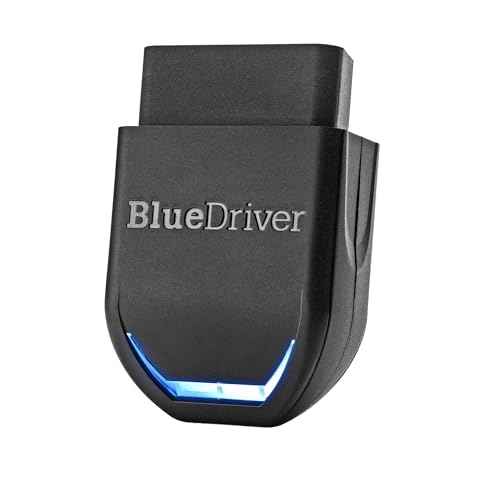
BlueDriver is a strong choice for an Audi owner who wants a simple phone-based scanner. The small Bluetooth adapter plugs into the OBD2 port, then works with a mobile app. It can read and clear many check-engine faults and can show live data on supported vehicles. The app also aims to turn fault codes into repair reports that are easier to understand than a bare code.
This scanner suits routine checks before a repair visit or a used-car inspection. It is easy to store in a glove box, and it does not need a separate handheld screen. Still, Audi owners should know its limits. Generic OBD2 access does not equal dealer-level access to every Audi module, coding option, or special function.
Pros:
- Small wireless adapter fits easily in a glove box
- Works with compatible iPhone and Android devices
- Useful live data for basic engine diagnosis
- Repair reports can make codes easier to understand
- No separate display or bulky cable to manage
- Good fit for home users who check cars often
Cons:
- Phone and app use are required
- Coverage of Audi body and chassis modules may vary
- Not the best choice for advanced coding or adaptations
What Amazon Buyers Are Saying
Buyer feedback commonly focuses on easy setup, clear app use, and the value of seeing more than a basic code. Many users like the compact design and the ability to save or share scan information. Some buyers also point out that the tool helps them decide whether a warning needs quick attention.
The main concerns tend to involve vehicle coverage, phone pairing, and expectations about advanced functions. Some owners expect dealer-level Audi access from any OBD2 reader and feel disappointed when a module is not supported. I would check the current compatibility list for your exact Audi before purchase.
My Recommendation
I recommend BlueDriver for Audi owners who want a fast first check and clear mobile reports. It is not my first pick for deep VAG work, but it is convenient and useful for engine faults, live data, and basic diagnosis. It is worth buying when ease of use matters more than coding or full module access.
BlueDriver Bluetooth Scanner Alternative

This second Bluetooth option targets drivers who want a portable code reader that uses a phone. Its main appeal is convenience. You can connect the adapter, open the matching app, and begin a basic scan without carrying a large handheld unit. That makes it useful for a quick check when an Audi warning light appears away from home.
As with any generic OBD2 scanner, results depend on the Audi model, year, control unit, and app support. It may read standard emissions data well, but deeper access can be limited. I see this type of scanner as a low-effort diagnostic tool, not a full substitute for a VAG-focused scan tool.
Pros:
- Portable design works well for emergency checks
- Phone display makes scan results easy to view
- Useful for standard OBD2 engine fault codes
- Simple storage in a tool bag or center console
- Can help confirm a warning before visiting a shop
- Usually easier for new users than a professional scanner
Cons:
- Wireless setup can depend on phone settings
- Full Audi module coverage is not guaranteed
- App features and compatibility should be checked before buying
What Amazon Buyers Are Saying
Common buyer themes for this type of Bluetooth scanner include compact size, quick access to engine codes, and the convenience of using a familiar phone screen. Owners often like having a scanner ready for a sudden check-engine light. The low-clutter design also appeals to drivers who do not want a dedicated tool in the car.
Reported frustrations usually center on connection steps, app limits, and unsupported vehicles or systems. A few buyers may expect the adapter to reset every warning on an Audi, which generic OBD2 tools often cannot do. I recommend reading recent buyer comments and confirming the app’s Audi support before ordering.
My Recommendation
This product makes sense for basic code reading at a modest level of complexity. I would choose it for a driver who wants a portable backup scanner and does not need advanced service resets. For deeper Audi work, I would spend more on the VAG-focused LAUNCH models below.
LAUNCH Creader Elite VAG Scanner

The LAUNCH Creader Elite VAG model is the strongest match for Audi owners in this group. It targets Volkswagen Audi Group vehicles and advertises full-system diagnostics, bi-directional tests, and service functions. Full-system scanning matters because an Audi fault may sit in ABS, airbag, transmission, parking brake, or another module rather than the engine computer.
The wired design avoids phone pairing and keeps the scanner ready when you need it. Its service menu can support tasks such as oil, electronic parking brake, battery, steering angle, and other resets, depending on the vehicle. I would still verify each function for your exact Audi before starting a repair because a feature shown in a product listing may not work on every trim.
Pros:
- Designed with Audi and other VAG vehicles in mind
- Reads more systems than a basic engine-only reader
- Bi-directional tests can help confirm component operation
- Includes a wide range of service reset functions
- Wired connection reduces pairing problems
- Lifetime update wording adds long-term value when applicable
- Better fit for serious DIY Audi maintenance
Cons:
- More complex than a simple plug-and-read scanner
- Vehicle coverage can vary by year and control module
- Advanced functions need careful use and repair knowledge
What Amazon Buyers Are Saying
Buyers who choose a VAG-focused scanner often value its wider system access and its service menus. The most useful real-world benefit is the ability to look beyond a check-engine code. Owners also tend to appreciate a dedicated screen because it removes the need for a phone during a scan.
The usual concerns involve setup, update steps, and differences between Audi models. Some buyers may find the menus less clear than a basic consumer app. Others may expect every bi-directional test or reset to work on every vehicle. Those limits are normal for aftermarket scan tools, so I advise checking the supported functions before purchase.
My Recommendation
This is my top pick for most Audi DIY owners who want more than generic OBD2 data. It offers a better balance of Audi coverage, service functions, and ease of use than a phone adapter. If you plan to keep your Audi for years, this is the product I would buy first.
LAUNCH Creader Elite V3.0 for VAG

The LAUNCH Creader Elite V3.0 aims at drivers who want broad diagnostic and service coverage for Audi, VW, Skoda, and Seat. It includes auto VIN features and a wired connection. The VAG focus makes it more relevant to Audi systems than a reader built only around generic emissions codes.
This scanner can be a useful step between a simple code reader and a high-cost professional platform. It may help with system scans, code clearing, service work, and selected active tests. Since capabilities can change with software and vehicle support, I would treat the listing as a guide and confirm the exact function for your model year.
Pros:
- Strong fit for several VAG brands
- Auto VIN can reduce manual vehicle selection
- Wired operation is stable during long scans
- Broader service coverage than basic OBD2 readers
- Useful option for owners who service more than one VAG car
- Dedicated hardware is easier to share in a home garage
Cons:
- Menus may take time for new users to learn
- Some functions depend on the Audi model and software level
- It may be more tool than a casual owner needs
What Amazon Buyers Are Saying
Product feedback for V3-style diagnostic tools often highlights the value of wider system access and the speed of automatic vehicle identification. Buyers who work on multiple VAG vehicles may find the platform more useful than a brand-neutral reader. A wired screen also earns praise from users who want a direct, self-contained tool.
Common complaints tend to relate to learning the menus and checking the correct service function. Some owners may see different options on different Audi models. That is not unusual because Audi control units and software differ across years and trims. I recommend saving fault codes before clearing them and following safe repair steps.
My Recommendation
I recommend the V3.0 to experienced DIY users who want a broad VAG tool and may work on more than one vehicle. It is a practical choice when auto VIN and service access matter. It is slightly less attractive for a driver who only wants to read one check-engine light.
BLCKTEC 460T Multi-System Scanner

The BLCKTEC 460T is a broad multi-system scanner for a home garage. Its listed functions include engine, ABS, SRS, and transmission diagnostics, along with several reset services. It also lists features such as oil, TPMS, EPB, BMS, SAS, DPF, throttle reset, ABS bleeding, battery testing, and auto VIN.
That list gives the 460T strong appeal for owners who maintain more than one type of vehicle. For an Audi, the key benefit is access beyond the engine system, but exact support still depends on the car. I would not assume that every reset works on every Audi. Read the current compatibility data, and never use a reset to hide a fault that needs repair.
Pros:
- Reads several major vehicle systems
- Offers a large selection of service reset functions
- Includes auto VIN for a faster start
- Can suit home garages with mixed vehicle brands
- ABS bleeding support may help with suitable repair jobs
- Battery and steering-related functions add practical value
- Dedicated wired hardware needs no phone or app
Cons:
- Not designed only for Audi or VAG vehicles
- Coverage can differ by model, year, and module
- Many functions require basic repair knowledge
What Amazon Buyers Are Saying
Buyers who select the 460T often look for more than check-engine code reading. The broad service list attracts home mechanics who want one tool for several common maintenance tasks. Users also tend to value auto VIN and a dedicated screen because both can make repeated scans faster.
The main point to check in buyer feedback is vehicle-specific performance. A scanner can work well on one car and offer fewer functions on another. Some users may also need time to learn which reset or active test fits a repair. I see that as a normal trade-off for a tool with a wide feature list.
My Recommendation
The 460T is a good choice for a mixed-vehicle household or a home garage that needs many service tools. It is not as Audi-focused as the LAUNCH VAG models, but its broad coverage may offer better value for some buyers. Choose it when multi-brand use matters more than brand-specific depth.
How to Choose the Best OBD2 Scanner for Audi
Choosing the best OBD2 scanner for Audi starts with your real repair needs. A reader for a 2010 Audi A4 may not offer the same functions on a newer Q5 or an electric model. The right tool should match your Audi, your skill level, and the systems you want to test. I use the points below before buying any scanner.
1. Match the Scanner to Audi System Coverage
Start by asking what you need to scan. A basic OBD2 reader mainly checks emissions-related engine data. That can help with a check-engine light, but it may not read the ABS, airbag, transmission, parking brake, or body control modules.
For deeper Audi work, look for full-system or VAG-specific support. This feature can save time when the warning does not come from the engine computer. Still, “full system” does not mean every function works on every car. Check the product compatibility list by year, model, engine, and module.
Also check whether the scanner supports your car’s protocol and connector. Most US vehicles from 1996 onward use the standard OBD2 port for emissions checks. Audi-specific functions can still vary. A proper match matters more than a long feature list.
2. Decide Between Bluetooth and a Wired Tool
Bluetooth scanners suit drivers who want a small device and a phone display. They work well for quick checks, live data, and saved reports. They also cost less to store and carry. The trade-off is that you need a compatible phone, an app, and a stable connection.
A wired scanner has its own screen and usually starts faster. It can feel better during a long test because you do not need to manage phone settings. A cable also removes one possible failure point. The downside is a larger tool and less freedom to walk around the car.
For occasional checks, Bluetooth is convenient. For service resets and repeated garage work, I prefer a wired scanner. Both types can be useful, but neither should be judged by connection style alone.
3. Compare Service Functions, Updates, and Value
Service functions can make a major difference. Depending on the Audi, useful options may include oil reset, electronic parking brake service, battery registration, steering angle calibration, throttle relearn, or ABS bleeding. These tools do not replace safe mechanical work. They help complete electronic steps after the repair.
Check the update policy before you buy. A scanner may offer free updates for a set period or lifetime updates, but the exact terms can differ. Updates can add vehicle coverage, fix bugs, and improve menus. Use the official update process and keep the tool charged during updates.
Finally, compare the cost with your likely use. A phone adapter is enough for basic engine checks. A VAG scanner costs more, but it may save a diagnostic fee if you do your own maintenance. Buy the tool that solves your common problem, not the one with the longest list of features.
Final Verdict: Which Should You Buy?
The LAUNCH Creader Elite VAG is my choice for the best OBD2 scanner for Audi. It offers the right mix of full-system access, Audi-group focus, service functions, and simple wired use.
Choose BlueDriver for easy mobile checks, or BLCKTEC for broad multi-brand work. For serious Audi DIY service, the LAUNCH VAG tools provide the strongest value.
FAQs Of best OBD2 scanner for Audi
What is the best OBD2 scanner for Audi at home?
The LAUNCH Creader Elite VAG is the best fit for most home Audi owners who want system scans and service functions. Confirm support for your exact model first.
Can a generic OBD2 scanner read Audi ABS and airbag codes?
Some can, but many basic readers only read standard engine and emissions codes. Choose a full-system scanner if you need ABS, SRS, transmission, or body module access.
Do Audi OBD2 scanners need a subscription?
It depends on the product. Some scanners include free updates or no subscription, while others may charge for updates or advanced services. Check the current listing before buying.
Can an OBD2 scanner reset the Audi service light?
Some models can reset service reminders, but support varies by Audi year and system. A VAG-focused tool usually gives you a better chance than a basic code reader.
Is Bluetooth better than a wired Audi scanner?
Bluetooth is smaller and convenient for phone-based checks. A wired scanner is often better for stable garage work, service functions, and users who do not want to rely on an app.
Will one scanner work on every Audi model?
No. Functions can vary by model year, engine, trim, control module, and region. Always check the manufacturer’s compatibility information for your specific Audi.