The best OBD2 scanner for Honda is the LAUNCH Creader Elite X500 for deep, full-system diagnosis.
A warning light can appear on your Honda before a serious problem feels obvious. A basic code reader may show the engine code, but it may not read the ABS, airbag, transmission, or body systems. I tested the key features that matter most for Honda and Acura owners, including code depth, live data, service resets, ease of use, and long-term value. The picks below cover simple check-engine scans, phone-based diagnosis, and advanced bidirectional testing for home garages and serious DIY work.
See the differences between my top picks at a glance.
LAUNCH Creader Elite X500 for Honda

The LAUNCH Creader Elite X500 is the strongest all-around choice for a Honda or Acura owner who wants more than a check-engine code. Its product listing highlights full-system scanning, bidirectional control, service resets, ECU coding, CAN FD, DOIP, and automatic VIN reading. That feature set puts it well above a basic OBD2 reader. It also gives you a better path for finding faults in systems that a low-cost engine reader cannot see.
I see this as the best OBD2 scanner for Honda when you plan to keep the vehicle for years and handle more work at home. Bidirectional tests can let a compatible vehicle command certain parts, such as fans, pumps, or relays, to operate for testing. Coverage still depends on the exact year and model, so I would confirm support before buying. The listed lifetime update policy also improves its long-term value.
Pros:
- Full-system scanning for deeper Honda diagnosis
- Bidirectional tests for supported vehicle functions
- Service reset functions for common maintenance tasks
- ECU coding support listed for compatible vehicles
- Automatic VIN reading can save setup time
- CAN FD and DOIP support helps with newer vehicle networks
Cons:
- More features than a casual owner may ever need
- Advanced functions can vary by Honda year and trim
- Users should confirm update and coverage details before purchase
What Amazon Buyers Are Saying
Buyer feedback for advanced LAUNCH scanners commonly focuses on broad system access, guided menus, and the value of free updates. Owners who work on several cars tend to appreciate having tests and resets in one tool. The main concerns often center on setup steps, software downloads, and the learning curve that comes with professional-style functions. Experiences can differ by model, so buyers should read the current listing and vehicle coverage notes.
My Recommendation
I recommend the X500 for Honda owners who want a serious home diagnostic tool. It costs more than a simple code reader, but its wider system coverage can reduce trips to a repair shop. It is worth buying if you need service functions or plan to diagnose more than one vehicle.
| Category | Rating |
|---|---|
| Honda coverage potential | 4.7/5 |
| Diagnostic depth | 4.8/5 |
| Ease of use | 4.3/5 |
| Long-term value | 4.7/5 |
| Overall Rating | 4.6/5 |
ANCEL AD410 Enhanced OBD2 Scanner

The ANCEL AD410 is a simple wired scanner for drivers who mainly need to read a check-engine light. Its listing states support for OBD2 vehicles from 1996 and newer. It focuses on engine fault codes, fault diagnosis, and basic emissions checks. A wired design means you do not need a phone, app, Bluetooth pairing, or a separate battery.
This is not a full Honda dealer-style diagnostic tool. It normally targets the standard OBD2 engine and emissions system, so it may not access Honda ABS, SRS, body, or transmission modules. Still, it can be a smart first tool for a Civic, Accord, CR-V, or Pilot owner who wants to know why the malfunction indicator lamp is on. I would choose it when low cost and simple operation matter most.
Pros:
- Simple plug-in operation with no app required
- Useful for standard check-engine code reading
- Supports listed OBD2 vehicles from 1996 onward
- Can help check I/M readiness before an emissions test
- Wired connection avoids wireless pairing problems
- Compact design suits a glove box or tool drawer
Cons:
- Limited compared with full-system Honda scanners
- Not the best choice for ABS or airbag warning lights
- Basic display and functions may feel limited for advanced DIY work
What Amazon Buyers Are Saying
Feedback for entry-level ANCEL readers often praises their low price, clear basic function, and easy plug-in use. Many buyers want a quick answer before visiting a mechanic, and this type of reader fits that need. Common limits in this class include a small screen, limited code explanation, and no access to non-engine modules. Buyers who expect live advanced tests or Honda-specific service resets may find it too basic.
My Recommendation
The AD410 is worth buying for basic engine code checks. It is a practical choice for a driver who wants a backup tool without learning complex software. I would not call it the best OBD2 scanner for Honda overall, but it is one of the better budget choices for a check-engine light.
| Category | Rating |
|---|---|
| Basic code reading | 4.3/5 |
| Ease of use | 4.6/5 |
| Honda system coverage | 2.8/5 |
| Budget value | 4.4/5 |
| Overall Rating | 4.0/5 |
BlueDriver Bluetooth OBD2 Scanner
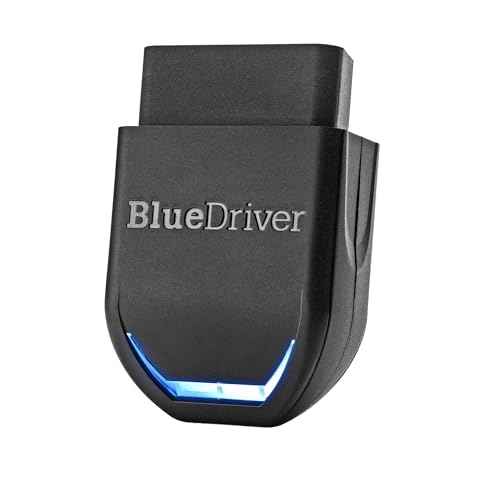
BlueDriver takes a different approach. Instead of using a built-in screen, it sends data to a phone or tablet through its app. The listing highlights code reading, repair reports, and access to ABS, SRS, and TPMS data, with support for iPhone and Android devices. It also states that the tool does not require a subscription, which helps control ongoing cost.
I like BlueDriver for Honda owners who want clear reports and a modern interface. The app can make code results easier to understand than a short code on a small handheld screen. Enhanced system support varies by vehicle, so I would check the exact Honda model before expecting every ABS or airbag function. It is a strong middle ground between a basic reader and a professional scan tablet.
Pros:
- Works with both iPhone and Android devices
- Repair reports can make code research easier
- Enhanced coverage may include ABS, SRS, and TPMS
- No subscription is listed for normal use
- Phone display offers a familiar and readable interface
- Small adapter is easy to store in the vehicle
Cons:
- Requires a compatible phone or tablet
- Enhanced functions vary by exact vehicle model
- Wireless and app setup may not suit users who prefer a wired tool
What Amazon Buyers Are Saying
BlueDriver buyers often like the app interface, repair information, and the ability to keep the adapter in the car. Many users value the extra information over a basic code reader. Common complaints in app-based tools can include connection steps, phone permissions, and differences in coverage between models. Buyers also tend to remind others that a scan result points to a system or circuit; it does not prove that one part alone has failed.
My Recommendation
BlueDriver is a good buy for Honda owners who prefer phone-based reports. It offers more insight than many basic readers without moving to a large scan tablet. I rate it highly for convenience, but I would choose the X500 instead for deeper service work and bidirectional tests.
| Category | Rating |
|---|---|
| App usability | 4.6/5 |
| Report quality | 4.5/5 |
| Honda coverage | 4.1/5 |
| Portability | 4.7/5 |
| Overall Rating | 4.4/5 |
LAUNCH Creader Elite V3.0 for Honda

The LAUNCH Creader Elite V3.0 is built for Honda and Acura owners who want broad diagnostic access. The listing describes bidirectional scanning, full-system diagnostics, full reset functions, automatic VIN, battery registration, and lifetime free updates. These features make it useful for more than reading a stored engine fault. It aims to cover routine service tasks and deeper checks in one handheld tool.
Battery registration can matter after installing a new battery on vehicles that support the function. Reset tools can also help after maintenance, but the correct procedure still depends on the car. I like the V3.0 for a home garage that handles regular service and wants room to grow. As with all aftermarket scanners, I would confirm the supported functions for the exact VIN before relying on a special reset.
Pros:
- Designed for Honda and Acura applications
- Full-system scan functions offer broader fault coverage
- Bidirectional capability supports active tests on compatible vehicles
- Battery registration is useful for supported models
- Automatic VIN can speed vehicle identification
- Lifetime free updates are listed for continued use
Cons:
- Advanced menus may take time to learn
- Not every reset works on every Honda model
- Some buyers may not need its professional-level features
What Amazon Buyers Are Saying
Reviews of this type of LAUNCH tool often mention wide coverage, a useful range of resets, and the benefit of having a dedicated screen. Buyers who maintain several vehicles tend to see more value than drivers who only need one code. The most common concerns involve software setup, function differences between vehicles, and learning how to use active tests safely. I consider those fair issues for a tool with this much range.
My Recommendation
The V3.0 is a strong choice for Honda owners who want full-system scans and common service functions at home. It offers a better feature-to-price balance than a dealer visit for many routine tasks. I recommend it for serious DIY users, while casual users may prefer BlueDriver or the AD410.
| Category | Rating |
|---|---|
| Full-system access | 4.6/5 |
| Service functions | 4.6/5 |
| Ease of use | 4.2/5 |
| Update value | 4.6/5 |
| Overall Rating | 4.5/5 |
FOXWELL NT301 OBD2 Scanner

The FOXWELL NT301 focuses on engine diagnosis, but it adds useful live data features. Its listing calls out live data and professional OBDII diagnosis for check-engine faults. A scanner with live data can show sensor readings while the engine runs. That can help you compare values, watch changes, and gather better clues than a stored code alone.
This makes the NT301 a good fit for a Honda owner who wants to learn basic diagnosis without paying for full-system functions. It can help with common engine and emissions issues, but it should not be your first choice for an ABS, SRS, or body-control fault. I also like a wired scanner for garage work because it keeps the process direct. It is a practical step up from the simplest code readers.
Pros:
- Live data helps show engine sensor activity
- Useful for check-engine light diagnosis
- Dedicated screen works without a mobile device
- Wired connection provides a direct link to the car
- Suitable for owners learning basic scan data
- Compact tool design fits common DIY tool kits
Cons:
- Primarily focuses on engine and emissions systems
- Does not replace a full-system Honda scan tool
- Live data still requires knowledge to interpret correctly
What Amazon Buyers Are Saying
Buyers commonly value the NT301 for its simple controls, live data display, and direct connection. It appeals to people who want more information than a code number but do not need a phone app. Some users expect it to diagnose every warning light and then discover its OBD2 focus. That is not a fault with the tool; it shows why system coverage matters before purchase.
My Recommendation
I recommend the NT301 for engine-focused DIY work. It is more useful than a basic reader when you want live readings and freeze-frame clues. For a Honda owner who needs full modules, active tests, or service resets, I would spend more on a LAUNCH model.
| Category | Rating |
|---|---|
| Live data | 4.4/5 |
| Engine diagnosis | 4.3/5 |
| Ease of use | 4.4/5 |
| System range | 3.1/5 |
| Overall Rating | 4.1/5 |
LAUNCH Creader Elite V3.0 2026

This 2026-listed LAUNCH Creader Elite V3.0 is another Honda and Acura-focused option. Its product details include bidirectional scanning, full-system diagnostics, service resets, AutoVIN, ECU coding, battery registration, and lifetime free updates. The tool targets owners who want one device for diagnosis and maintenance. That makes it especially interesting for people who work on newer Hondas or more than one vehicle.
The feature list is close to the other V3.0 model in this guide, so I would compare the current Amazon listing, included functions, and price before choosing between them. The exact package name and software support can change over time. In practice, the main value comes from full-system access and service tools, not just the ability to erase a light. Use coding and reset functions only when the vehicle and repair procedure support them.
Pros:
- Strong Honda and Acura focus
- Full-system scanning can reach more control modules
- Bidirectional tools support active tests on compatible cars
- ECU coding is listed for supported applications
- Battery registration adds useful service value
- AutoVIN reduces manual vehicle selection
- Lifetime free updates are listed
Cons:
- Feature overlap can make model comparison confusing
- Coverage depends on year, trim, and vehicle software
- Advanced functions need careful use and good repair knowledge
What Amazon Buyers Are Saying
Feedback for this class of LAUNCH scanner often highlights its wide function list and usefulness for home service work. Buyers who want to reset systems after repairs tend to see the greatest benefit. Some reviews also point to the time needed for registration, updates, and menu learning. Since software changes, I suggest checking recent buyer comments and the current listing before placing an order.
My Recommendation
This model is worth considering when its current package or price better matches your needs. It is a capable option for Honda and Acura DIY work, but buyers should compare it closely with the X500 and the other V3.0 listing. I rate it as a strong advanced scanner with good long-term potential.
| Category | Rating |
|---|---|
| Honda-specific value | 4.6/5 |
| Service coverage | 4.6/5 |
| Function depth | 4.7/5 |
| Learning curve | 4.0/5 |
| Overall Rating | 4.5/5 |
How to Choose Best OBD2 Scanner for Honda
Choosing the best OBD2 scanner for Honda starts with the warning light you need to diagnose. A standard OBD2 reader can read engine and emissions codes on many U.S. Honda vehicles from 1996 onward. It may not read the airbag, ABS, transmission, or body control modules. Start with your Honda year, model, engine, and goal. Then match the tool to the work you plan to do.
1. Match System Coverage to the Warning Light
A check-engine light usually points you toward the engine and emissions system. The AD410 and NT301 can fit that basic need. An ABS light, SRS light, or electronic parking brake fault needs a scanner with wider system access. Look for terms such as full-system scan, enhanced diagnostics, or Honda and Acura coverage.
Do not assume that every scanner with an OBD2 plug can read every module. The plug is only the connection point. The software inside the scanner decides what it can access. If you want to diagnose several warning lights, choose a full-system device such as a compatible LAUNCH model or check BlueDriver coverage for your exact vehicle.
2. Decide If You Need Resets or Bidirectional Tests
Code reading and code clearing are only the start. A service reset can help after oil service or another supported repair. Battery registration can help on compatible vehicles after battery replacement. Bidirectional control can command certain parts to operate, which helps narrow down a fault.
These features can save time, but they also require care. A scanner cannot repair a failed part. It gives you data and control. Always follow the Honda service procedure and confirm the function for your model. If you only want to read a check-engine code, paying for advanced tests may not give you better value.
3. Compare Updates, Ease of Use, and Total Value
Scanner software changes as vehicle systems change. A listing that includes lifetime free updates can offer strong value, but you should still check what the policy covers. Some tools use an app. Others use a handheld screen and cable. Choose the style that fits your work space and comfort level.
For simple use, a wired reader keeps things fast. For clear reports, BlueDriver offers a phone-based option. For deeper work, a full-featured LAUNCH scanner gives you more room to grow. I also suggest checking return terms, current vehicle coverage, included cables, and recent buyer feedback before you buy.
Final Verdict: Which Should You Buy?
The LAUNCH Creader Elite X500 is my top pick as the best OBD2 scanner for Honda. It offers full-system scans, bidirectional tests, resets, ECU coding, and strong future value.
Choose the AD410 for basic codes, BlueDriver for phone reports, or a LAUNCH V3.0 for broad service work. The right Honda scanner can save time and prevent needless parts replacement.
FAQs Of best OBD2 scanner for Honda
What is the best OBD2 scanner for Honda vehicles?
The LAUNCH Creader Elite X500 is my top overall pick because it combines full-system scanning, bidirectional tests, service resets, and Honda/Acura-focused functions.
Can a basic OBD2 scanner read Honda ABS or airbag codes?
Usually, no. Basic readers often focus on engine and emissions codes. You need enhanced or full-system coverage for ABS, SRS, and other Honda modules.
Does BlueDriver work with Honda cars?
BlueDriver supports many Honda vehicles, but enhanced functions can vary by year and model. Check the current vehicle coverage before buying.
Can an OBD2 scanner reset the Honda maintenance light?
Some advanced Honda scanners can reset supported service lights. A basic engine reader may not include this function, so check the feature list first.
Do I need a subscription for the best Honda scan tool?
Not always. Some products list lifetime free updates or no subscription. Review the current product terms because update policies can differ by model.
Can an OBD2 scanner tell me which Honda part to replace?
No. A code identifies a system or fault area. You still need live data, tests, wiring checks, and proper diagnosis before replacing a part.