The best OBD2 scanner for Android is BlueDriver for deep scans, while Veepeak offers excellent everyday value.
A warning light can appear at the worst time. Many drivers then visit a repair shop just to learn what one code means. An Android OBD2 scanner can help you read that code at home. It can also show live data, clear some stored faults, and help you decide if the car needs urgent care. I compared seven popular Bluetooth scanners for connection quality, app support, useful data, ease of use, and value. These picks suit different drivers, from beginners who want a simple check-engine reader to owners who need deeper system reports.
See the differences between my top picks at a glance.
Veepeak OBDCheck BLE

The Veepeak OBDCheck BLE is one of the easiest adapters to recommend for mixed Android and iPhone homes. It uses Bluetooth Low Energy, so it can work with compatible diagnostic apps without the Wi-Fi setup found on some older adapters. The small case fits near many OBD2 ports and does not require a separate screen. You use your phone as the display.
This scanner reads standard emissions-related trouble codes on compatible vehicles. It can also show live sensor data when the selected app and vehicle support those functions. App choice matters here, since the adapter itself does not provide a full repair report. It is a strong match for drivers who want a clean, low-cost way to check a check-engine light.
Pros:
- Works with compatible Android and iOS devices
- Small design that stays out of the way
- Useful for code reading and live data
- Works with several popular diagnostic apps
- Simple setup for routine checks
- Good value for home vehicle maintenance
Cons:
- Advanced features depend on the app and vehicle
- It does not replace a professional scan tool
- Some users may need to adjust phone Bluetooth settings
What Amazon Buyers Are Saying
Amazon buyers commonly like the compact size, quick pairing, and ability to use a familiar phone app. Many owners use it to read a code before deciding whether to visit a shop. The main complaints tend to involve app setup, phone permissions, or expectations about clearing every type of warning light. Buyers also note that results vary by car and by the app they choose.
My Recommendation
I recommend the OBDCheck BLE for most drivers who want a simple Android OBD2 scanner with broad phone compatibility. It offers a sensible balance of size, cost, and useful data. Buy it when you want a dependable first check, not dealer-level control of every module.
Bluetooth 5.4 OBD2 Diagnostic Tool
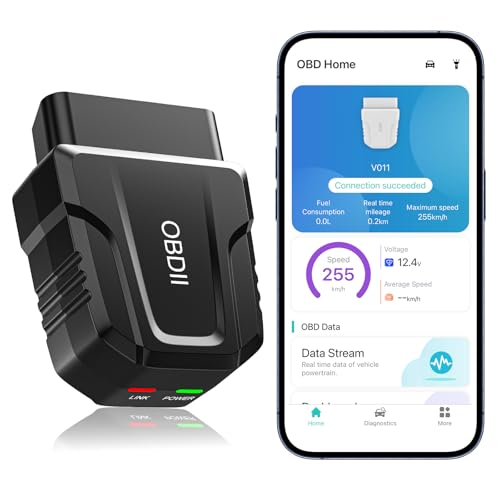
This Bluetooth 5.4 OBD2 scanner targets drivers who want a modern wireless connection and a dedicated companion app. Its main job is to read check-engine codes, display live data, clear supported errors, and provide basic performance information. The phone handles the user interface, so the experience depends on app design and permissions.
The product can make a useful home diagnostic tool for cars and trucks that support standard OBD2 functions. Bluetooth 5.4 sounds impressive, but connection quality still depends on the phone, vehicle, and app. I would view this model as a practical general-purpose reader rather than a full professional scanner.
Pros:
- Modern Bluetooth connection
- Supports Android and iOS use as listed
- Can display codes and selected live data
- Wireless design keeps the cabin uncluttered
- Useful performance-test functions through the app
- Convenient for drivers who scan more than one car
Cons:
- App quality controls much of the user experience
- Advanced module access may not be available
- Vehicle coverage should be checked before purchase
What Amazon Buyers Are Saying
Buyer feedback for this type of product often focuses on easy pairing, quick code access, and the convenience of a phone-based screen. Some users enjoy the extra live-data views, while others find the app less clear than expected. Common concerns include setup steps and differences between what the listing suggests and what a specific vehicle allows. I suggest checking recent listing details and app information before ordering.
My Recommendation
This is worth considering if you want a newer Bluetooth adapter and plan to use its included app. It suits routine code checks and basic monitoring. I would not choose it over a more established option when you need proven repair guidance or deeper system coverage.
BlueDriver OBD2 Scanner
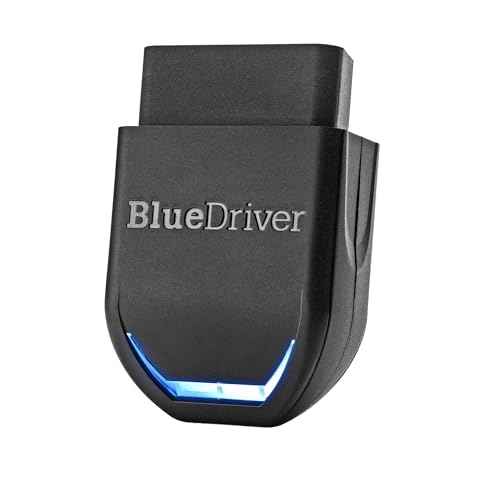
BlueDriver is my leading choice for drivers who want more than a basic powertrain code reader. Its app can provide repair reports and, on supported vehicles, scan systems such as ABS, SRS, and TPMS. The adapter connects to an Android or iPhone by Bluetooth. The app then turns scan results into plain-language information.
That extra guidance makes BlueDriver different from a generic ELM327-style adapter. It can help you understand the likely cause and see possible fixes, though no scanner can confirm a repair without testing the car. Vehicle coverage remains important because enhanced functions vary by make, model, year, and system. The product listing states support for vehicles from 1996 and newer, but buyers should still confirm their exact car.
Pros:
- Clear repair reports for supported vehicles
- Android and iPhone compatibility
- Can reach ABS, SRS, and TPMS systems on supported cars
- Useful for owners who want guided information
- No separate handheld display is needed
- Strong choice for home diagnosis before a repair visit
Cons:
- Enhanced system coverage differs by vehicle
- More expensive than basic code adapters
- App reports still need real mechanical testing
What Amazon Buyers Are Saying
Amazon buyers often praise BlueDriver for readable reports, simple setup, and the ability to find more than a generic check-engine code. Many users like having possible causes and repair information in one app. Some complaints center on unsupported vehicles, limited system access on certain models, or confusion when a code remains after clearing. Those comments reinforce one key point: check exact coverage before buying.
My Recommendation
I consider BlueDriver the best obd2 scanner for Android for most owners who want clear reports and wider system coverage. It costs more than a basic adapter, but the app adds real value. I recommend it for home mechanics, used-car checks, and drivers who want better information before paying for diagnosis.
OBDLink MX+ Bluetooth Scanner

The OBDLink MX+ is built for users who care about connection speed, app choice, and wider compatibility. It works with Android, iPhone, and Windows devices. That makes it more flexible than Android-only Bluetooth readers. It also suits people who like to select their own diagnostic, gauge, or logging app.
This adapter is a strong fit for enthusiasts who monitor data over time. It can work with compatible third-party apps, but the final feature set depends on the software and vehicle. I like its broad platform support and established name. Still, a buyer who wants simple repair explanations may find BlueDriver easier to use.
Pros:
- Works across Android, iOS, and Windows
- Supports a broad range of compatible apps
- Good choice for live data and data logging
- Useful for enthusiasts with more than one vehicle
- Compact wireless design
- More flexible than a reader tied to one app
Cons:
- App selection can feel complex for beginners
- Advanced features vary by app and vehicle
- May cost more than basic Android adapters
What Amazon Buyers Are Saying
Buyers commonly mention reliable connections, fast response, and compatibility with several apps. Enthusiasts often value the ability to build custom dashboards or record live data. The most common drawback is the learning curve. Some owners expect one app to provide every feature, while the adapter works best when the user understands which app matches the task.
My Recommendation
I recommend the OBDLink MX+ for experienced users, app fans, and people who want one adapter for Android, iPhone, and Windows. It delivers strong flexibility. It is not my first pick for a first-time buyer who wants step-by-step repair advice.
Veepeak OBDCheck BLE+

The Veepeak OBDCheck BLE+ is a practical adapter for Android and iOS users who already know which app they want to use. It reads standard OBD2 information and can display live data through compatible software. The low-profile shape works well for drivers who prefer to leave an adapter connected during short monitoring sessions.
Its main advantage is flexibility without a large price jump. You can use it with different apps, but each app may expose different gauges and functions. It is best for routine engine checks, sensor viewing, and basic fault-code work. It is less suitable when you need guided repair reports or guaranteed access to body and safety modules.
Pros:
- Compatible with Android and iOS devices
- Supports several advanced diagnostic apps
- Useful for live sensor readings
- Small design fits many vehicle interiors
- Good option for app-based vehicle monitoring
- Reasonable value for regular home use
Cons:
- Does not include a built-in screen
- App support controls the available features
- Enhanced system scans are not universal
What Amazon Buyers Are Saying
Amazon customers often like the small size and the ability to pair it with apps they already use. Many buyers report good results for engine codes and live data. The less positive comments usually involve pairing instructions, app choice, or a vehicle that does not expose the expected data. These are common limits of app-based OBD2 adapters, not just this model.
My Recommendation
The BLE+ makes sense for an Android owner who wants app freedom and low cost. I would pick it over a very basic adapter when live data matters. Choose BlueDriver instead if you want the scanner app to explain results in greater detail.
Panlong OBD2 Bluetooth Scanner

The Panlong OBD2 scanner is aimed at Android users who want a low-cost way to read live data and clear supported error codes. It uses a wireless Bluetooth link and works with compatible Android diagnostic apps. The design keeps the purchase simple because your phone supplies the screen and controls.
This model can help with standard OBD2 engine checks on compatible vehicles. It is a sensible tool for learning basic sensor values or checking a warning before a repair visit. It does not offer the same system coverage or guided reports as BlueDriver. Buyers should also note the Android focus before ordering.
Pros:
- Budget-friendly entry into wireless diagnostics
- Designed for Android phones and tablets
- Can read standard codes on compatible vehicles
- Supports live-data viewing through an app
- Can clear supported error codes
- Simple choice for occasional home use
Cons:
- Not the best choice for iPhone users
- Limited compared with enhanced scan tools
- App and phone compatibility must be checked
What Amazon Buyers Are Saying
Buyers often choose Panlong because it costs less than feature-rich scanners. Positive comments tend to mention easy code reading and useful basic data. Complaints often relate to Bluetooth pairing, app permissions, or a car that does not support a requested function. The buyer experience can change when users select a different Android app.
My Recommendation
I recommend Panlong for an Android owner who needs a basic code reader and wants to spend as little as possible. It can do useful work for standard engine diagnostics. I would pay more for Veepeak or BlueDriver if you want broader phone support, stronger app options, or deeper reports.
Veepeak Mini Bluetooth Scanner

The Veepeak Mini is a compact Android-only OBD2 adapter. Its narrow body can fit in tight spaces around the diagnostic port, and it works with compatible apps such as Torque and Car Scanner. It focuses on standard engine diagnostics, code reading, and live data rather than advanced service functions.
This scanner suits a buyer who already owns an Android phone and wants a small tool for occasional use. It can help you understand a check-engine light and watch values such as engine speed or coolant temperature when the vehicle reports them. The product is not compatible with iPhone or iPad, so that limit deserves attention before checkout.
Pros:
- Very compact form factor
- Works with compatible Android apps
- Supports Torque and Car Scanner app use
- Useful for standard check-engine diagnostics
- Can show supported live data
- Good fit for Android-only households
Cons:
- Not compatible with iPhone or iPad
- Advanced functions depend on the app and car
- May be harder to remove from a tight OBD2 port
What Amazon Buyers Are Saying
Amazon buyers often praise the tiny size and low price. Many use it with Torque or another Android app for basic codes and gauges. The most repeated limitation is the lack of iOS support. Some buyers also need extra time to choose the correct Bluetooth device and app settings during first use.
My Recommendation
The Veepeak Mini is a good pick for a dedicated Android user who wants the smallest practical adapter. It offers solid basic value. I would choose the newer BLE models if your household may switch to an iPhone or if you want more platform flexibility.
BlueDriver Bluetooth OBD2 Scanner

This BlueDriver listing offers the same core idea that makes the brand popular: a Bluetooth adapter paired with an Android or iPhone app. It is designed for check-engine work and can provide repair reports. On supported vehicles, the app may also access ABS, SRS, and TPMS systems. That makes it more useful than a simple generic code reader.
I like BlueDriver because it helps bridge the gap between a raw code and a useful next step. Still, the report does not prove that a part has failed. You should test the related circuit and inspect the vehicle before buying parts. Coverage can vary, so confirm your car in the app or product information before you order.
Pros:
- Clear reports for supported trouble codes
- Works with Android and iPhone
- May scan more than the engine computer
- Useful for home mechanics and used-car checks
- No monthly subscription is listed for core use
- Strong support for drivers who dislike raw code lists
Cons:
- Not every car supports every enhanced scan
- Higher cost than entry-level Bluetooth readers
- It cannot replace a qualified mechanic or repair test
What Amazon Buyers Are Saying
Common buyer praise centers on the app, repair information, and easy wireless use. Owners often value the chance to see more than a generic powertrain code. Less favorable experiences usually involve vehicle limits, code-clearing expectations, or a report that still needs further testing. This is normal for consumer scan tools, since the car controls which modules and data are available.
My Recommendation
This BlueDriver is a strong buy when you want clear Android reports and wider diagnostic coverage. It is one of the safest recommendations in this guide. I rate it especially well for owners who want to make a better repair decision before visiting a shop.
How to Choose the Best OBD2 Scanner for Android
Choosing the best obd2 scanner for Android is not just about finding the cheapest Bluetooth adapter. You need a scanner that matches your phone, car, app, and repair goals. The right model can save time. The wrong model may connect but show little useful data.
1. Confirm Android, App, and Vehicle Support
Start with your phone. Check the Android version, Bluetooth settings, and app requirements. Some adapters work with many apps, while others rely on one companion app. Also check the vehicle year and make. In the United States, most cars sold from the 1996 model year onward use OBD2 for emissions diagnosis, but that does not mean every scanner can access every system.
Standard OBD2 usually covers emissions-related data. It may include engine codes, readiness monitors, and live sensor values. ABS, airbag, transmission, body, and TPMS access often needs enhanced vehicle coverage. If you need those systems, choose a product that clearly lists support for your exact vehicle.
2. Match the Scanner to the Job
For a quick check-engine scan, a small Veepeak or Panlong adapter may be enough. For live data, look for support for common values such as engine speed, coolant temperature, fuel trims, oxygen sensor data, and vehicle speed. The app must also display the data in a useful way.
If you want repair reports, BlueDriver is a better fit. If you want custom gauges, logging, and several apps, OBDLink MX+ makes more sense. Remember that clearing a code does not fix the fault. It may also erase useful freeze-frame information and reset readiness monitors. I always record the code before clearing it.
3. Compare Connection Quality, Safety, and Long-Term Value
A good wireless adapter should pair without repeated drops. It should also fit the OBD2 port without blocking the driver’s foot space. Avoid leaving any scanner connected for long periods if it draws power while the car sits. Follow the maker’s instructions, and remove it if the vehicle shows battery drain or unusual behavior.
Finally, compare the total value. A cheap reader may cost less but offer weak app support. A pricier model may save money by giving better reports before a repair visit. I also check warranty terms, app updates, vehicle coverage, and whether the scanner requires a subscription. These details matter more than a long list of Bluetooth features.
Final Verdict: Which Should You Buy?
BlueDriver is my top pick and the best obd2 scanner for Android for drivers who want clear reports, broad supported-system access, and simple app use. Choose Veepeak OBDCheck BLE for lower-cost daily code checks.
Check your exact vehicle before buying. A good Android OBD2 scanner explains the fault; safe testing and proper repair still matter most.
FAQs Of best obd2 scanner for android
What is the best OBD2 scanner for Android?
BlueDriver is the best overall choice for clear reports and supported ABS, SRS, and TPMS scans. Veepeak offers better value for basic engine checks.
Can an Android OBD2 scanner clear a check-engine light?
Many scanners can clear supported codes. Fix the cause first, because the light may return and clearing codes can erase useful diagnostic data.
Do all OBD2 scanners work with every Android phone?
No. Check Android version, Bluetooth type, app support, and phone permissions before buying. Some older adapters work only with certain Android apps.
Can a Bluetooth OBD2 scanner read ABS and airbag codes?
Only some models can do this, and coverage depends on the vehicle. Standard OBD2 mainly covers emissions systems, so verify enhanced coverage for your exact car.
Is Bluetooth or Wi-Fi better for Android OBD2 scanning?
Bluetooth is usually simpler for Android phones because it keeps mobile internet available. Wi-Fi can work well, but it may require more connection steps.
Can I leave an Android OBD2 adapter plugged in?
It depends on the adapter and vehicle. Remove it when parked for long periods if you notice battery drain, heat, or unusual electrical behavior.