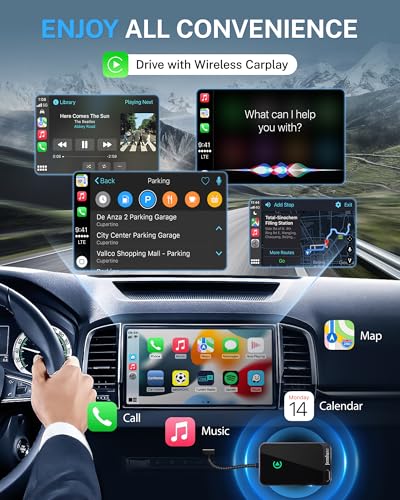
The best wireless CarPlay adapter for Honda is the Polynex adapter for compatible CR-V models with factory wired CarPlay.
If your Honda supports wired Apple CarPlay, you may know the small daily hassle: you enter the car, search for a cable, and plug in your iPhone before navigation or music works. A good wireless adapter removes that extra step and keeps the factory screen in use. I reviewed five promising options for connection speed, ease of setup, phone sharing, port support, and Honda compatibility. The key point is simple: your Honda must already support wired CarPlay, because these adapters do not add CarPlay to a car that lacks it.
Polynex Wireless CarPlay Adapter for Honda CR-V

The Polynex adapter is the most direct match for Honda CR-V drivers who own a 2017–2022 model with factory wired CarPlay. It uses a compact design and aims to turn the existing USB CarPlay connection into a wireless one. The advertised A7-Ultra chip is designed for quick pairing and smooth screen response. In daily use, that means less time waiting before Maps, music, or calls appear on the Honda display.
This model also supports more than one driver, which is useful for family cars. Once each approved iPhone has paired, the adapter can reconnect without forcing you through the setup menu every time. The adapter still needs a compatible wired CarPlay system, and the exact USB port matters. I would check the Honda owner’s manual and the Amazon compatibility details before ordering.
Pros:
- Designed for compatible Honda CR-V models from 2017–2022
- Automatic connection can save time on daily drives
- Multi-user support suits family vehicles
- Compact plug-and-play setup keeps the dash tidy
- Uses the Honda factory screen and controls
- Supports wireless access to navigation, calls, messages, and music
Cons:
- Requires factory wired CarPlay to work
- Listed Honda coverage focuses on CR-V models
- Wireless performance can vary with phone software and vehicle USB power
My Recommendation
I recommend the Polynex as the best wireless CarPlay adapter for Honda CR-V owners who want the closest fit to their vehicle. It makes the most sense for drivers with a 2017–2022 CR-V that already shows CarPlay when an iPhone is connected by cable. The multi-user feature is especially useful when two people regularly drive the same Honda.
This is not a universal fix for every Honda infotainment system. Verify the model year, trim, wired CarPlay support, and connector before buying. For the right CR-V, it offers strong convenience and a clean setup at a reasonable adapter price when available.
2-in-1 Wireless CarPlay Adapter for iPhone and Android
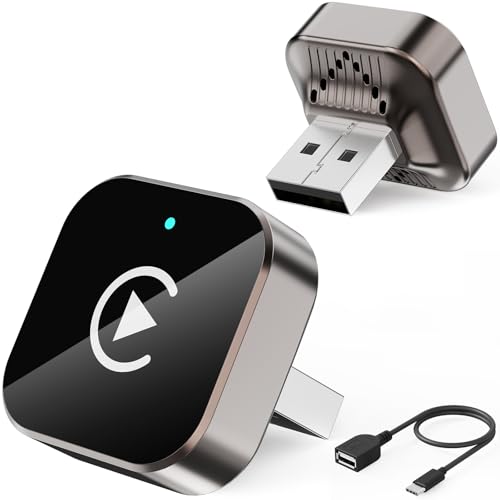
This 2-in-1 adapter targets households that use both Apple and Android phones. It can convert a compatible wired CarPlay system to wireless CarPlay and may also support Android Auto, depending on the phone and vehicle setup. That makes it a flexible choice for a Honda shared by partners, children, or work drivers. One small adapter can cover two major phone platforms instead of forcing each driver to use a different solution.
The setup should be simple: connect the adapter to the Honda’s wired CarPlay USB port, pair the phone, and allow the required wireless permissions. After the first pairing, the phone should reconnect when you start the car. I like this format because it keeps the factory display, steering buttons, microphone, and speakers in the loop. Still, users should confirm that their Honda supports the required wired system before expecting wireless service.
Pros:
- Supports a mixed iPhone and Android household
- Can reduce the need for separate adapters
- Useful for wireless CarPlay and compatible Android Auto setups
- Plug-and-play design needs no major dashboard work
- Retains the Honda factory display and steering controls
- Good fit for drivers who change phones often
Cons:
- Compatibility may differ between iPhone and Android devices
- Requires factory wired CarPlay or a supported wired platform
- Some users may need to repeat pairing after phone or system updates
My Recommendation
I see this as the best wireless CarPlay adapter for Honda families that do not all use iPhones. It is a practical pick when one driver uses an iPhone and another uses an Android phone. The 2-in-1 design adds value because you do not need to buy separate hardware for each platform.
I would choose it over an iPhone-only adapter when phone variety matters most. Before ordering, check the listing for your Honda year and confirm that the factory system starts wired CarPlay or Android Auto. Its broad purpose is useful, but exact compatibility remains more important than the product label.
Yizro Wireless CarPlay Adapter for Honda

The Yizro wireless adapter is built for drivers who want a simple way to remove the CarPlay cable. Its listing supports iPhone and Android devices, giving it a wider target audience than a basic iPhone-only dongle. The small form factor should fit neatly near the Honda USB port without creating much clutter. This can help keep the center console clean, especially when the adapter remains connected all the time.
Wireless adapters work best when the car and phone already communicate through a wired CarPlay or Android Auto connection. The Yizro model follows that general approach rather than replacing the Honda head unit. I would test the original cable first and confirm that wired CarPlay launches correctly. If it does, this adapter may provide a smooth path to wireless use for navigation, calls, podcasts, and music.
Pros:
- Supports iPhone and Android device users
- Small design helps reduce cable clutter
- Suitable for drivers who want a simple wireless upgrade
- Can keep the original Honda screen and controls active
- Useful for navigation, calls, audio, and messages
- May work well for shared vehicles with different phone types
Cons:
- Vehicle compatibility must be checked before purchase
- Wireless connection depends on the phone’s Bluetooth and Wi-Fi settings
- Some Honda systems may need a specific USB port or cable
My Recommendation
The Yizro is a good choice for drivers who want broad device support in a compact package. I would consider it the best wireless CarPlay adapter for Honda owners who share the vehicle or move between iPhone and Android devices. It also suits people who want to leave the adapter connected and avoid handling a cable on every trip.
Its value depends on your Honda’s existing system, so do not skip the compatibility check. If your vehicle does not have factory wired CarPlay or Android Auto, this type of adapter will not normally create those features. For supported vehicles, the Yizro offers a practical balance of flexibility and convenience.
Jemluse Wireless CarPlay Adapter for iPhone

The Jemluse adapter focuses on Apple iPhone users who want a wireless CarPlay connection without changing the Honda head unit. It supports iOS 10 or later according to the product details and includes USB-C support for newer vehicle ports and cables. The gray housing has a low-key look that should blend into most center consoles. Its multi-user connection feature can help when more than one iPhone uses the car.
I like iPhone-focused adapters when every regular driver uses Apple devices. There are fewer platform questions, and the setup can feel more straightforward. You connect the unit to the wired CarPlay port, pair the iPhone, and let the Honda screen handle the rest. The adapter does not replace the need for a compatible wired CarPlay system, so I would confirm that feature before purchase.
Pros:
- Designed for iPhone users and iOS 10 or later
- USB-C support helps with newer Honda connection ports
- Multi-user pairing suits households with several iPhones
- Compact gray design looks discreet in the console
- Removes the need to plug in an iPhone on every drive
- Works with the Honda factory screen when compatible
Cons:
- Not the best choice for Android-only drivers
- Requires existing wired Apple CarPlay
- Older Honda USB ports may need the correct included cable or adapter
My Recommendation
I recommend the Jemluse for an all-iPhone household that wants a focused and simple wireless upgrade. It may be the best wireless CarPlay adapter for Honda drivers who value multi-user iPhone support more than Android compatibility. The USB-C option also makes it worth considering when your Honda has a newer port or when you want a modern cable setup.
Choose this model when your phone is an iPhone and your car already runs wired CarPlay. Drivers who regularly use Android should select a 2-in-1 model instead. For Apple households, Jemluse offers a clean way to make everyday Honda trips feel less connected to a cable.
CAENEEDER Wireless CarPlay Adapter for Honda

The CAENEEDER adapter is made for drivers who want a broad vehicle fit and a straightforward setup. Its listing mentions compatibility with more than 800 vehicles, but that number should not replace a model-specific check for your Honda. The adapter includes Type-C and USB connection support, which can help with different factory port layouts. Its blue finish also makes it easy to spot if you unplug it for use in another vehicle.
The main appeal is convenience. Once the adapter connects to a compatible wired CarPlay port, your iPhone can connect without a loose cable crossing the console. I would use a short, good-quality cable and keep the adapter away from metal objects that could affect wireless signals. Like the other options here, it is a converter, not a complete infotainment upgrade.
Pros:
- Broad advertised vehicle coverage
- Supports USB and Type-C connection options
- Plug-and-play format is easy for first-time buyers
- Bright blue body is easy to locate in the console
- Helps reduce cable clutter during daily drives
- Can use the Honda factory screen and steering controls
Cons:
- Broad vehicle claims still require Honda-specific verification
- Must have factory wired CarPlay to function
- Blue housing may be more visible than a black adapter
My Recommendation
The CAENEEDER is a sensible option for Honda owners who want wide stated compatibility and flexible USB support. I would call it the best wireless CarPlay adapter for Honda drivers who need both USB and USB-C connection choices. It may also suit people who use the same adapter in more than one compatible vehicle.
Check your Honda port before ordering, then confirm that wired CarPlay works with your phone. The product’s broad coverage is helpful, but every Honda trim can use different infotainment hardware. When the connection matches, this adapter delivers the basic benefit most drivers want: wireless access to familiar CarPlay features.
How I Chose the Best Wireless CarPlay Adapter for Honda
I began with compatibility because it is the most important part of any CarPlay adapter review. A wireless dongle cannot normally add Apple CarPlay to a Honda that never had it. It usually converts an existing wired CarPlay connection into a wireless link. Honda owners should connect an iPhone by cable first and check whether the CarPlay icon appears on the factory screen.
I also looked at phone support. Some adapters focus on iPhone, while others claim to support Android Auto as well. This matters in a shared Honda, since one driver may use an iPhone and another may use a Samsung or Google phone. A product that fits one person but not the next may create more hassle than it removes.
Connection behavior matters just as much as the first setup. The best wireless CarPlay adapter for Honda should reconnect without repeated menus or long delays. It should also keep audio, calls, maps, and steering-wheel controls stable. No adapter can promise perfect service in every car, since phone software, USB power, radio noise, and the factory head unit all affect performance.
I also considered physical design. A small adapter is easier to leave in the center console. A short cable can prevent the dongle from swinging near the gear shifter. USB-C support is useful in newer vehicles, but the port on the Honda matters more than the shape of the adapter itself.
Honda Compatibility: What You Need to Check
Start by checking whether your Honda has factory wired Apple CarPlay. Use a known-good data cable, not a charge-only cable, and connect your iPhone to the main USB media port. If the Honda screen launches CarPlay, the car may support a wireless converter. If it only charges the phone, an adapter may not solve the issue.
Next, check the model year and trim. Two Honda vehicles from nearby years can use different infotainment systems. A CR-V, Civic, Accord, Pilot, Passport, Odyssey, and Ridgeline may not share the same software or USB layout. Product listings often name supported vehicles, but I still compare the listing with the owner’s manual and the seller’s current compatibility notes.
Make sure your iPhone meets the product requirements. Keep iOS updated, turn on Bluetooth and Wi-Fi, and allow CarPlay when prompted. For Android support, check the product’s Android Auto requirements separately. A title that says “2 in 1” does not guarantee that every Android phone or every Honda system will work.
Finally, confirm the port. Some Honda models have one data port and one charge-only port. Plugging the adapter into the wrong one can look like a defective product. If the adapter does not start, try the original cable, another approved port, and a phone restart before assuming the unit has failed.
Wireless CarPlay Adapter Features That Matter
Fast automatic pairing
Automatic pairing is the main reason to buy a wireless adapter. After the first setup, the phone should connect when you unlock the car or start the vehicle. A short delay is normal, but repeated manual pairing is a warning sign. Multi-user pairing also helps families, though the adapter may connect to the last active or strongest approved phone first.
Stable audio and maps
Most drivers use CarPlay for turn-by-turn directions, calls, music, podcasts, and messages. A good adapter should keep audio from dropping when the phone moves in a pocket. Navigation should remain visible on the Honda screen without frequent blackouts. Signal stability depends on the car and phone, so I prefer adapters with clear setup steps and current firmware support.
USB and USB-C flexibility
Some adapters use a USB-A plug, while others include a USB-C cable or both options. The correct choice depends on your Honda’s port. A USB-C adapter cannot help if the vehicle has only a USB-A data port unless you use a suitable data cable. Avoid very cheap charge-only cables because they may not carry the CarPlay data signal.
Small size
A wireless adapter should not block nearby controls or sit where a cup can hit it. Small hardware also makes it easier to hide the cable. I prefer a design that can stay plugged in without pressing against the console lid. A neat fit may sound minor, but it improves the daily experience.
Update and reset options
Phone and car software can change over time. An adapter with a reset process or firmware update path is easier to manage after an iOS update. Before buying, read the current listing and instructions for update support. Do not install random firmware from an unverified site, since the wrong file can stop the adapter from working.
How to Install a Wireless CarPlay Adapter in a Honda
Installation usually takes only a few minutes. Park the Honda, turn on the infotainment system, and keep the iPhone nearby. Plug the adapter into the same data USB port that works with wired CarPlay. If the kit includes two cables, use the one that matches the car’s port and the adapter’s input.
On the iPhone, turn on Bluetooth and Wi-Fi. Select the adapter name when it appears, then accept the CarPlay prompts. The Honda screen may ask whether you want to allow CarPlay while the phone is locked. Allowing that option makes automatic reconnection easier.
Test the key functions before driving. Open Apple Maps or another supported navigation app. Play a short track, place a safe test call while parked, and press the steering-wheel voice button. Check that the sound comes through the Honda speakers and that the screen responds to touch or controls.
If the first attempt fails, remove old CarPlay pairings from the iPhone and Honda menu. Restart the phone and the adapter. Try the original wired connection again to separate a vehicle problem from an adapter problem. If wired CarPlay itself fails, the wireless adapter is unlikely to correct it.
Common Problems and Simple Fixes
The adapter will not connect
First, confirm that the adapter is in the data port. Then turn Bluetooth and Wi-Fi off and on. Remove the adapter from the iPhone’s Bluetooth list, restart both devices, and pair again. A full reset may help, but use the instructions supplied with your specific model.
CarPlay connects but has no sound
Check the Honda audio source and volume. Make sure the iPhone is sending sound to CarPlay rather than headphones or another Bluetooth device. Disconnect other nearby audio accessories during testing. If calls work but music does not, check the audio app and its permission settings.
The connection drops while driving
Keep the adapter away from a wireless charger, metal storage box, or other radio device. Try a shorter cable and make sure the adapter fits firmly. Update the iPhone and check whether the adapter has a supported firmware update. If the problem happens only in one area, local wireless interference may play a role.
Two phones keep fighting for the connection
Turn off CarPlay permission for a phone that should not connect. You can also disable Bluetooth on the passenger’s phone during startup. Some adapters select the first approved phone they find, while others use the most recent phone. Clear old pairings if the wrong device connects every time.
The screen is slow
A short startup delay is common with wireless systems. Close unused apps, restart the iPhone, and test with a direct wired connection. If wired CarPlay is fast but wireless is slow, reset the adapter and review its instructions. A weak phone battery or heavy background activity can also affect response.
Best For Comparison
| Best for | Why |
|---|---|
| Honda CR-V owners | Polynex directly targets compatible 2017–2022 CR-V models and supports multi-user pairing. |
| Mixed iPhone and Android homes | The 2-in-1 adapter and Yizro offer wider device support than an iPhone-only model. |
| USB-C and broad vehicle needs | CAENEEDER offers USB and Type-C connection options, while Jemluse suits iPhone users. |
Is Wireless CarPlay Better Than Wired CarPlay?
Wireless CarPlay is more convenient, but wired CarPlay can still be more dependable. A cable gives the phone power and creates a direct data path. That can help on long trips, especially when the iPhone battery is low or the wireless signal becomes unstable.
Wireless CarPlay wins for short daily drives. You can keep the phone in your pocket, start the Honda, and use navigation without reaching for a cable. The best wireless CarPlay adapter for Honda should make that routine feel natural while keeping the factory screen and controls.
I suggest keeping one quality data cable in the car even after installing an adapter. It gives you a backup when the phone is nearly empty or the adapter needs a reset. This small habit can prevent a minor connection issue from becoming a travel problem.
Safety Tips for Using CarPlay in a Honda
Set navigation and music before moving. Use Siri or the steering-wheel voice button for changes while driving. Do not handle the phone to troubleshoot a connection on the road. Pull over in a safe place if the adapter needs a reset or new pairing.
CarPlay can reduce distraction because it places selected phone functions on the Honda screen. It does not remove the need for safe driving. Keep alerts limited, use a secure phone location, and avoid watching video content while the car is moving.
FAQs Of best wireless CarPlay adapter for honda
Will a wireless CarPlay adapter work in every Honda?
No. Most adapters require factory wired Apple CarPlay. Check the Honda model, year, trim, USB data port, and phone support before buying.
Can these adapters add CarPlay to an older Honda?
Usually not. A wireless adapter converts wired CarPlay to wireless CarPlay. It does not normally upgrade a Honda head unit that lacks CarPlay hardware and software.
Do I need an iPhone for wireless CarPlay?
Yes, Apple CarPlay requires a compatible iPhone. Some 2-in-1 adapters also support Android Auto, but Android compatibility varies by adapter, phone, and Honda system.
Will the Honda steering-wheel controls still work?
They should work when the adapter correctly uses the factory CarPlay system. Volume, voice control, and track buttons may vary by Honda model and trim.
Which is the best wireless CarPlay adapter for Honda CR-V?
The Polynex is the strongest match for compatible 2017–2022 Honda CR-V models with wired CarPlay. Always confirm the exact trim and port before ordering.
Final Verdict: Which Should You Buy?
The Polynex is my top pick and the best wireless CarPlay adapter for Honda CR-V owners with compatible wired CarPlay. Choose the 2-in-1 or Yizro model for mixed phone households, and Jemluse for iPhone-only use.
Confirm compatibility first, then enjoy a cleaner Honda console and easier daily drives. The right wireless CarPlay adapter can make your factory screen feel fresh without a costly head-unit replacement.