For most Volkswagen owners, the BLCKTEC 460T offers the best mix of system coverage, reset tools, and value.
A warning light can appear on your Volkswagen when you are far from a repair shop. A basic code reader may show only an engine code, while the real fault sits in the ABS, airbag, transmission, or battery system. The right scanner helps you find the cause before you pay for diagnosis. I compared four popular tools for VW owners, focusing on system coverage, live data, service resets, app use, update needs, and daily value. My goal is simple: help you choose a scanner that fits your Volkswagen, skill level, and repair plans.
See the differences between my top picks at a glance.
BLCKTEC 460T OBD2 Scanner

The BLCKTEC 460T is the strongest all-around pick in this guide. It uses a wired connection, so it does not depend on phone pairing, app permissions, or Bluetooth range. The tool is designed to read more than the standard check-engine system, including ABS, SRS, and transmission data. That wider reach matters on Volkswagen models because a dashboard warning may come from several control modules.
Its advertised service menu includes oil, TPMS, EPB, BMS, SAS, DPF, and throttle resets, along with ABS bleeding and battery testing. The exact functions can vary by year, engine, and module, so I would check the vehicle coverage list before purchase. Auto VIN can reduce setup time when the scanner identifies a supported vehicle. For a home garage, this makes it a practical choice when you need more than a simple P-code reader.
Pros:
- Reads several major vehicle systems beyond the engine module
- Includes a broad set of useful service and reset functions
- Wired design avoids Bluetooth pairing problems
- Auto VIN can make vehicle setup faster
- Battery test adds value for starting and charging checks
- Useful for owners who perform their own maintenance
Cons:
- It is less convenient to store than a small wireless adapter
- Advanced functions may vary by Volkswagen model and year
- New users may need time to learn the larger service menu
What Amazon Buyers Are Saying
Buyer feedback for scanners in this class often focuses on ease of use, the number of systems reached, and the value of included reset tools. Users who want to work on ABS or service functions tend to see more value than buyers who only need to clear a check-engine light. As with any multi-brand tool, buyers should confirm coverage for their exact Volkswagen before ordering. Some owners may also need time to understand which resets are safe after a repair.
My Recommendation
I recommend the BLCKTEC 460T for Volkswagen owners who want a serious home diagnostic tool without moving to expensive professional equipment. It is the best choice here for broad system access and service work. I would choose it for routine repairs, warning-light checks, battery work, and maintenance resets. Its main drawback is the wired format, but the cable also makes the connection stable.
BlueDriver Bluetooth OBD2 Scanner
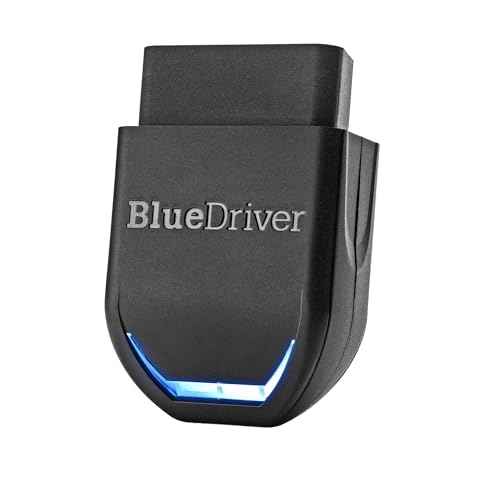
BlueDriver takes a different approach. It uses a compact Bluetooth adapter and a phone app instead of a built-in display. This makes it easy to keep in a glove box and use when a warning light appears. The product listing presents it as a no-subscription tool with support for check-engine diagnostics and selected ABS, SRS, and TPMS functions.
The app is the main reason to consider BlueDriver. It can present scan results in a report that is easier for many drivers to understand than a raw code number. Phone-based live data can help you watch sensor readings while the engine runs. Still, coverage depends on the vehicle, and the adapter does not replace a full factory-level Volkswagen scan tool.
Pros:
- Small Bluetooth design fits well in a glove box
- Works with supported iPhone and Android devices
- Repair reports can make code results easier to follow
- No cable across the front seats during use
- Useful live-data view for basic engine checks
- Good choice for drivers who prefer a phone screen
Cons:
- Requires a compatible phone and app setup
- Advanced module access varies by Volkswagen model
- Phone battery, permissions, or wireless pairing can affect use
What Amazon Buyers Are Saying
Buyers commonly look at BlueDriver for its compact size and the clear way it presents diagnostic results. Phone-based reports appeal to people who do not want to read a small handheld screen. Feedback can differ by vehicle because not every Volkswagen exposes the same modules through the same functions. Before buying, I suggest checking the current vehicle coverage information and confirming that your phone meets the app requirements.
My Recommendation
BlueDriver is worth buying if you want a simple wireless scanner for regular code checks and guided repair information. I especially like it for drivers who value a clean app and easy storage. It is not my first pick for broad service resets, but it is a strong choice for everyday engine diagnosis. For many users, the phone interface will feel faster and less intimidating than a traditional tool.
Carista EVO Bluetooth Scanner

Carista EVO is aimed at owners who want more than fault-code reading. Its listing highlights diagnostics, customizations, service tools, and live data through a Bluetooth connection. Volkswagen owners often look at Carista because coding and comfort settings can be as useful as engine diagnosis. The app may let you change supported vehicle settings that a basic OBD2 reader cannot reach.
The key point is the subscription requirement. The hardware can connect to the app, but access to some diagnostics, coding, and service features requires the right subscription plan. Supported options depend on the vehicle and software version. If you want customization tools and will use them often, the cost may make sense; if you only need to read one engine code, a simpler scanner may offer better value.
Pros:
- Strong focus on Volkswagen-friendly customization features
- Combines diagnostics, live data, and service tools in one app
- Compact Bluetooth hardware is easy to carry
- Can appeal to owners who enjoy changing comfort settings
- Phone interface is familiar for many users
- Useful alternative to a basic generic code reader
Cons:
- Subscription access is required for some functions
- Available coding options vary by vehicle and trim
- Bluetooth and app setup may take more effort than a wired tool
What Amazon Buyers Are Saying
Buyer interest usually centers on customization, app convenience, and access to functions that ordinary OBD2 readers do not provide. Users who understand the subscription model tend to have clearer expectations. The most important point to confirm is whether the exact coding or service feature you want supports your Volkswagen. A feature shown in the app for one model may not appear for another.
My Recommendation
Carista EVO is a good buy for a Volkswagen owner who wants coding and personalization tools. I would not select it as the only scanner for every repair unless the subscription cost fits your plans. It is best for owners who enjoy changing settings and checking live data from a phone. Read the current plan details before ordering so the total cost does not surprise you.
Bluetooth 5.4 OBD2 Scanner
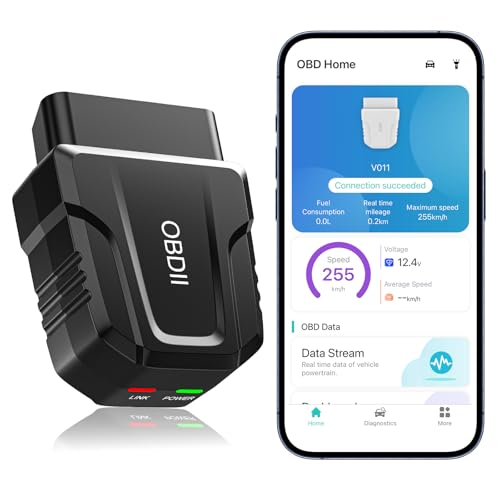
This Bluetooth 5.4 OBD2 scanner is the simple option in this group. It connects to iOS and Android devices through its exclusive app. The listing focuses on check-engine codes, live data, error clearing, and a performance test. That makes it a sensible entry point for drivers who want to know why the engine light came on.
Its low-complexity design can be a benefit for basic checks. You can keep the adapter in the vehicle and use your phone as the display. However, generic OBD2 access should not be confused with full Volkswagen module diagnosis. Before buying, confirm whether the tool can read the ABS, airbag, transmission, or body modules on your specific car.
Pros:
- Small wireless format is easy to store
- Bluetooth 5.4 supports a modern phone connection
- Works with listed iOS and Android devices
- Useful for basic engine-code reading and clearing
- Live data can help with simple sensor checks
- Good starting tool for first-time DIY users
Cons:
- It may focus mainly on standard engine OBD2 functions
- Full Volkswagen module coverage is not guaranteed
- App quality and phone compatibility affect the experience
What Amazon Buyers Are Saying
Buyers who choose this type of adapter usually want a low-cost way to view engine codes and basic live data. The wireless format is convenient, especially for quick checks at home. The main issue to consider is the difference between a generic OBD2 scan and a Volkswagen-specific scan. Anyone seeking ABS, SRS, or coding functions should check the product coverage rather than assume Bluetooth alone provides them.
My Recommendation
I recommend this scanner for basic check-engine work, not for advanced Volkswagen repairs. It can suit a driver who wants a compact tool for occasional code checks and live data. I would choose a wider-coverage scanner if your VW has an ABS, airbag, transmission, or service warning. Its value is strongest when you need simple information at a modest cost.
How to Choose the Best OBD2 Scanner for Volkswagen
Choosing the best OBD2 scanner for Volkswagen takes more thought than picking the tool with the most buttons. Volkswagen cars use several control modules, and a generic reader may not reach all of them. The right choice depends on your model year, repair goals, phone preference, and need for service resets. I use the points below when judging a scanner for VW use.
1. Confirm Volkswagen Module Coverage
Start with the systems you need to scan. Standard OBD2 mainly covers emissions and engine faults. It may not reach the ABS, SRS, transmission, parking brake, battery, or body control modules. A warning light from one of those systems can remain hidden from a basic reader.
Look for clear support for your exact Volkswagen year, model, engine, and market. A 2018 Golf may not offer the same functions as a 2023 Tiguan. Even two trims from the same year can expose different features. The product page should list supported systems or functions. If it does not, contact the seller before buying.
For broad coverage, the BLCKTEC 460T is the strongest option in this guide. BlueDriver offers a more convenient app approach, while Carista EVO focuses on coding and settings. The Bluetooth 5.4 adapter makes more sense for standard engine checks. This is why no single scanner is perfect for every Volkswagen owner.
2. Match the Tool to Your Repair Skills
A first-time user may want a clear code description and a simple path to live data. A home mechanic may need actuator tests, battery registration, ABS bleeding, or service resets. These tasks require different tool types. Do not pay for features you will never use, but do not buy a basic reader if you already know you want module-level work.
A wired scanner often feels easier during a repair. It has its own screen and does not need a phone. You can move through menus while checking a fuse, sensor, or battery. A Bluetooth scanner feels better for quick checks and storage. It needs a phone, an app, and a stable connection.
Coding deserves special care. It can change how a vehicle behaves, and an incorrect setting may create a new problem. Save the original settings when the app supports that option. Keep the battery well charged during coding. If you do not understand a setting, leave it alone and ask a qualified technician.
3. Compare Updates, Subscriptions, and Long-Term Value
Check how the scanner receives software updates. Some tools include updates for a stated period. Some depend on an app. Others lock advanced functions behind a subscription. These costs can change the real price over time.
Carista EVO clearly suits users who accept a subscription for added functions. BlueDriver appeals to buyers who want an app-based tool without the same type of ongoing access model described in its listing. The BLCKTEC 460T is attractive to owners who want a dedicated scanner with service functions. The generic Bluetooth tool can cost less, but its feature range may also be narrower.
Also check the return policy and vehicle coverage before opening the package. Product software changes over time, so I would review the latest listing details before purchase. A scanner that works well today may gain more vehicle support through updates. Still, never assume an update will add a function that the hardware cannot support.
How I Use an OBD2 Scanner on a Volkswagen
I begin with the car parked in a safe place. I switch off accessories and make sure the battery has enough charge. Low voltage can cause confusing results, especially during module scans or service procedures. I then find the OBD2 port, which is usually below the dashboard near the driver’s knees.
Next, I connect the tool before turning on the ignition. I follow the scanner instructions and let it identify the vehicle. I read stored and pending codes before clearing anything. A code is a clue, not a final diagnosis. For example, an oxygen sensor code may come from a wiring issue, an exhaust leak, or a sensor that truly failed.
I save the code report when the app or scanner allows it. Then I check freeze-frame data and live readings. Freeze-frame data shows the conditions present when the fault appeared. Live data shows what the sensors report now. These two views can help separate a current fault from an old event.
I clear codes only after I record them and inspect the cause. Clearing a code does not repair the car. It may also erase useful data for a technician. After a repair, I run another scan and take a short test drive when it is safe. I then scan again to see if the fault returns.
For ABS, SRS, and transmission warnings, I take extra care. These systems affect safety and vehicle control. A scanner can point to a fault, but it cannot replace proper electrical tests or mechanical inspection. If the airbag light stays on, I avoid unnecessary driving and seek qualified help.
Common Volkswagen Scanner Mistakes to Avoid
The most common mistake is buying a tool based only on the phrase “works with OBD2.” That phrase often means standard emissions data. It does not always mean full access to Volkswagen modules. Read the function list and check your vehicle.
Another mistake is clearing a light before saving the code. This removes useful information. It can also reset readiness monitors. If you plan an emissions test, the vehicle may need time and driving cycles to set the monitors again.
Some users replace a part because a code names that part. This can waste money. A code can identify a circuit or system, not a failed component. Check connectors, wires, fuses, air leaks, and battery voltage before ordering parts.
Finally, do not use coding or reset tools with a weak battery. A voltage drop during a module update can cause serious problems. Use a proper battery charger when the tool maker calls for stable voltage. Follow the instructions for your exact Volkswagen.
Final Verdict: Which Should You Buy?
The BLCKTEC 460T is my top pick and the best OBD2 scanner for Volkswagen in this comparison. It offers broad system access, many service functions, and a stable wired connection.
Choose BlueDriver for easy phone reports, Carista EVO for coding, or the Bluetooth 5.4 tool for basic engine checks. Always confirm coverage for your exact VW before buying.
FAQs Of best OBD2 scanner for Volkswagen
What is the best OBD2 scanner for Volkswagen?
The BLCKTEC 460T is the best overall pick here because it combines broad system coverage with useful service and reset functions. Confirm support for your exact model and year first.
Can a generic OBD2 scanner read Volkswagen ABS codes?
Not always. Standard OBD2 mainly covers emissions and engine data. ABS access needs a scanner that specifically supports Volkswagen ABS modules.
Do I need a subscription for a Volkswagen scanner?
It depends on the product. Carista EVO requires a subscription for some diagnostics, customizations, and service tools. Check the current plan before purchase.
Can an OBD2 scanner reset a Volkswagen service light?
Some scanners can reset selected service functions, but support varies by model and year. Check the tool’s vehicle coverage before relying on that feature.
Is a Bluetooth OBD2 scanner better than a wired scanner for VW?
Bluetooth scanners are smaller and use your phone. Wired scanners often provide a stable connection and more direct controls. The better choice depends on your repair needs.