The ANCEL FD500 is the best OBD2 scanner for Ford owners who need deep Ford-specific diagnostics and service resets.
A check engine light can appear just before a trip, a repair visit, or a vehicle inspection. Many Ford owners want more than a basic code reader. They may need ABS, airbag, battery, oil, throttle, or electronic parking brake information. The right scan tool can show the fault, explain live data, and help you decide what to do next. I compared Ford-focused tools, full-system scanners, Bluetooth units, and simple code readers to help you find the best OBD2 scanner for Ford models from Ford, Lincoln, and Mercury.
See the differences between my top picks at a glance.
| Scanner | Best For | Main Coverage | Connection | Best Advantage | Buy |
|---|---|---|---|---|---|
| ANCEL FD500 | Ford owners | Full-system Ford diagnostics | Wired | Ford service functions | View on Amazon |
| BlueDriver | App-based reports | Engine, ABS, SRS, TPMS | Bluetooth | Repair suggestions | View on Amazon |
| ANCEL FD700 | Advanced Ford service | Full system and resets | Wired | Broad Ford function list | View on Amazon |
| ANCEL AD410 | Basic home checks | OBD2 engine system | Wired | Simple operation | View on Amazon |
| FOXWELL NT301 | Live data checks | Engine and emissions | Wired | Clear code data | View on Amazon |
| BLCKTEC 460T | Multi-service work | Engine, ABS, SRS, resets | Wired | 12 service functions | View on Amazon |
| Innova 5210 | Home diagnosis | Engine and selected systems | Wired/Bluetooth compatible | Battery testing | View on Amazon |
ANCEL FD500 for Ford

The ANCEL FD500 stands out because it focuses on Ford, Lincoln, and Mercury vehicles. It goes well beyond the basic engine computer. The scanner can access systems such as ABS, SRS, 4WD, and other supported modules. It also lists useful service jobs, including battery registration, electronic parking brake, throttle, and oil resets.
I see the FD500 as a strong match for a Ford owner who does regular home repairs. Its wired design avoids phone pairing and app setup. The screen gives you a direct way to read and clear codes. Still, a reset function does not repair the cause of a fault, so you should always diagnose the problem before clearing it.
Pros:
- Designed for Ford, Lincoln, and Mercury vehicles
- Reads more than basic engine codes
- Supports useful service and reset functions
- Works without a phone or wireless app
- Useful for home mechanics and careful DIY work
- Can help check ABS, SRS, 4WD, and other systems
Cons:
- Ford-focused coverage may be less useful for a mixed-brand household
- Some functions depend on the vehicle year and module
- A wired scanner is less convenient than a phone-based tool
What Amazon Buyers Are Saying
Buyer feedback for Ford-focused scanners often praises direct access to vehicle systems and the ability to perform tasks that basic readers cannot. Users also tend to like the simple cable connection. Common concerns include learning which functions work on a specific model and understanding that a service reset does not equal a full repair.
My Recommendation
I recommend the FD500 for Ford owners who want deeper coverage without paying for a professional shop scanner. Check the supported functions for your exact year, engine, and model before ordering. For most Ford DIY users, it offers the best mix of focus, coverage, and ease of use.
| Category | Rating |
|---|---|
| Ford coverage | 4.7/5 |
| Service functions | 4.6/5 |
| Ease of use | 4.4/5 |
| Value | 4.5/5 |
| Overall Rating | 4.6/5 |
BlueDriver Bluetooth Scanner
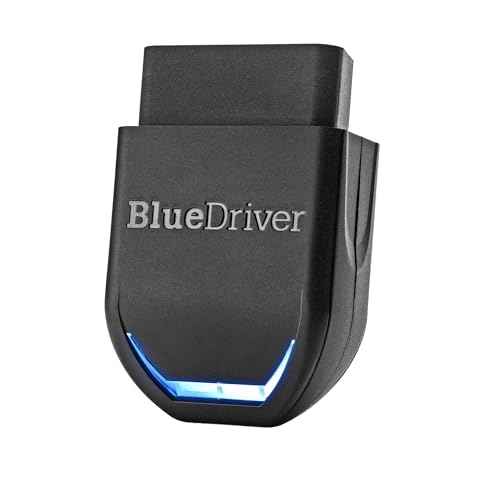
BlueDriver takes a different approach. It uses a Bluetooth adapter and a mobile app instead of a built-in screen. This makes it a good choice for drivers who prefer a phone display, saved reports, and guided information. The listed coverage includes check engine, ABS, SRS, and TPMS functions on supported vehicles.
The app can make code reading less stressful for a new user. You can view repair reports and live data from a compatible phone. The no-subscription design is also attractive for owners who dislike ongoing fees. However, Bluetooth pairing, app support, phone battery life, and vehicle coverage all matter before you buy.
Pros:
- Convenient wireless connection
- Works with supported iPhone and Android devices
- Provides repair reports in the app
- Offers more than basic engine code reading
- No stated subscription requirement for normal use
- Easy to carry in a glove box
Cons:
- Requires a compatible phone or tablet
- App-based tools may feel slower than a dedicated screen
- Coverage can vary by Ford model and system
What Amazon Buyers Are Saying
Buyers commonly like the compact size, wireless use, and clear app reports. Many app-based scanner users also value the ability to save information and review it later. Complaints tend to focus on pairing steps, phone permissions, or differences in coverage between vehicle models. These are normal points to check with any Bluetooth OBD2 scanner.
My Recommendation
BlueDriver is a smart pick for Ford owners who want a polished mobile experience. I would choose it over a basic reader when report quality and convenience matter more than Ford-only service functions. It is not my first choice for every reset job, but it is one of the best OBD2 scanner for Ford options for app-based diagnosis.
| Category | Rating |
|---|---|
| App experience | 4.7/5 |
| Diagnostic reports | 4.6/5 |
| Ford coverage | 4.3/5 |
| Value | 4.4/5 |
| Overall Rating | 4.5/5 |
ANCEL FD700 Ford Scanner

The ANCEL FD700 targets Ford, Lincoln, and Mercury vehicles with a broad list of diagnostic and service features. It includes functions such as battery registration, ABS, SRS, SAS, BMS, oil reset, TPMS, EPB, regen, and throttle-related work. This gives it a wider role than a simple check engine light reader. It may suit a serious DIY owner who wants one tool for several repair tasks.
The FD700 makes the most sense when you work on vehicles often. It can reduce the need for several small tools, but the long feature list also creates a learning curve. Vehicle support can differ by year and module. I suggest checking the maker’s fit list before you rely on it for a specific Ford repair.
Pros:
- Broad Ford, Lincoln, and Mercury focus
- Supports many system checks and service tasks
- Includes battery and oil-related functions
- Useful for ABS, SRS, SAS, BMS, and TPMS work
- Good fit for advanced home mechanics
- Wired operation avoids wireless connection problems
Cons:
- More features can make the menus harder for beginners
- Not every function works on every Ford vehicle
- May be more tool than a casual driver needs
What Amazon Buyers Are Saying
Feedback on advanced Ford scanners usually highlights the value of having many service functions in one device. Buyers who perform their own maintenance tend to appreciate deeper system access. Some users report a learning period with the menus and vehicle selection. That concern is fair, since advanced scan tools need more careful setup than basic readers.
My Recommendation
The FD700 is a strong alternative to the FD500 for users who want a wider feature set. I would pick it for a Ford household with more than one vehicle or for a hands-on owner who performs regular service. It earns a high score, but beginners may find the FD500 easier to start with.
| Category | Rating |
|---|---|
| Ford system coverage | 4.7/5 |
| Reset functions | 4.7/5 |
| Ease of use | 4.2/5 |
| Value for advanced users | 4.5/5 |
| Overall Rating | 4.5/5 |
ANCEL AD410 OBD2 Scanner

The ANCEL AD410 is a simple OBD2 code reader for check engine problems. It is made for OBD2 cars from 1996 and newer, subject to vehicle compatibility. Its main job is to read and clear engine fault codes and show basic emissions information. This makes it useful for a Ford owner who wants a low-cost first look.
It does not aim to replace a full Ford diagnostic tool. You should not expect deep ABS, SRS, battery registration, or special reset coverage from this basic class of scanner. The wired connection keeps the process direct. For a driver who only needs engine code checks, that simple design can be a real advantage.
Pros:
- Simple choice for check engine light checks
- Wired design needs no app or pairing
- Supports OBD2 vehicles from 1996 and newer
- Easy to carry and store
- Useful for basic code reading and clearing
- Good starting tool for new DIY owners
Cons:
- Limited compared with Ford-specific full-system scanners
- Not the right choice for many service resets
- Basic code readers cannot diagnose every warning light
What Amazon Buyers Are Saying
Basic readers often receive praise for their low learning curve and quick connection. Buyers like knowing why the check engine light is on before visiting a repair shop. Common limits include a lack of advanced module access and the need to search code meanings. Those limits reflect its purpose as an entry-level reader.
My Recommendation
Buy the AD410 if your main goal is basic engine fault diagnosis. It is not the best OBD2 scanner for Ford if you need ABS, airbag, or battery service functions. Still, it offers good value for a driver who wants a simple tool for common check engine tasks.
| Category | Rating |
|---|---|
| Basic engine checks | 4.4/5 |
| Ease of use | 4.7/5 |
| Advanced Ford coverage | 3.2/5 |
| Value | 4.5/5 |
| Overall Rating | 4.2/5 |
FOXWELL NT301 Live Data Scanner

The FOXWELL NT301 focuses on engine code reading and live data. Live data lets you view changing values while the engine runs. This can help you spot odd readings instead of relying only on a stored code. It is a useful step above a very basic reader for Ford owners who want more information.
The NT301 remains an engine-focused tool. It should not be treated as a full Ford module scanner. Its wired design works well in a garage, and the dedicated display avoids phone issues. For deeper ABS, SRS, or service reset work, you should consider a Ford-focused model instead.
Pros:
- Shows useful engine live data
- Dedicated screen works without a smartphone
- Helpful for check engine light diagnosis
- Simple wired connection
- Good fit for home garage checks
- More informative than a code-only reader
Cons:
- Limited full-system coverage
- Live data can confuse users without basic vehicle knowledge
- Not designed for every Ford service reset
What Amazon Buyers Are Saying
Users of live data scanners often like the direct display and the extra information during diagnosis. Buyers may find the tool useful when a code alone does not explain a rough idle or sensor issue. The most common concern with this type of product is the learning curve. Live data needs context, and a value outside a normal range does not always prove that one part has failed.
My Recommendation
I recommend the NT301 for Ford owners who want engine live data at a reasonable level of complexity. It is a better diagnostic tool than a basic reader, but it lacks the system reach of the FD500 or FD700. Choose it when engine work matters most.
| Category | Rating |
|---|---|
| Live data | 4.5/5 |
| Engine diagnosis | 4.4/5 |
| Ford module coverage | 3.5/5 |
| Ease of use | 4.2/5 |
| Overall Rating | 4.2/5 |
BLCKTEC 460T Diagnostic Scanner

The BLCKTEC 460T is built for owners who want broad diagnostic coverage and several maintenance functions. Its listed tools include engine, ABS, SRS, transmission, oil, TPMS, EPB, BMS, SAS, DPF, and throttle-related functions. It also lists ABS bleeding, battery testing, auto VIN, and free updates. That range gives it appeal beyond Ford-only engine checks.
This scanner may suit a busy home garage or a user who owns more than one vehicle brand. Its wider design can be useful, but you must confirm Ford compatibility for each special function. Menu depth may also take time to learn. I would treat update access and supported vehicle lists as key buying checks.
Pros:
- Broad system coverage
- Lists 12 service and reset functions
- Includes battery, TPMS, EPB, and oil tools
- Can support ABS bleeding on compatible vehicles
- Auto VIN may speed vehicle setup
- Useful for owners with varied repair needs
Cons:
- Special functions depend on the exact vehicle
- Broad coverage can make the tool less simple
- Users should confirm update terms and support details
What Amazon Buyers Are Saying
Buyers who choose multi-service scanners often value the number of jobs they can attempt with one tool. The ability to handle more than engine codes is a common reason to buy. Some users may need time to learn the menus and find their vehicle’s supported functions. As with any advanced scanner, customer satisfaction depends on matching the tool to the exact repair task.
My Recommendation
The BLCKTEC 460T is a good choice when you want broad service coverage rather than a Ford-only tool. It may offer better flexibility for a mixed household. I would choose the FD500 or FD700 for Ford-specific work, but the 460T deserves attention from users who also service other cars.
| Category | Rating |
|---|---|
| System coverage | 4.6/5 |
| Service functions | 4.6/5 |
| Ford suitability | 4.3/5 |
| Ease of use | 4.1/5 |
| Overall Rating | 4.4/5 |
Innova 5210 OBD2 Scanner

The Innova 5210 combines a handheld scanner with engine diagnosis, live data, battery testing, and oil reset features. It is aimed at drivers who want more than a code reader but do not need a large professional platform. The battery test feature can help you check charging and starting concerns. It also works with a compatible repair app for added information.
This model has broad appeal for general vehicle maintenance. It can help a Ford owner understand engine codes and monitor selected data. However, buyers should not assume that a general scanner covers every Ford module. If you need Ford-specific coding or many special functions, compare it with the ANCEL Ford models first.
Pros:
- Includes live data support
- Offers battery testing
- Includes an oil reset function
- Useful for general home vehicle checks
- Works with a compatible repair app
- Handheld format is easy to share and store
Cons:
- Ford coverage is not as specialized as ANCEL FD models
- Some advanced functions may not apply to every vehicle
- Users should verify app and vehicle compatibility
What Amazon Buyers Are Saying
Buyers often like the mix of a physical scanner and app support. Battery testing and live data add value for people who maintain their own cars. Some complaints with general scanners center on the limits of system coverage. That is why I recommend checking whether the tool covers the exact Ford module you want to test.
My Recommendation
The Innova 5210 is a balanced home maintenance tool. I recommend it for general checks, live data, battery concerns, and oil service. It is less suitable when Ford-specific functions are your main goal. For mixed needs, it remains a practical and flexible option.
| Category | Rating |
|---|---|
| Live data | 4.4/5 |
| Battery testing | 4.5/5 |
| Ford-specific functions | 3.8/5 |
| General value | 4.3/5 |
| Overall Rating | 4.2/5 |
Bluetooth OBD2 Scanner with App
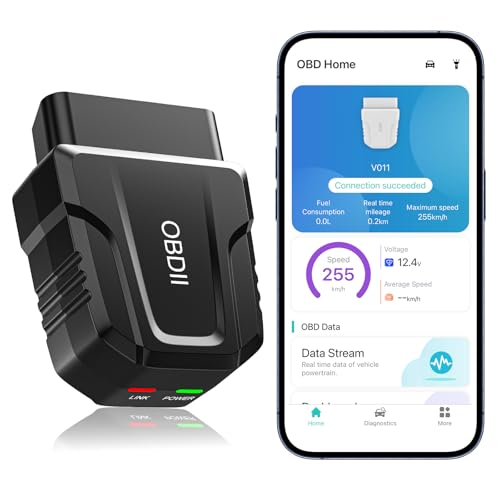
This compact Bluetooth scanner connects to iOS and Android devices through its app. It is designed for check engine codes, live data, error clearing, and performance tests. Bluetooth 5.4 is listed as a connection feature. Its small size makes it easy to leave in a glove box for quick checks.
The main benefit is convenience. You can use the phone you already carry and view data on a larger screen. Yet this type of tool depends on app quality and phone compatibility. It is best for basic OBD2 work unless the app clearly lists deeper Ford system support.
Pros:
- Small and easy to store
- Works with iOS and Android devices
- Supports live data through the app
- Can clear supported error codes
- Useful for basic performance checks
- Wireless use reduces cable clutter
Cons:
- Requires an app and compatible phone
- General Bluetooth scanners may not access Ford body modules
- App quality and update support affect the experience
What Amazon Buyers Are Saying
Compact Bluetooth readers often attract buyers who want quick checks without carrying a handheld tool. Users tend to value the phone display and small adapter size. Common concerns include setup, permissions, and unclear advanced coverage. I would review the app details and supported functions before expecting ABS, SRS, or reset access.
My Recommendation
This scanner is a reasonable low-cost choice for basic OBD2 use. It can work well for check engine codes and live data when the app performs as expected. It is not my first recommendation for Ford service work. Choose a wired Ford-focused scanner if you need dependable access to special functions.
| Category | Rating |
|---|---|
| Wireless use | 4.5/5 |
| Basic OBD2 checks | 4.2/5 |
| Ford-specific access | 3.4/5 |
| Portability | 4.7/5 |
| Overall Rating | 4.1/5 |
How to Choose the Best OBD2 Scanner for Ford
Choosing the best OBD2 scanner for Ford depends on the warning light, vehicle year, and repair task. A tool that reads engine codes may not read an airbag module. A scanner that supports one Ford model may not support every function on another. Use the points below before you place an order.
1. Match the Scanner to Your Ford Systems
Start with the system you need to test. Basic OBD2 scanners focus on the powertrain and emissions system. They can read many check engine codes on compatible vehicles. They may not access ABS, SRS, TPMS, transmission, or body control modules.
If your Ford has an ABS or airbag light, choose a scanner that lists those systems. If you want to register a new battery, look for battery registration or BMS support. For an electronic parking brake, look for EPB service. Always match the function to your exact year and model.
2. Check Service Resets and Ford Compatibility
Special functions are a major reason to buy a Ford scanner. Oil reset, battery registration, throttle adaptation, steering angle reset, and DPF service can save a shop visit. But these functions do not work on every vehicle. The vehicle’s computer, engine, trim, and module all affect support.
Read the compatibility list before buying. Do not rely only on a product title that says “full system.” Ask whether the tool supports your Ford Escape, F-150, Explorer, Fusion, Mustang, Ranger, Bronco, Edge, or Lincoln model. Also check if the function performs a reset, a relearn, an active test, or only a code read.
3. Balance Ease, Updates, and Long-Term Value
A wired scanner is often easy to start. Plug it into the OBD2 port, turn on the ignition, and follow the screen. A Bluetooth tool is smaller and can show reports on your phone. It may need app permissions, wireless pairing, and regular app support.
Advanced tools need updates to stay useful as vehicle coverage changes. Check how updates work before you buy. A low price has less value if the scanner cannot support your Ford’s needed function. For occasional engine checks, the AD410 or NT301 may be enough. For deeper Ford work, the FD500 or FD700 offers better long-term value.
Final Verdict: Which Should You Buy?
The ANCEL FD500 is my top pick and the best OBD2 scanner for Ford owners who need full-system access and useful service resets. Choose the FD700 for a broader Ford function list, or BlueDriver for app-based reports.
Match the scanner to your exact Ford model and repair task. A good code reader helps you make a better repair decision, but it never replaces safe testing and proper mechanical work.
FAQs Of best OBD2 scanner for Ford
What is the best OBD2 scanner for Ford vehicles?
The ANCEL FD500 is my top choice for Ford, Lincoln, and Mercury owners. It offers deeper system coverage and useful service functions than a basic engine code reader.
Can a Ford OBD2 scanner read ABS and airbag codes?
Some can, but basic readers may not. Choose a model that clearly lists ABS and SRS support for your exact Ford year and model.
Can an OBD2 scanner register a new Ford battery?
Some Ford-focused scanners support battery registration or BMS functions. Confirm that the feature supports your vehicle before replacing the battery.
Is a Bluetooth OBD2 scanner better than a wired scanner for Ford?
Bluetooth is easier to carry and uses your phone. A wired Ford-focused scanner may offer simpler setup and better access to special service functions.
Will every OBD2 scanner work with every Ford model?
No. Basic OBD2 engine functions are broad, but ABS, SRS, TPMS, resets, and other modules vary by year, model, engine, and trim.