For most Mazda CX-5 owners, the BlueDriver is the best OBD2 scanner for Mazda CX-5 diagnostics.
A check engine light can appear before a trip, during cold weather, or after a simple fuel stop. Many drivers then face a costly shop visit just to learn the trouble code. An OBD2 scanner gives you a fast first check from your driveway. It can read engine faults, show live data, and help you decide if the issue needs urgent repair. I compared eight popular scanners for Mazda CX-5 owners, from simple code readers to advanced tools that can check ABS, airbag, and transmission systems. See the differences between my top picks at a glance.
BlueDriver Bluetooth Scanner
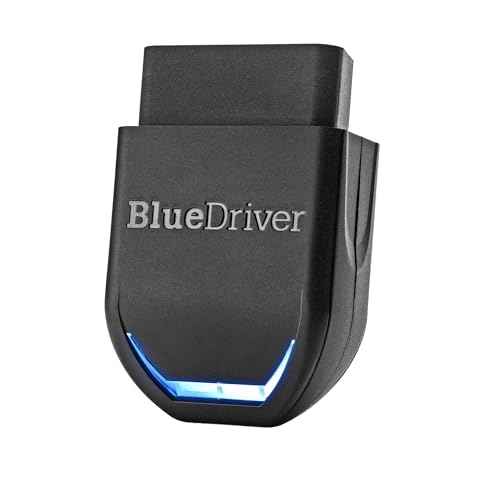
BlueDriver is one of the easiest choices for a Mazda CX-5 driver who wants more than a raw trouble code. It uses a small Bluetooth adapter and a phone app. The app can read diagnostic codes and present them in a clear format. That makes it more useful for home checks than many low-cost readers with short code descriptions.
The listing highlights engine, ABS, SRS, and TPMS coverage, but exact support can vary by vehicle year and system. I like the repair-report approach because it can give likely causes and possible fixes instead of only showing a code. It has no subscription requirement listed, which helps control long-term cost. Still, it is not a replacement for a factory Mazda scan tool or a trained technician.
Pros:
- Clear app-based code reports
- Useful live data display
- Can cover more than the engine system on supported vehicles
- No ongoing subscription listed
- Small and easy to keep in the glove box
Cons:
- Needs a compatible phone and app
- Advanced functions depend on the Mazda year and system
- Wireless setup may feel less direct than a wired reader
What Amazon Buyers Are Saying
Buyer feedback commonly focuses on the simple setup, helpful reports, and easy-to-read app. Many users like having more context than a basic P-code reader gives. As with most connected scanners, some complaints center on pairing, phone permissions, or coverage limits on certain cars. Check recent listing details and Mazda compatibility before ordering.
My Recommendation
I recommend BlueDriver for owners who want a friendly tool for engine faults and supported safety systems. It is the best overall pick in this guide because it balances ease of use and useful data. Do not buy it expecting dealer-level coding or every Mazda module.
OBDLink MX+ Bluetooth Scanner

The OBDLink MX+ is a strong choice for Mazda CX-5 owners who already use phone-based car apps. It connects through Bluetooth and works with iPhone, Android, and Windows devices according to the product listing. The adapter is compact, so it can stay in the vehicle without taking much space. It also gives you the freedom to choose an app that fits your preferred data view.
This flexibility is both its main strength and its main learning curve. The hardware can be capable, but your final experience depends on the app you select. Some apps offer basic code reading, while others show graphs and more live sensor data. I would choose this scanner for a technically minded driver who wants control, not for someone who wants a guided repair report out of the box.
Pros:
- Works with several device types
- Compact wireless design
- Good choice for live data fans
- Lets the user choose a preferred app
- Useful for repeated vehicle checks
Cons:
- App choice can make setup confusing
- Some app features may cost extra
- Coverage beyond generic OBD2 depends on software and vehicle support
What Amazon Buyers Are Saying
Common buyer themes include reliable connection, small size, and broad app support. Some users praise the extra control over data and dashboards. Other buyers report that setup takes time or that an app does not support every desired feature. These comments show why you should check the app, phone, and Mazda year before purchase.
My Recommendation
The OBDLink MX+ is worth buying if you enjoy using automotive apps and reading live sensor data. It is less friendly than BlueDriver for a first-time user, but it can be more flexible. I rate it highly for advanced hobby use.
FOXWELL NT604 Elite Scanner

The FOXWELL NT604 is aimed at drivers who want a wired tool with broader system coverage. Its product title calls out ABS, SRS, transmission, check engine codes, and live data. That makes it more appealing than a basic reader for a CX-5 with a warning light outside the engine system. A wired design also avoids phone pairing and app battery concerns.
This scanner suits a garage better than a glove box. It gives you a dedicated display and physical controls, which can help when you work beside the vehicle. Support for a specific Mazda module can vary, so I would confirm the exact model year and feature list before purchase. It should be treated as a diagnostic aid, not proof that a part has failed.
Pros:
- Dedicated screen and controls
- Focus on ABS and SRS diagnosis
- Transmission coverage is listed
- Live data support
- No phone app needed for basic use
Cons:
- More expensive than simple engine readers
- Less compact than Bluetooth adapters
- Enhanced Mazda functions may vary by year
What Amazon Buyers Are Saying
Buyer discussions often value the larger function set and direct wired operation. Users who work on several vehicles may like the dedicated tool format. The most likely concerns involve menu learning, update steps, and limits on advanced functions. Read the current product page for update and compatibility details before ordering.
My Recommendation
I recommend the NT604 for a serious DIY owner who wants to investigate ABS, airbag, and transmission warnings. It is overkill for a driver who only wants to clear a check engine code. Its wider coverage earns it a strong score.
FOXWELL NT301 Live Data Reader

The FOXWELL NT301 keeps its focus on the engine side of OBD2 diagnosis. It reads codes, supports live data, and targets check engine light work. That focused design can help a new user avoid menus that they do not need. The wired plug also makes it ready when the CX-5 turns on a warning lamp.
Live data can help you watch values while the engine runs, but you must know what the numbers mean. A scan tool can point toward a problem without confirming the failed part. The NT301 is best for basic engine fault checks and simple maintenance research. It is not the right choice if your main goal is airbag or ABS scanning.
Pros:
- Simple engine-focused design
- Live data support
- Physical buttons are easy to use
- Useful for check engine light checks
- No smartphone needed
Cons:
- Limited compared with multi-system scanners
- Wired cable limits placement
- Advanced Mazda functions are not guaranteed
What Amazon Buyers Are Saying
Amazon buyers commonly mention the simple operation and useful code display. Many value a dedicated tool that works without installing an app. Some users expect more system coverage than this engine-focused unit provides. That gap explains why it is important to match the scanner to the warning light you need to diagnose.
My Recommendation
The NT301 is a sensible mid-level engine scanner. Buy it if you mainly need check engine codes and live data. Skip it if you need ABS, SRS, or transmission diagnosis.
ANCEL AD410 Enhanced Scanner

The ANCEL AD410 is a practical budget scanner for standard OBD2 work. Its listing targets vehicles from 1996 onward and focuses on check engine fault diagnosis. For many CX-5 owners, that covers the first step after the engine light appears. The black and yellow case also gives it a clear, simple workshop look.
This is the kind of reader I would keep for basic checks, code clearing after repairs, and emissions readiness review. It will not replace a multi-system Mazda diagnostic tool. Before clearing any code, record it and understand the cause. Erasing a code does not repair the fault, and the light may return.
Pros:
- Budget-friendly format
- Designed for standard OBD2 vehicles
- Simple check engine light use
- Compact wired design
- Good first tool for home diagnosis
Cons:
- Limited system coverage
- Not ideal for advanced live data work
- May feel basic to experienced mechanics
What Amazon Buyers Are Saying
Common buyer comments praise the low price, simple plug-in use, and clear code reading. Some buyers want more detailed repair help or wider module access. That is a normal limit for this class of scanner. It offers value when your needs stay within basic engine OBD2 functions.
My Recommendation
The AD410 is a good low-cost pick for a CX-5 owner who wants a basic check engine scanner. It offers useful first-step information but has limited value for ABS, SRS, and transmission faults.
OBD2 Scanner for Mazda CX-5

This scanner is listed for Mazda CX-5 models from 2013 through 2026. That model-focused wording makes it worth considering for an owner who wants a direct match rather than a broad universal listing. A dedicated OBD2 tool can help read engine fault codes and support basic vehicle checks. Still, the model range in a title does not prove that every system or function works on every year.
I would verify the product page for your exact CX-5 year before buying. Pay close attention to whether it supports only generic powertrain codes or also Mazda-specific modules. This step matters because the OBD2 port can be physically compatible while software access remains limited. It is a sensible option when model fit ranks above app features.
Pros:
- Listing targets Mazda CX-5 model years
- Simple wired connection
- Useful for first-line code checks
- No phone or app setup required
- Easy option for CX-5-focused buyers
Cons:
- Exact functions need year-by-year confirmation
- May not access every Mazda module
- Less flexible than app-based scanners
What Amazon Buyers Are Saying
For a model-focused listing, buyers usually look for easy connection and clear compatibility details. The most important feedback to review concerns the exact Mazda year, code types, and reset functions. Do not assume that a CX-5 label means dealer-level access. Read recent customer comments and the seller’s current feature list before purchase.
My Recommendation
This can be a good choice for a CX-5 owner who wants a direct model listing and basic OBD2 checks. I would not choose it over BlueDriver when repair reports and broader supported system data matter more. Confirm compatibility first.
Innova 5210 Diagnostic Scanner

The Innova 5210 combines OBD2 scanning with battery testing and an oil reset function. Those extra maintenance tools can make it useful for a CX-5 owner who wants one device for more than fault codes. The listing also mentions live data and compatibility with a repair app. Its wired scanner format keeps the basic workflow simple.
Battery information can help when a CX-5 shows slow cranking or odd electrical behavior, but a scan tool cannot replace a proper battery load test in every case. Oil reset support also depends on the vehicle and service system. I like this tool for routine ownership tasks, especially when you want a screen and app option. Confirm the supported reset functions for your specific year.
Pros:
- Battery test function listed
- Oil reset support listed
- Live data capability
- Dedicated handheld format
- Optional connection with a repair app
Cons:
- Some functions vary by vehicle
- Not a full Mazda module scanner
- Can cost more than a basic code reader
What Amazon Buyers Are Saying
Buyers commonly like the mix of code reading, battery checks, and maintenance features. Users who want one tool for home use often find that combination attractive. Some feedback focuses on app pairing or differences between vehicles. Check current support details before relying on a particular reset feature.
My Recommendation
The Innova 5210 is a strong choice for an owner who wants a wider maintenance tool, not just a check engine reader. It earns extra value from battery and oil functions. Choose another model if you need deep ABS or SRS diagnostics.
Autel AL319 Professional Scanner
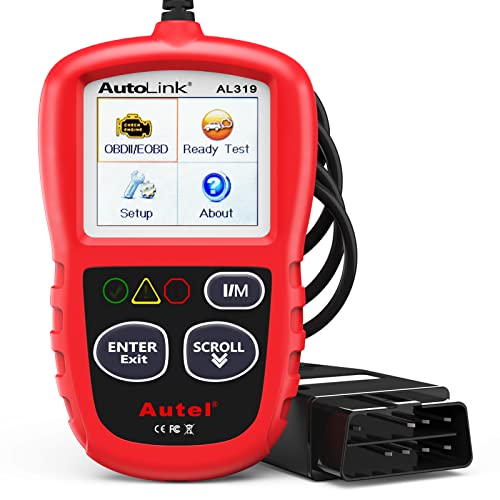
The Autel AL319 is built for straightforward OBD2 checks. Its listing includes check engine code reading, freeze frame, live data, and fault-code reset functions. Freeze frame is helpful because it records key conditions from the moment a fault appears. That can give you more context than a code alone.
The AL319 makes sense for a driver who wants a small, direct tool with no wireless setup. It can help with standard engine diagnostics on supported OBD2 vehicles. It does not offer the same broad system focus as a dedicated ABS and SRS scanner. Use it as a first check, then seek deeper testing when the warning involves another module.
Pros:
- Freeze-frame data support
- Live data function listed
- Fault-code reset capability
- Simple wired operation
- Good fit for basic engine checks
Cons:
- Limited multi-system coverage
- Small tool may show less data at once
- Reset functions require careful use
What Amazon Buyers Are Saying
Amazon buyers often value the compact size and direct operation. Many users want a tool that reads a code without a subscription or phone. Complaints tend to involve expectations for advanced features that this type of reader does not provide. Its best value comes from standard engine fault work.
My Recommendation
I recommend the AL319 for simple CX-5 engine checks and freeze-frame review. It is affordable and easy to carry. Select a higher-level scanner if you need body, airbag, or transmission modules.
How to Choose the Best OBD2 Scanner for Mazda CX-5
The best OBD2 scanner for Mazda CX-5 owners depends on the warning light, your skill level, and the type of data you need. A low-cost reader can handle a standard check engine code. A larger scanner may be better for ABS, SRS, or transmission faults. Use these three checks before you buy.
1. Match the Scanner to the Warning Light
Generic OBD2 usually focuses on emissions-related powertrain faults. It does not always reach the airbag, brake, body, or transmission modules. If your CX-5 shows only a check engine light, a basic reader may be enough. If it shows an ABS or SRS warning, choose a scanner that clearly lists that system.
Do not assume that every product with an “enhanced” label offers the same Mazda coverage. Look for your model year in the current compatibility details. If the seller does not name the system, ask before you order.
2. Choose Wired or Bluetooth Operation
A wired scanner starts fast and does not need a phone. It works well in a garage and suits drivers who want a clear handheld screen. Bluetooth scanners take less storage space and can show graphs on a phone. They may also provide better repair guidance.
Wireless tools need a compatible phone, app, and permissions. App quality matters as much as the adapter. If you dislike setup steps, choose a wired model such as the Autel, ANCEL, or FOXWELL engine readers.
3. Check Data, Updates, and Long-Term Value
Live data can help you watch sensor values. Freeze-frame data can show the conditions present when a fault set. Repair reports can help a new owner understand the next step. These features can save time, but they do not prove that one part has failed.
Also check update rules and costs. Some tools update through a computer or app. Others may have different access rules for advanced functions. A cheap scanner is not a good deal if it cannot read the system you need. For many owners, BlueDriver offers the best balance. For basic codes, the ANCEL AD410 or Autel AL319 may offer better value.
Final Verdict: Which Should You Buy?
BlueDriver is my top choice and the best OBD2 scanner for Mazda CX-5 owners who want clear reports, live data, and supported extra systems. Choose FOXWELL NT604 for broader wired diagnostics.
For basic engine codes, ANCEL AD410 and Autel AL319 cost less. Always confirm your CX-5 year and system support before ordering.
FAQs Of best OBD2 scanner for Mazda CX-5
What is the best OBD2 scanner for Mazda CX-5?
BlueDriver is the best overall choice for clear reports, live data, and supported extra systems. Confirm coverage for your CX-5 year before purchase.
Can an OBD2 scanner read Mazda CX-5 ABS codes?
Some scanners can read ABS codes, but basic engine readers often cannot. Choose a model that clearly lists ABS support for your vehicle year.
Do I need a Mazda-specific scan tool?
You do not need one for every check engine code. A Mazda-specific or enhanced tool helps when you need manufacturer data or access to systems beyond generic OBD2.
Can I clear a CX-5 check engine light with an OBD2 scanner?
Many scanners can clear supported fault codes. Repair the cause first, because the light may return and clearing codes can erase useful diagnostic data.
Is a Bluetooth scanner better than a wired scanner?
Bluetooth models are compact and offer app features. Wired models start quickly and need no phone. The better choice depends on your preferred workflow.