The BlueDriver Bluetooth OBD2 scanner is my top pick for BMW owners who want simple, deep, and useful fault-code reports.
A BMW warning light can turn a calm drive into a costly guess. A basic code reader may show a fault, but it may not explain what the code means or which system needs attention. The best OBD2 scanner for BMW with Bluetooth connects to your phone, reads data with less hassle, and helps you decide whether to repair the car now or visit a shop. I tested the key differences between popular Bluetooth adapters, BMW coding tools, and full diagnostic scanners so you can choose with confidence.
See the differences between my top picks at a glance.
| Scanner | Best For | Phone Support | BMW Coding | Key Strength | Buy |
|---|---|---|---|---|---|
| BlueDriver Bluetooth Scanner | Fuller repair reports | iPhone, Android | Not its main focus | Clear code reports | View on Amazon |
| Veepeak OBDCheck BLE | Basic DIY scans | iPhone, Android | Depends on app | Small, simple adapter | View on Amazon |
| OBDLink CX | BMW coding with BimmerCode | iPhone, Android | Yes, with compatible apps | BMW/MINI coding focus | View on Amazon |
| BlueDriver Bluetooth Scanner | Home troubleshooting | iPhone, Android | Not its main focus | Guided repair information | View on Amazon |
| OBDLink MX+ | Advanced app support | iPhone, Android, Windows | App dependent | Broad compatibility | View on Amazon |
| Vgate vLinker BM Plus | BMW/MINI coding value | iPhone, Android | Yes, with BimmerCode | BMW-focused connection | View on Amazon |
| Vgate vLinker BM+ | Entry BMW coding | iOS, Android, Windows | Yes, app dependent | Flexible device support | View on Amazon |
BlueDriver Bluetooth Scanner
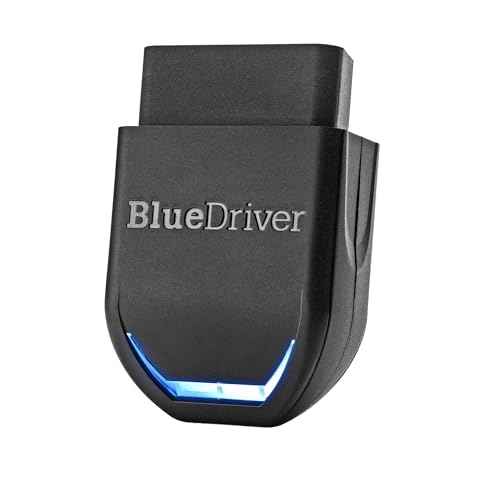
BlueDriver stands out because it does more than display a short fault-code number. Its app aims to turn a code into a useful report, which helps a BMW owner understand the next step. It supports iPhone and Android devices and works with vehicles that use the standard OBD2 connection. The product listing also highlights coverage for systems such as ABS, SRS, and TPMS, although exact access can vary by vehicle model and app support.
I like this scanner for owners who want simple guidance, not a long manual. It can help you review trouble codes, look at live data, and create reports before you call a mechanic. It is not a factory BMW diagnostic system, so it will not replace advanced workshop equipment. Still, it is one of the strongest choices for everyday fault checks and is a leading option for the best OBD2 scanner for BMW with Bluetooth.
Pros:
- Works with both iPhone and Android devices
- Clear reports help explain fault codes
- Supports more than basic engine-code reading on compatible vehicles
- No separate handheld display is needed
- Useful for home checks before a repair visit
- Compact design fits easily in a glove box
Cons:
- Some enhanced BMW functions may not be available
- Phone app use is required
- Coverage can vary by model year and control module
What Amazon Buyers Are Saying
Amazon buyers commonly like the easy setup, readable app, and repair information. Many users value the way the reports give more context than a basic code reader. Common concerns include limits on vehicle-specific functions and occasional confusion about which systems a particular BMW can access. Buyers also tend to note that the adapter works best when the phone, app, and vehicle support the same functions.
My Recommendation
I recommend this BlueDriver listing for BMW owners who want practical fault reports and simple phone use. It is worth buying when your main goal is diagnosis rather than coding hidden vehicle settings. Check your BMW model and the current app coverage before ordering.
| Category | Rating |
|---|---|
| BMW fault-code coverage | 4.5/5 |
| App clarity | 4.6/5 |
| Ease of setup | 4.5/5 |
| Repair guidance | 4.6/5 |
| Overall Rating | 4.5/5 |
Veepeak OBDCheck BLE

The Veepeak OBDCheck BLE is a small Bluetooth adapter for drivers who want a simple connection to a phone. It is designed for iOS and Android use and can work with compatible third-party diagnostic apps. That app-based design gives you more choice, but it also means the final experience depends on the app you select. For a BMW owner, this can be a cost-effective way to read standard engine codes and view common live data.
This model makes sense for a careful DIY owner who already knows which app to use. It does not present itself as a complete BMW dealer scanner, and buyers should not expect every ABS, airbag, or body module to respond. I see it as a useful entry tool, especially for check-engine light checks. It can be the best OBD2 scanner for BMW with Bluetooth for a buyer who wants a low-cost adapter and does not need guided reports.
Pros:
- Small design stays connected without taking much space
- Supports Bluetooth Low Energy phone connections
- Works with compatible iOS and Android apps
- Useful for standard OBD2 engine checks
- Good choice for basic live-data viewing
- Simple format suits first-time users
Cons:
- App quality can change the user experience
- Advanced BMW module access is not guaranteed
- Some phones may need Bluetooth permission changes
What Amazon Buyers Are Saying
Buyers often praise the compact size, quick connection, and simple operation with supported apps. Many use it for reading and clearing basic codes or checking sensor data. Some complaints focus on app compatibility, phone permissions, or expectations that the adapter would perform full BMW coding. Those comments show why buyers should choose the app first and then confirm that the Veepeak adapter supports it.
My Recommendation
I recommend the Veepeak for basic BMW checks and budget-minded owners. It offers good value when you need standard OBD2 access, but it is not my first choice for BMW coding or deep module work. Buy it if you want a simple Bluetooth bridge rather than a guided diagnostic system.
| Category | Rating |
|---|---|
| Basic BMW scanning | 4/5 |
| Phone connection | 4.2/5 |
| App flexibility | 4.1/5 |
| Value | 4.4/5 |
| Overall Rating | 4.1/5 |
OBDLink CX for BMW Coding

The OBDLink CX targets BMW and MINI owners who want to use BimmerCode and other supported apps. Its Bluetooth 5.1 connection is a major attraction for buyers who want wireless coding from a phone. With a compatible vehicle and app, it can support tasks such as changing selected comfort settings and viewing diagnostic information. The exact coding menu depends on the BMW platform, software version, and app support.
This is not the same type of product as BlueDriver. BlueDriver focuses on readable repair reports, while the OBDLink CX focuses more on the connection between your BMW and coding apps. I would choose it for an enthusiast who understands that coding can change vehicle behavior and should be done with care. For BMW customization, it is a strong candidate for the best OBD2 scanner for BMW with Bluetooth.
Pros:
- Designed with BMW and MINI app use in mind
- Bluetooth 5.1 supports modern wireless connections
- Compatible with BimmerCode when the vehicle is supported
- Useful for selected coding and customization tasks
- Works with iPhone and Android devices
- Small design is easy to keep in the car
Cons:
- Requires a compatible app for most advanced functions
- Coding can be confusing for new users
- Not a replacement for factory workshop equipment
What Amazon Buyers Are Saying
Amazon buyers commonly like the stable connection with supported BMW coding apps and the quick setup. Enthusiasts often value the ability to change supported settings without a cable or laptop. The main complaints involve vehicle compatibility, app limits, and uncertainty about coding steps. Some buyers also expect full dealer-level diagnostics, which this adapter does not promise.
My Recommendation
I recommend the OBDLink CX to BMW owners who want coding first and fault-code reading second. It is worth buying when BimmerCode lists your car and the functions you want. If you only need clear repair reports, BlueDriver may suit you better.
| Category | Rating |
|---|---|
| BMW coding support | 4.7/5 |
| Wireless performance | 4.6/5 |
| App compatibility | 4.5/5 |
| Ease for beginners | 4/5 |
| Overall Rating | 4.5/5 |
BlueDriver Bluetooth Scanner Listing

This second BlueDriver listing offers the same core product name and the same general purpose: connect the scanner to a phone and review vehicle data through the BlueDriver app. The listing highlights ABS, SRS, and TPMS support, plus reports for supported vehicles. These enhanced systems matter to BMW drivers because a dashboard warning can come from more than the engine computer. Still, I always advise checking current compatibility before assuming that every module will work on every BMW.
The main advantage remains ease of use. You plug in the adapter, open the app, and follow the scan process. The app can help a DIY owner understand whether a fault needs urgent attention. This model is best for routine diagnosis, used-car checks, and repair preparation. It remains a practical choice for the best OBD2 scanner for BMW with Bluetooth when clear information matters more than coding.
Pros:
- Helpful reports for supported trouble codes
- Supports common smartphone platforms
- Can inspect more than basic engine faults on compatible cars
- Good fit for home diagnosis
- Does not require a separate screen
- Useful before speaking with a repair shop
Cons:
- Enhanced functions depend on vehicle coverage
- It does not provide every factory BMW function
- Requires the BlueDriver mobile app
What Amazon Buyers Are Saying
Customer review patterns often point to easy pairing and useful code explanations. Buyers appreciate having a report they can save or discuss with a mechanic. Less positive comments usually relate to model-specific limits, phone setup, or the gap between a consumer scanner and a dealer tool. These are fair limits for a Bluetooth diagnostic adapter, not signs that it can replace professional BMW equipment.
My Recommendation
I recommend this listing when you want the BlueDriver experience and a simple path from code to explanation. It is a good buy for routine ownership needs. My rating reflects strong usability, with the reminder that BMW coverage can vary by year and module.
| Category | Rating |
|---|---|
| Report quality | 4.6/5 |
| BMW usability | 4.4/5 |
| Setup | 4.5/5 |
| DIY value | 4.4/5 |
| Overall Rating | 4.5/5 |
OBDLink MX+ Bluetooth Scanner

The OBDLink MX+ is a flexible Bluetooth scanner for iPhone, Android, and Windows users. Its wider platform support makes it attractive to owners who switch between devices or use more than one diagnostic app. It can read standard OBD2 data and may work with enhanced apps that support BMW systems. The app, vehicle, and operating system must all support the function you want.
I see the MX+ as a versatile tool for an experienced DIY user. It gives you more room to explore than a very basic adapter, yet it still depends on software for advanced work. It can monitor live values, review codes, and support different app choices. If you want broad device support and plan to learn the software, this may be the best OBD2 scanner for BMW with Bluetooth for your setup.
Pros:
- Supports iPhone, Android, and Windows devices
- Works with a range of compatible diagnostic apps
- Useful for standard OBD2 data and live readings
- Good choice for users with more than one device
- Suitable for experienced DIY owners
- Compact wireless design keeps the cabin tidy
Cons:
- Advanced BMW features depend on the chosen app
- New users may face a steeper learning curve
- Not every Windows or phone app offers the same support
What Amazon Buyers Are Saying
Buyers often like the broad device support and the ability to use several apps. Experienced users value the control and data access it offers. Common complaints concern app setup, Bluetooth permissions, and the need to understand which protocol or vehicle system an app supports. Review patterns suggest that this scanner rewards users who read the app instructions before starting.
My Recommendation
I recommend the MX+ for technically minded BMW owners who want flexibility. It is less beginner-friendly than a guided scanner, but it can provide a useful long-term tool as your skills grow. Choose it if app choice and Windows support matter to you.
| Category | Rating |
|---|---|
| Device support | 4.7/5 |
| App flexibility | 4.6/5 |
| BMW use | 4.3/5 |
| Beginner ease | 3.9/5 |
| Overall Rating | 4.4/5 |
Vgate vLinker BM Plus

The Vgate vLinker BM Plus is built around BMW and MINI use with compatible apps. Its main appeal comes from coding support through BimmerCode, along with wireless access from an iPhone or Android phone. This makes it more focused than a general OBD2 adapter. It can suit drivers who want to adjust supported settings without buying a larger scan tool.
Like any coding adapter, it needs careful use. A supported app does not mean every BMW function will appear on every car. I suggest saving the original settings and keeping the battery healthy during coding. For owners who want a BMW-focused tool at a sensible price, the BM Plus is a serious contender for the best OBD2 scanner for BMW with Bluetooth.
Pros:
- BMW and MINI focus suits brand enthusiasts
- Works with BimmerCode when vehicle support is confirmed
- Compatible with iPhone and Android devices
- Useful for supported comfort and coding changes
- Compact and easy to store
- More focused than a generic OBD2 adapter
Cons:
- Advanced functions depend on app and vehicle support
- Not ideal for buyers who only need guided repair reports
- Coding mistakes can create unwanted settings changes
What Amazon Buyers Are Saying
Amazon buyers often mention easy pairing and good results with supported BMW coding apps. Enthusiasts like the focused design and the ability to make selected changes from a phone. Critical comments tend to involve unsupported vehicle features, setup steps, or expectations of full diagnostic access. The most useful feedback points to checking the BimmerCode compatibility list before purchase.
My Recommendation
I recommend the BM Plus for BMW owners who want coding features without moving to a wired professional system. It offers strong value when your car appears on the compatibility list. For fault explanations, choose BlueDriver instead.
| Category | Rating |
|---|---|
| BMW coding | 4.6/5 |
| Wireless use | 4.5/5 |
| App fit | 4.4/5 |
| Value | 4.5/5 |
| Overall Rating | 4.5/5 |
Vgate vLinker BM+ Scanner

The vLinker BM+ offers another BMW-focused route into phone-based diagnostics and coding. It supports iOS, Android, and Windows according to the product listing, which gives it useful reach for buyers who do not stay on one platform. It can work with BimmerCode and other compatible software. As always, the app controls the final feature set.
I would place this model between a basic generic adapter and a full professional scanner. It suits a BMW owner who wants to explore coding and standard data without a large tool case. The wider device support is helpful, but the extra flexibility may require more setup. It is a good alternative if you want the best OBD2 scanner for BMW with Bluetooth and use more than one operating system.
Pros:
- Supports iOS, Android, and Windows use
- Designed for BMW and MINI app connections
- Works with compatible BimmerCode functions
- Useful for selected coding and diagnostic tasks
- Compact design suits in-car storage
- Flexible choice for multi-device households
Cons:
- Feature access depends on software support
- Less guided than a report-focused scanner
- Users must confirm compatibility before coding
What Amazon Buyers Are Saying
Buyers commonly like the multi-platform support and BMW coding focus. Many appreciate having a wireless tool that works with a familiar phone or computer. Common concerns include app learning, vehicle-specific limits, and confusion about the difference between scanning and coding. These comments make one point clear: the BM+ works best for buyers who know the task they want to perform.
My Recommendation
I recommend this vLinker BM+ for budget-minded BMW enthusiasts who want flexible device support. It is worth buying for compatible coding tasks, but I would not choose it as the only tool for complex repair diagnosis. Confirm the app and vehicle match before ordering.
| Category | Rating |
|---|---|
| BMW compatibility | 4.4/5 |
| Operating system range | 4.6/5 |
| Coding use | 4.4/5 |
| Ease of learning | 4/5 |
| Overall Rating | 4.3/5 |
How to Choose the Best OBD2 Scanner for BMW with Bluetooth
Choosing the best OBD2 scanner for BMW with Bluetooth starts with your real goal. A scanner for a check-engine light is not the same as a tool for coding comfort settings. BMW cars also use many control modules, and a low-cost adapter may not reach all of them. Use the points below before you buy.
1. Match the Scanner to Your BMW and App
Start with the exact BMW model, year, engine, and phone type. Then check the app compatibility list. BimmerCode, BlueDriver, and general OBD2 apps do different jobs. A Bluetooth adapter may connect to your phone but still lack access to a specific BMW module.
Do not rely only on the phrase “works with BMW.” Check whether the product supports your chassis and the function you need. If you want coding, confirm the car appears in the app list. If you want ABS or airbag scans, confirm enhanced system support.
2. Decide Between Repair Reports and Coding
Choose BlueDriver when you want plain-language code reports and repair help. Choose OBDLink CX or a Vgate BM model when BMW coding is your main goal. Choose OBDCheck BLE when you need basic OBD2 data at a lower cost.
Coding changes vehicle settings. It does not fix a mechanical fault. Save original settings, keep the battery charged, and avoid changing functions you do not understand. A Bluetooth scanner can make access easy, but it cannot remove the need for care.
3. Check Connection, Device Support, and Value
Bluetooth Low Energy works well with many modern phones, but pairing still depends on permissions and app design. If you use Windows, check that the scanner and software support it. If you use an iPhone, avoid products that rely on unsupported connection types.
Also consider the total cost. Some apps charge for advanced features, while others include more functions. A low-price adapter may cost more over time if it cannot perform the job you need. The best value comes from buying the right level of access, not simply the cheapest scanner.
Final Verdict: Which Should You Buy?
BlueDriver is my top overall pick for the best OBD2 scanner for BMW with Bluetooth because it offers clear reports and simple phone use. For BMW coding, choose the OBDLink CX or Vgate vLinker BM Plus after checking compatibility.
Buy based on your goal: repair diagnosis, basic data, or coding. Confirm your BMW model and app support first, then use the scanner as a helpful guide rather than a replacement for safe repairs.
FAQs Of best OBD2 scanner for BMW with Bluetooth
What is the best OBD2 scanner for BMW with Bluetooth?
BlueDriver is the best overall choice for clear reports and easy phone use. OBDLink CX is better for compatible BMW coding.
Can a Bluetooth OBD2 scanner read BMW ABS and airbag codes?
Some can, but support varies by scanner, app, BMW model, and control module. Confirm enhanced-system coverage before buying.
Can I use a BMW Bluetooth scanner with an iPhone?
Yes. The products reviewed here include models designed for iPhone use. Install the correct app and allow Bluetooth permissions.
Is BimmerCode included with an OBD2 Bluetooth adapter?
Usually, the adapter and app are separate products. Confirm current app pricing and BMW compatibility before purchase.
Can an OBD2 scanner code every BMW feature?
No. Coding options depend on the BMW model, software, app, and adapter. A consumer scanner does not replace factory equipment.