The best Android Auto wireless head unit combines fast pairing, a clear screen, strong audio, and easy vehicle fit.
You know the feeling: your phone is in your hand, the old factory radio sounds thin, and every route needs a cable that seems to vanish under the seat. A good wireless head unit fixes that daily hassle. It brings maps, calls, music, messages, and voice control to the dash without making your car feel outdated. I reviewed the listed models for screen size, wireless support, sound control, installation needs, camera options, and value. This guide will help you choose the right upgrade for your car and driving style.
SJoyBring 7-Inch QLED Wireless Stereo

The SJoyBring 7-inch QLED stereo is a strong choice for drivers who want a familiar double-DIN upgrade without a huge screen. Its QLED display should offer bright color and better viewing than many basic LCD panels. The unit supports wireless Apple CarPlay and wireless Android Auto, so compatible phones can connect without a daily cable routine. Its 240-watt power claim and 4.2-channel layout also give it useful flexibility for a simple factory-speaker system.
I especially like the focus on sound expansion. Two subwoofer outputs can help bass lovers build a fuller system later, while Bluetooth handles calls and music for quick everyday use. Steering-wheel control support can keep volume and track changes close to your fingertips, although the exact wiring depends on the vehicle and adapter. The backup-camera input adds practical value in crowded lots and tight driveways.
Pros:
- Wireless Android Auto reduces cable clutter
- QLED screen aims for bright, clear viewing
- Double-DIN size fits many common dashboards
- Two subwoofer outputs support future audio upgrades
- Steering-wheel control support improves driving comfort
- Backup-camera input adds useful rear visibility
- Bluetooth supports hands-free calls and audio
Cons:
- Vehicle wiring adapters may be needed for steering-wheel controls
- Wireless performance depends on phone and vehicle interference
- Power ratings do not equal the real continuous output at every speaker
Kissound 7-Inch Wireless Double-DIN Stereo

The Kissound 7-inch double-DIN receiver takes a broad approach to phone and media support. It offers wireless Apple CarPlay and wireless Android Auto, along with Bluetooth, USB-C, AUX, and TF-card support. That mix suits a household with different phones and music habits. The 7-inch format is large enough for maps while still looking natural in many factory dash openings.
This model also includes a backup-camera connection, steering-wheel control support, and a subwoofer output. Those features make it more than a basic screen replacement. Mirror Link may help with compatible phones, but I would treat it as a secondary feature because phone support and app behavior can change. The main attraction remains its wide input range and wireless smartphone access.
Pros:
- Supports both wireless Apple CarPlay and Android Auto
- Includes USB-C, AUX, USB, and TF media options
- 7-inch display gives maps useful space
- Subwoofer output allows a stronger bass system
- Backup-camera input improves parking awareness
- Bluetooth supports calls and wireless music
- Mirror Link adds another phone connection option
Cons:
- Some advanced features may need a compatible phone
- Double-DIN installation can still require a dash kit
- Included camera or wiring accessories may vary by package
CarlinKit CPC200 Wireless CarPlay Dongle
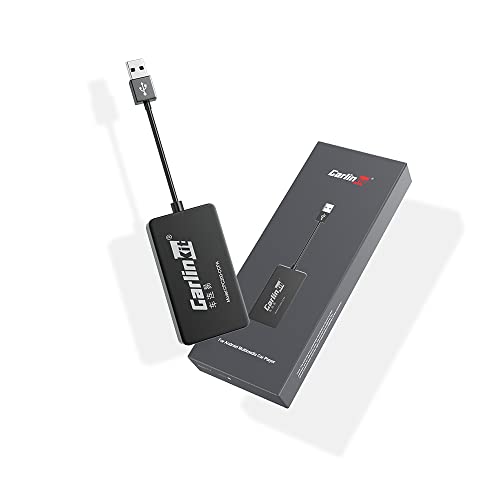
The CarlinKit CPC200 is different from the other products here. It is not a complete radio with a screen. It is a wireless adapter designed for an Android head unit that already supports wired Apple CarPlay. In simple terms, it can turn a compatible wired CarPlay connection into a wireless one. That makes it useful for owners who like their current Android head unit but dislike plugging in every trip.
Compatibility deserves careful attention before purchase. The listing identifies support for Android head units running version 4.4.2 or later, but the head unit must also have the right wired CarPlay function. This is not a replacement for a broken stereo, and it does not create Android Auto support from nothing. For the right setup, though, it is a small and affordable way to remove a daily cable.
Pros:
- Compact alternative to replacing a full head unit
- Can add wireless CarPlay to a compatible Android stereo
- Simple USB-based concept reduces dashboard changes
- Useful for drivers happy with their current screen
- Usually costs less than a complete stereo upgrade
- Keeps the factory-style display and controls in place
Cons:
- It is not a complete Android Auto wireless head unit
- Requires a compatible wired CarPlay connection
- Does not replace a faulty screen, amplifier, or radio
- Wireless performance can vary with the host stereo
Eonon GMX7A Android 14 Stereo for GM Vehicles
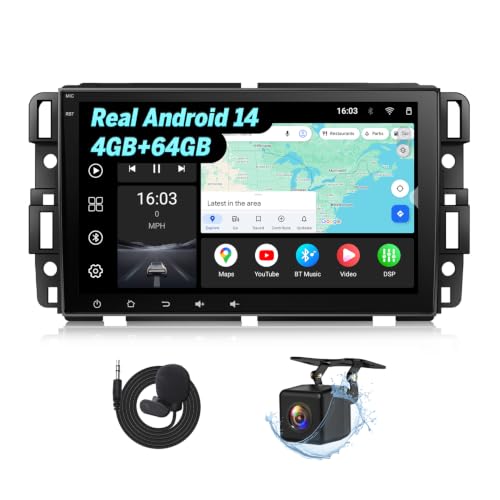
The Eonon GMX7A is the most vehicle-specific option in this group. It is made for selected GMC, Chevrolet, and Buick vehicles from roughly 2007 to 2013, so fit is its biggest selling point. It uses Android 14 and lists 4GB of RAM with 64GB of storage, giving the system more room for apps and media than a basic receiver. For the correct vehicle, this can feel like a true technology reset rather than a small radio swap.
A vehicle-specific stereo may reduce the guesswork found with universal double-DIN units, but buyers still need to check the exact model, trim, dash shape, and factory features. Older GM vehicles can have special amplifier, chime, backup-camera, or steering-wheel wiring. I would confirm those details before ordering and keep the original radio until installation is complete. When the fit matches, Android 14, wireless phone access, and built-in storage make this a compelling upgrade.
Pros:
- Vehicle-focused design for selected 2007–2013 GM models
- Android 14 provides a current operating system platform
- 4GB RAM and 64GB storage support apps and media
- Better upgrade potential than a simple Bluetooth radio
- Large modern interface can refresh an older cabin
- Wireless smartphone features reduce cable use
- Dedicated fit may look cleaner than a universal install
Cons:
- Compatibility is limited to certain GMC, Chevy, and Buick vehicles
- Factory amplifier and vehicle functions may need extra setup
- Android features can require a learning period
- Professional installation may be wise for complex GM wiring
Carlinkit CCPA Wireless CarPlay Adapter

The Carlinkit CCPA adapter targets Android head units that already have wired Apple CarPlay. Like the CPC200, it is an accessory rather than a complete stereo. Its appeal is easy to understand: keep the existing Android screen, plug in the adapter, and aim for a wireless CarPlay connection. This can save time, money, and the trouble of removing a working head unit.
I would place this product on a short list for drivers who have already confirmed compatibility. The words “for Android head unit only” are important because this adapter does not work as a universal screen or radio. It cannot add features that the host system lacks, and the final experience depends on the head unit’s USB port, software, and wired CarPlay support. If those pieces match, its small size makes it a neat cable-free upgrade.
Pros:
- Small adapter avoids a full dashboard replacement
- Designed for compatible Android head units
- Can make wired CarPlay more convenient
- Preserves the current screen and radio interface
- Useful for owners who already like their stereo
- Simple concept with little physical installation
Cons:
- Requires an Android head unit with wired CarPlay
- Does not function as a complete radio replacement
- Not the right choice for Android Auto users seeking a new stereo
- Results may vary between head-unit brands and USB ports
My Recommendation
For most drivers replacing an old factory radio, I would start with the SJoyBring. It offers the core features I expect from the best Android Auto wireless head unit: a 7-inch screen, wireless phone access, Bluetooth, camera support, steering-wheel control support, and room for audio upgrades. The Kissound is a better fit for households that need many media inputs, including USB-C, AUX, and TF support. Its broad connection list makes it a flexible daily receiver.
The Eonon GMX7A deserves the top spot for a compatible 2007–2013 GMC, Chevrolet, or Buick. Its Android 14 platform and 4GB/64GB configuration give it more room to grow than a simple receiver. The two Carlinkit products are best for a different buyer: someone who already owns a compatible Android head unit and only wants wireless CarPlay. Always check the host stereo before ordering an adapter.
| Best for | Why |
|---|---|
| Most universal double-DIN upgrades | SJoyBring combines wireless phone access, a 7-inch QLED display, camera support, and audio expansion. |
| Older compatible GM vehicles | Eonon GMX7A offers a vehicle-focused fit, Android 14, and 4GB RAM with 64GB storage. |
| Existing compatible Android stereos | CarlinKit adapters can remove the cable without replacing a working head unit. |
How I Evaluated These Wireless Head Units
A product title can sound impressive, but a good car stereo must work in the real world. I look first at phone connection type, because wireless Android Auto should reduce daily effort rather than add new steps. I then check screen size, control layout, audio outputs, camera support, and installation demands. These details shape the drive far more than a large power number printed on a box.
I also separate a full head unit from an adapter. A complete receiver replaces the radio and provides a screen, tuner, controls, and inputs. An adapter only changes the way a compatible system connects to a phone. Confusing these two product types is one of the easiest ways to buy the wrong item.
Wireless Android Auto: What You Really Get
Wireless Android Auto lets a compatible Android phone connect to the car without a USB cable. In most cases, the first setup uses Bluetooth for discovery and Wi-Fi for the main data link. After that, the phone may connect when you start the vehicle. The exact process can differ by head unit, phone model, Android version, and saved Bluetooth settings.
This convenience feels small until you use it each day. I can leave the phone in a pocket, start navigation, and answer a call with less fuss. It also keeps the center console cleaner. Still, wireless operation uses more phone battery than a wired connection, so a long trip may call for a charging pad or a short cable.
Android Auto does not mirror every phone app on the car screen. It focuses on driving-friendly apps for maps, calls, messages, music, podcasts, and voice tasks. Google Assistant or the phone’s supported voice tools can help keep eyes and hands focused on the road. Safe use still matters; even a smart screen should never become a reason to browse while driving.
Screen Size and Touch Response
A 7-inch screen remains a practical size for many double-DIN dashboards. It offers enough room for map arrows and music controls without covering too much of the view. A QLED label may point to brighter color and stronger contrast, but buyers should also consider viewing angle, glare, touch response, and screen placement. A bright screen is not useful if sunlight washes out the map.
Touch response matters during quick stops, such as changing a route before leaving a parking lot. I prefer a simple home screen with large icons and physical knobs when available. Knobs are easier to use by feel than small touch buttons. If the unit relies mainly on touch controls, steering-wheel controls become even more valuable.
Screen size is not the only measure of safety or quality. A 7-inch display with clean menus can feel better than a larger unit with slow software. Check product photos, vehicle fit notes, and return terms before treating any screen as a guaranteed match.
Audio Power, Outputs, and Real-World Sound
Many inexpensive car stereos advertise high peak watt numbers. Peak power describes a short burst under ideal conditions. Continuous or RMS power gives a more useful idea of what the built-in amplifier can deliver over time. This is why I do not choose the best Android Auto wireless head unit by watt claims alone.
Preamp outputs matter if you plan to add an external amplifier. A subwoofer output can make bass integration easier, especially when the head unit offers level control or filtering. The SJoyBring and Kissound both list subwoofer support, which gives owners a path beyond factory speakers. However, the final sound also depends on speaker condition, enclosure design, amplifier gain, and proper wiring.
Bluetooth audio is convenient, but wireless phone projection usually gives a more complete experience. It places supported music apps and voice commands on the screen. For the cleanest sound, use a good source file or streaming setting and avoid pushing a weak factory speaker system beyond its limits.
Backup Cameras and Steering-Wheel Controls
A backup-camera input is one of the most useful features in an aftermarket stereo. It can show the rear of the car when the transmission moves into reverse. The camera itself may be included or sold separately, and image quality depends on the camera, wiring, lighting, and screen. A camera helps, but it does not replace mirrors or a shoulder check.
Steering-wheel control support can preserve the factory feel. It may allow volume, source, track, or call commands without reaching across the dash. Universal stereos often need a separate interface to translate the car’s factory signals. Vehicle-specific models may include more of the needed wiring, but I still recommend checking the exact trim.
Factory amplifiers, warning chimes, USB ports, and backup-camera systems can create extra installation steps. A plug-and-play claim does not always mean every function works without configuration. Take clear photos of the existing connectors before removal, label wires, and read the vehicle fit notes carefully.
Installation Advice Before You Buy
Measure the dash opening, but do not stop there. A double-DIN radio may fit the metal opening while the trim, screen depth, or USB location creates a problem. Look for a dash kit, wiring harness, antenna adapter, and steering-wheel control interface if your car needs them. Some vehicles also require a data interface to keep factory functions alive.
Disconnect the negative battery cable before touching radio wiring. Use a proper harness instead of cutting factory wires when possible. Crimp or solder connections carefully, cover them with heat-shrink tubing, and keep wires away from pedals and airbag parts. If the vehicle has a complex factory amplifier or integrated climate controls, professional installation can protect both safety and time.
Test everything before pushing the unit into place. Check wireless Android Auto, Bluetooth calls, radio reception, every speaker, steering-wheel buttons, the backup camera, and any USB ports. A loose ground or incomplete connection is much easier to fix while the stereo is still outside the dash.
Common Buying Mistakes to Avoid
The first mistake is assuming every Android stereo supports wireless Android Auto. Some units run Android but only offer Bluetooth, while others need a wired connection or separate adapter. Read the exact feature list and look for phone compatibility details. “Android head unit” and “wireless Android Auto head unit” do not always mean the same thing.
The second mistake is ignoring vehicle fit. A universal double-DIN receiver may need extra parts in a car with a narrow opening, factory screen, unusual amplifier, or integrated controls. The Eonon GMX7A shows why vehicle-specific fit can matter. Its focused design is useful, but only for the listed GM applications.
The third mistake is buying an adapter without checking the host unit. Both Carlinkit options require a compatible Android head unit and wired CarPlay support. They do not turn any display into a full smartphone receiver. Confirm the current stereo’s operating system, USB behavior, and CarPlay function before ordering.
The fourth mistake is judging sound by peak watts alone. Look at speaker condition, preamp outputs, equalizer controls, and installation quality. A modest receiver with clean wiring can sound better than a high-number unit connected poorly. Think of the system as a chain: the weakest link affects the whole result.
Which Type of Buyer Should Choose Each Product?
The SJoyBring is aimed at the driver who wants a straightforward universal upgrade with wireless phone access and audio expansion. It is a sensible starting point for an older car with a standard double-DIN opening. The QLED screen, camera input, and subwoofer outputs make it more versatile than a bare-bones radio.
The Kissound fits buyers who use several types of media. USB-C, AUX, TF, Bluetooth, and wireless phone projection cover many daily habits. It is also a good choice when both Apple and Android users share the car. Just confirm the dash kit and wiring before installation.
The Eonon GMX7A suits owners of the listed GM vehicles who want a deeper Android experience. Its storage and RAM can support more apps and media than a minimal receiver. The trade-off is narrower compatibility and a potentially more involved setup for factory systems.
The CPC200 and CCPA adapters fit a different need. Choose one only if your current Android stereo already supports the required wired CarPlay function. They are attractive when the screen works well and the only real annoyance is plugging in. If the current radio is slow, damaged, or missing smartphone support, buy a complete head unit instead.
How to Keep Wireless Connections Stable
Start with a clean first pairing. Remove old Bluetooth records from the phone and head unit if the connection keeps failing. Keep the phone’s Bluetooth and Wi-Fi active, and allow Android Auto to run without aggressive battery restrictions. A phone case rarely causes trouble, but heavy wireless traffic in a crowded area can affect connection time.
Software also matters. Keep Android, Android Auto, and the head unit firmware updated when the maker provides a trusted update. Do not install random firmware from an unknown site. If a connection drops, restart both devices, forget the pairing, and set it up again before assuming the hardware is defective.
Place the phone where it gets a strong signal and stays cool. A hot phone under a windshield can slow down or shut down apps. Wireless projection is convenient, but it still depends on the phone as the main computer. Good phone care supports a better stereo experience.
FAQs Of best android auto wireless head unit
What is the best Android Auto wireless head unit for most cars?
The SJoyBring 7-inch QLED stereo is a strong general pick from this list. It combines wireless Android Auto, a 7-inch screen, Bluetooth, camera support, steering-wheel control support, and subwoofer outputs. You still need to confirm double-DIN fit and wiring for your vehicle.
Do wireless Android Auto head units need Wi-Fi?
Yes, wireless Android Auto normally uses a Wi-Fi connection between the phone and head unit, while Bluetooth helps begin the connection. You do not need home internet for the feature. Phone and head-unit compatibility still matters.
Can a CarlinKit adapter add Android Auto to any Android stereo?
No. The CarlinKit adapters listed here are made for compatible Android head units with the required wired CarPlay support. They are not complete radios and cannot fix an incompatible or damaged system.
Will a double-DIN stereo fit every car?
No. Double-DIN describes a common radio size, but dash shape, trim, depth, wiring, factory amplifiers, and vehicle controls can differ. Check a vehicle-specific fit guide and plan for any needed dash kit or wiring interface.
Is wireless Android Auto better than wired Android Auto?
Wireless Android Auto is more convenient because it removes the cable. Wired use can offer steadier connection and phone charging during long trips. The better choice depends on your battery needs, phone, and daily driving pattern.
Final Verdict: Which Should You Buy?
For most shoppers, the SJoyBring is the best Android Auto wireless head unit here because it balances screen size, wireless access, camera support, and audio options. Choose the Eonon GMX7A for a matching GM vehicle, or a CarlinKit adapter for a compatible existing stereo.
Check fit, wiring, and phone support before ordering. The right wireless head unit can make an older car feel newer, safer, and far easier to enjoy every day.