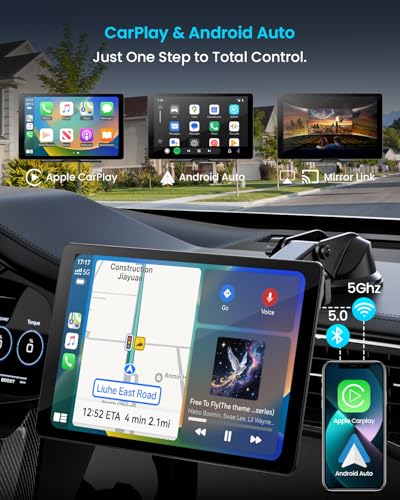
The best wireless CarPlay and Android Auto adapter is the Teeran 2-in-1 for fast setup, stable links, and broad phone support.
You know the moment: you start the car, plug in your phone, tuck away the cable, and then reach for it again when the cord slips loose. A wireless CarPlay and Android Auto adapter fixes that daily annoyance. It lets a compatible factory screen connect to your iPhone or Android phone without a cable. I reviewed five compact adapters for connection speed, ease of use, size, and practical value. Each model can be a good fit, but your car stereo and phone must first support wired CarPlay or wired Android Auto.
Teeran 2-in-1 Wireless CarPlay Adapter

The Teeran 2-in-1 adapter is a strong starting point for drivers who want both wireless Apple CarPlay and wireless Android Auto. Its main job is simple: convert a compatible wired system into a wireless one without adding a new screen or changing the dash. The compact body should fit neatly near the USB port. That makes it less distracting than a large box with a long cable.
I like this type of adapter for shared cars and families because it supports both major phone platforms. An iPhone user and an Android user can take turns without swapping hardware. The first setup may take a few minutes, but later starts should feel much easier than plugging in each time. Keep in mind that it does not add CarPlay to a car that never had factory wired CarPlay.
Pros:
- Supports wireless CarPlay and wireless Android Auto
- Useful for households with both iPhone and Android users
- Compact design helps reduce cable clutter
- Simple plug-and-play style installation
- Good choice for daily commuting and road trips
- Lets the factory display and controls remain in use
Cons:
- Requires existing wired CarPlay or wired Android Auto
- Wireless startup can vary by phone and vehicle
- May need a short setup process before the first drive
My Recommendation
The Teeran adapter suits drivers who want one small device for both platforms. It is especially useful in a family car, a shared work vehicle, or a car used by guests. I would choose it when broad compatibility matters more than advanced features. Among the models in this review, it is a practical candidate for the best wireless CarPlay and Android Auto adapter because it keeps the setup simple and covers both systems. Check your vehicle requirements before ordering, since compatibility depends on the factory head unit.
Beamlit 2-in-1 Wireless CarPlay Adapter

The Beamlit 2-in-1 adapter focuses on a small size, quick connection, and low-lag use. Its mini form should work well in a tight console area where a bulky adapter would get bumped. It converts a wired CarPlay or Android Auto connection into a wireless connection through the car’s USB port. That can make daily use feel cleaner from the moment you start the engine.
The product is aimed at drivers who dislike waiting for a phone to connect or dealing with a loose cable. In real use, connection speed can depend on the vehicle, phone software, Bluetooth settings, and nearby wireless traffic. A stable power source also matters. I suggest using the original or a high-quality USB cable and keeping the phone’s operating system current.
Pros:
- 2-in-1 support for iPhone and Android phones
- Mini design is easy to place out of sight
- Designed for a fast and stable wireless link
- Plug-and-play approach keeps installation simple
- Low-lag operation is helpful for maps and music
- Good fit for drivers who want a tidy console
Cons:
- It cannot replace a missing factory CarPlay system
- Some cars may need a specific USB data port
- Connection behavior may differ after phone updates
My Recommendation
I recommend the Beamlit for a driver who values a small footprint and quick everyday use. It is a good match for a newer vehicle with a cramped USB area or a center console that gets busy. The 2-in-1 support also makes it useful for couples and families. If your main goal is a discreet, low-clutter setup, this model deserves a place on your shortlist for the best wireless CarPlay and Android Auto adapter. Confirm that your car has wired phone projection before buying.
Spedal 2026 Wireless CarPlay Adapter

The Spedal 2026 2-in-1 adapter is built for people who want wireless access without replacing the factory radio. It supports both wireless CarPlay and wireless Android Auto, so it can serve more than one type of phone. The adapter uses the car’s existing display, speakers, steering controls, and microphone when the vehicle supports those features. That keeps the upgrade modest and avoids the cost of a complete stereo installation.
I see this as a useful option for a commuter who spends hours in the car. Wireless navigation, calls, podcasts, and music can make each trip less tiring. Like other adapters, it needs a compatible wired system and a working data connection from the USB port. It is also wise to stop the car before changing settings or troubleshooting a pairing issue.
Pros:
- Supports both major smartphone projection systems
- Works with the original vehicle screen in compatible cars
- Reduces repeated cable plugging during commutes
- Useful for navigation, calls, music, and messages
- Can help extend the practical life of an older factory stereo
- Suitable for drivers who want a simple upgrade
Cons:
- Compatibility is limited by the original head unit
- Wireless use may consume more phone battery than a cable
- Some functions still depend on the car and phone software
My Recommendation
The Spedal is best for commuters and owners who want to keep their factory dashboard intact. It gives a compatible car a more modern feel without a difficult installation. I would consider it when wireless navigation and hands-free media matter more than extra display features. It is a capable contender for the best wireless CarPlay and Android Auto adapter, especially for drivers who want a balanced upgrade from wired use. Availability and current pricing can change, so check the listing before purchase.
Mini 2-in-1 Wireless CarPlay Adapter

This mini 2-in-1 adapter is designed for drivers who want a small and quiet wireless upgrade. Its listed features include dual-band Wi-Fi, low-latency connection, plug-and-play setup, and automatic reconnection. Those features target the most common frustrations with wireless adapters: slow starts, dropped links, and extra steps at every drive. The small housing can also help keep the dashboard free from clutter.
The adapter is listed for cars from 2016 and newer, but model-year claims never tell the whole story. The key test is whether the exact vehicle already supports wired CarPlay or wired Android Auto. I would check the vehicle manual and the product compatibility details before ordering. When the match is right, automatic reconnection can feel like a small luxury that saves time every day.
Pros:
- Very small design can fit beside other USB devices
- Supports both CarPlay and Android Auto
- Dual-band Wi-Fi may help manage wireless data traffic
- Automatic reconnection can reduce daily setup steps
- Low-latency performance is useful for maps and media
- Listed as suitable for many vehicles from 2016 onward
Cons:
- Model-year fit does not guarantee compatibility
- May require the vehicle’s USB data port, not a charge-only port
- Small size can make the adapter easy to misplace
My Recommendation
This mini adapter is best for a driver who wants the least visible hardware. It makes sense for compact cars, rental vehicles, and center consoles with limited room. The dual-band Wi-Fi and auto-reconnect features are appealing for people who want fewer interruptions. If your top priorities are size and convenience, this may be the best wireless CarPlay and Android Auto adapter for your needs. Still, treat “2016+” as a guide, not a promise, and verify the exact stereo system first.
Janettar 4-in-1 Wireless Adapter

The Janettar 4-in-1 wireless adapter is aimed at drivers who want flexible phone support in one compact device. Its 4-in-1 design may appeal to households with different phones or vehicles, but the exact supported modes should be checked on the current product page. Like the other choices here, it is meant to build on an existing compatible wired connection. That makes installation far easier than replacing a factory head unit.
This model may be a good fit for a family vehicle where several people connect at different times. More connection options can be helpful, but they can also make setup less clear for first-time users. I would pair one phone at a time during the initial installation and give the adapter a clear name in the phone’s Bluetooth menu. A little care at the start can prevent confusion later.
Pros:
- 4-in-1 design may offer broad connection flexibility
- Useful for households with several phones
- Supports a wireless upgrade without changing the factory screen
- Compact form helps reduce cable mess
- Convenient for shared cars and family vehicles
- Simple USB-based installation in compatible systems
Cons:
- Extra modes may require more careful setup
- Exact compatibility should be confirmed before purchase
- It still needs a factory wired projection system
My Recommendation
The Janettar is best for shared vehicles and users who want more connection flexibility than a basic single-purpose dongle. It can be useful when family members switch between iPhone and Android phones. I would choose it for convenience rather than for a specific advanced feature. For shoppers who want a flexible best wireless CarPlay and Android Auto adapter, it is worth comparing with the simpler 2-in-1 models. Check the current listing for supported modes, included cables, and vehicle coverage.
How Wireless CarPlay and Android Auto Adapters Work
A wireless adapter does not create a complete infotainment system. Instead, it acts as a bridge between your phone and a compatible factory stereo. Your car must usually support wired Apple CarPlay or wired Android Auto through a USB data port. The adapter then handles the wireless link while the car continues to show the familiar phone projection interface.
This detail is the most important buying point. A car with only Bluetooth audio may not work with one of these dongles. Bluetooth can handle calls and music, but CarPlay and Android Auto also need a larger data connection for maps, messages, app screens, and voice features. The adapter helps carry that connection, but it cannot add hardware that the stereo does not have.
The setup usually follows a simple path:
- Park the vehicle and turn on the factory infotainment system.
- Plug the adapter into the USB port used for wired CarPlay or Android Auto.
- Turn on Bluetooth and Wi-Fi on the phone.
- Select the adapter name when it appears.
- Accept the pairing and phone projection prompts.
- Test calls, audio, navigation, and steering-wheel controls while parked.
After the first pairing, many adapters try to reconnect automatically. That is the feature that changes the daily experience. Instead of searching for a cable at the start of every trip, you can leave the phone in your pocket or on a charging pad. Still, wireless convenience does not mean every start will be instant. A phone update, a car firmware change, or a crowded wireless area can affect the connection.
What to Check Before Buying
1. Confirm factory wired compatibility
This is more important than brand name or advertised speed. Look for a USB connection that already launches CarPlay or Android Auto when you connect the phone with a cable. If the car never had that function, a small wireless dongle usually will not add it.
Some vehicles have more than one USB port. One may support data, while another only supplies power. Test the port with a wired phone before buying. If wired projection does not appear, try the port listed in the vehicle manual.
2. Match the phone platform
A 2-in-1 adapter is helpful if your household uses both iPhone and Android phones. However, “2-in-1” does not mean that every phone model will work perfectly. Phone software, wireless settings, and the vehicle’s stereo software all play a part.
For iPhone users, the phone should support the required CarPlay features and have Bluetooth and Wi-Fi enabled. Android users should check that their phone supports Android Auto and meets the current software requirements. Keeping the phone updated can help, but a new update can sometimes change pairing behavior.
3. Look for automatic reconnection
Auto-reconnect is one of the most useful features in daily use. Without it, an adapter may still work, but you could need to select it each time you start the car. A good connection should feel like turning on a lamp, not solving a puzzle.
Even with auto-reconnect, the phone may connect to another nearby vehicle or adapter. If two cars use similar dongles, rename each device during setup. This small step can prevent the wrong phone from taking over the screen.
4. Consider size and cable placement
A small adapter is not always better, but it is often easier to live with. A bulky unit can block another USB port, press against the console lid, or hang from the dashboard. A short cable can also make the adapter easier to hide.
Check whether the product includes USB-A, USB-C, or both connection options. The port on the car matters. An adapter cannot work if you cannot connect it to the correct data port without an appropriate cable.
5. Think about battery use
Wireless CarPlay and Android Auto use the phone’s wireless radios. Navigation, streaming, and a bright screen can also drain a battery. For a short drive, this may not matter. During a long road trip, place the phone on a compatible charging pad or use a separate charging cable if needed.
A wired connection may still be better when you want the fastest charging speed or the most direct link. The main benefit of a wireless adapter is ease, not unlimited battery life. I treat it as a comfort upgrade rather than a replacement for a charger.
6. Check return support and updates
Compatibility lists are useful, but they cannot cover every trim level and factory stereo. A clear return policy gives you a safety net. It is also helpful when a manufacturer provides reset steps or firmware support.
Before ordering, note your car’s year, make, model, trim, and infotainment system. Do not rely only on the model year. Two versions of the same car can use different radios, screens, or USB hardware.
Wireless Adapter Features That Matter Most
Not every advertised feature has equal value. I focus first on reliable pairing, broad compatibility, and a clean physical design. A device with a long feature list is not useful if it disconnects during a call or fails to reconnect in the morning.
Connection delay matters, but small differences may not bother every driver. A brief wait after starting the car is normal for many wireless systems. Trouble begins when the adapter repeatedly drops, freezes, or requires manual pairing.
Low latency is helpful for map movement, voice prompts, and music controls. It does not make the car’s screen faster than the factory hardware. If your vehicle has an older or slow head unit, the adapter cannot fully remove that limitation.
Dual-band Wi-Fi can help an adapter manage wireless traffic, but it is not a guarantee of perfect performance. Your phone and car system remain part of the chain. Think of the setup like a bridge: if one side is weak, a stronger middle section cannot solve every problem.
How I Would Test a Wireless CarPlay Adapter
I would begin with a clean test. First, I would remove old pairings from the phone and the vehicle so previous devices do not interfere. Then I would connect the adapter to the correct data port and pair one phone at a time.
Next, I would test several normal tasks. These include launching maps, starting music, making a hands-free call, using voice commands, and pressing the steering-wheel controls. I would also turn the car off, wait, and start it again to see whether the adapter reconnects without extra taps.
I would repeat that process with both an iPhone and an Android phone when the product supports both. A device that works well with one platform may behave differently with the other. I would also test the adapter after moving the phone away from the dash, since real drivers do not always keep a phone in the same place.
Finally, I would check heat, cable strain, and placement. The adapter should not become so hot that it is uncomfortable to touch. It should also stay secure rather than hanging from the USB port. These practical details often matter more than a colorful package or a long marketing list.
Best Uses for a Wireless CarPlay and Android Auto Adapter
These adapters are ideal for daily commuting. If you start the car several times each day, removing the cable step can save small bits of time that add up. It also reduces wear on the phone’s charging port and the car’s USB cable.
They are also helpful on road trips. Maps, music, traffic alerts, and hands-free calls are easier to use when the phone can stay in a safe place. A wireless connection does not make distracted driving safe, so set your route before moving and use voice commands when possible.
A shared family car is another strong use case. A 2-in-1 adapter can support different phone types without forcing someone to carry a special cable. Still, only one phone should normally control the projection screen at a time.
These adapters may not be right for every driver. If you need fast charging, use a wired connection. If your stereo has no wired CarPlay or Android Auto, consider a replacement head unit or a portable CarPlay screen instead. Choosing the correct solution is better than forcing a dongle to do a job it was not designed to do.
Best Features at a Glance
| Best for | Why |
|---|---|
| Families with iPhone and Android phones | Teeran offers a practical 2-in-1 setup for shared vehicles. |
| Small consoles and clean installation | Beamlit and the Mini 2-in-1 model use compact designs that limit clutter. |
| Flexible shared-car connections | Janettar’s 4-in-1 approach may suit households with varied devices. |
Tips for a Better Wireless Connection
Start by pairing the phone while the car is parked. This keeps setup safe and gives you time to read each prompt. If the adapter does not appear, confirm that Bluetooth and Wi-Fi are on and that the phone is not already connected to another vehicle.
Use the correct USB port. Many connection problems come from a charge-only port or a weak cable. If the adapter includes more than one cable, try the cable type that matches your car’s port and keep the connection firm.
If the system drops, restart in a simple order. Turn off the car, unplug the adapter, restart the phone, and reconnect after the infotainment system boots. Remove old pairings only when needed, since deleting every saved device can create more work.
Keep the adapter away from extreme heat. A closed car in summer can become very hot, and direct sun can warm both the phone and the dongle. A shaded location near the USB port is usually better than leaving the adapter on top of the dashboard.
Do not judge the product after one failed connection. Test it again after a full restart and with only one phone nearby. If the issue continues, check the vehicle-specific compatibility notes and the manufacturer’s reset instructions.
FAQs Of best wireless carplay and android auto adapter
Will a wireless adapter work in any car?
No. The car usually needs factory wired CarPlay or wired Android Auto. A charge-only USB port or Bluetooth-only stereo generally will not support these adapters.
Can one adapter work with both iPhone and Android?
Yes, a 2-in-1 model is designed for both platforms. The phone and vehicle must still meet the product’s compatibility requirements, and the adapter normally connects to one phone at a time.
Does wireless CarPlay drain the phone battery?
It can use more battery than a wired connection because the phone uses wireless radios and may run navigation. Use a charging pad or cable during long drives.
Why does my adapter fail to reconnect?
Check that Bluetooth and Wi-Fi are enabled, the correct USB data port is in use, and another nearby phone is not connecting first. Restarting the phone and adapter can also help.
Is a wireless adapter better than a cable?
It is more convenient, but not always faster for charging. Choose wireless use for comfort and less clutter. Choose a cable when you need strong charging or the most direct connection.
Final Verdict: Which Should You Buy?
The Teeran 2-in-1 is my top overall pick for broad phone support and simple daily use. Beamlit is best for a tiny footprint, while the Mini model suits drivers who want auto-reconnect features.
The best wireless CarPlay and Android Auto adapter must match your factory stereo first. Confirm compatibility, use the correct USB data port, and choose the model that fits your phone, car, and driving habits.