For most drivers, the Launch CRP123I V3.0 Elite offers the best mix of scan depth, service resets, and value.
A warning light can appear at the worst time. You may not know if the fault is small or serious. A basic code reader can help, but many drivers need more than engine codes. The best Launch OBD2 scanner can check several systems, show live data, and guide common repairs. I compared seven Launch scanners for home garages, DIY owners, and serious users. I looked at system coverage, reset tools, update terms, ease of use, and real value. This guide will help you pick the right scanner without paying for features you will never use.
See the differences between my top picks at a glance.
Launch CRP123I V3.0 Elite

The CRP123I V3.0 Elite is my top pick for most DIY owners. It goes well beyond a basic check engine reader. It can scan major vehicle systems and offers seven reset functions. The listed features include FCA SGW access, CAN FD, DoIP, and a large 64GB storage capacity.
This model also adds AI assistance, which may help users understand fault information in simpler terms. It supports common services such as oil, SAS, throttle, brake, BMS, DPF, and ABS work. The broad vehicle coverage makes it useful for families with more than one car. Still, service access can vary by make, model, year, and region, so I always advise checking compatibility before purchase.
Pros:
- Wide multi-system diagnostic coverage
- Seven useful service reset functions
- Supports newer CAN FD and DoIP networks
- FCA SGW support is helpful on selected vehicles
- Large 64GB storage space
- AI assistance may make code information easier to follow
Cons:
- More features than some casual users need
- Advanced functions may require vehicle-specific support
- The large feature set can take time to learn
What Amazon Buyers Are Saying
Buyer feedback for this type of Elite scanner often centers on its broad coverage and service functions. Owners who work on several vehicles tend to value the ability to scan systems beyond the engine. The screen, guided functions, and update process also matter to buyers. Common concerns include learning the menus and confirming support for a specific car before using a reset or special function.
My Recommendation
I recommend the CRP123I V3.0 Elite for a serious DIY owner who wants one scanner for regular maintenance and deeper checks. It is a strong choice when you need modern network support and several service tools. It costs more than a simple code reader, but the wider coverage can make it the best Launch OBD2 scanner for long-term home use.
Launch CRP123X V3.0 Elite

The CRP123X V3.0 Elite is a balanced choice for drivers who want more than OBD2 emissions data. It supports multi-system scans and lists seven reset functions. The scanner also includes graphic live data, battery testing, and Auto VIN, which can reduce setup time.
Its Android 8.1 platform gives it a familiar tablet-style feel. The listed support for CAN FD, DoIP, and FCA SGW helps it stay useful with many newer vehicles. I like this model for owners who want strong features without stepping up to a full professional platform. It remains important to check the exact service list for your vehicle before buying.
Pros:
- Good balance of price and diagnostic depth
- Multi-system scanning for broader fault checks
- Seven reset functions cover many routine jobs
- Graphic live data helps spot changing sensor values
- Auto VIN can speed up vehicle identification
- Lifetime updates are listed for this model
Cons:
- Some advanced tasks may need extra steps
- Not every reset works on every vehicle
- Android menus may feel less simple than a basic reader
What Amazon Buyers Are Saying
Buyers commonly look at the CRP123X because it offers more data and service tools than a low-cost reader. Feedback tends to favor the live-data display and broad system access. Some owners may need time to understand the menus or update process. As with most advanced scanners, reported results can differ by vehicle, software version, and the exact repair task.
My Recommendation
The CRP123X V3.0 Elite is worth considering when you want a capable home scanner at a middle level. It is less specialized than a professional bidirectional tool, yet it gives a DIY owner useful data and reset options. I rate it as one of the best Launch OBD2 scanner choices for value.
Launch CR529 OBD2 Code Reader
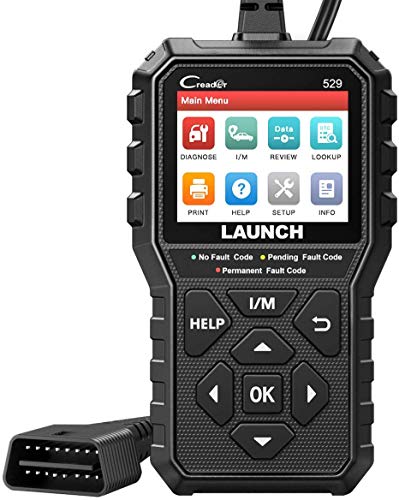
The Launch CR529 is built for drivers who need a clear answer to a check engine light. It supports OBD2 vehicles after 1996 and can read and clear diagnostic trouble codes. Its one-click I/M function also helps users check emissions readiness before an inspection.
This scanner does not try to be a full service platform. That is a strength for people who want a simple tool with fewer menus. It includes a DTC lookup function and listed lifetime free updates. The CR529 cannot replace a full system scanner for ABS, airbag, or transmission faults, but it can handle common engine-related OBD2 checks.
Pros:
- Simple design for first-time users
- Reads and clears standard OBD2 codes
- One-click I/M readiness check
- DTC lookup can explain common code terms
- Works with listed OBD2 vehicles after 1996
- Lifetime free updates are listed
Cons:
- Limited compared with a multi-system scanner
- Does not target advanced service resets
- May not read ABS or SRS faults
What Amazon Buyers Are Saying
Buyer feedback commonly focuses on ease of use, quick code checks, and the value of a dedicated wired reader. This type of scanner appeals to people who want to avoid a repair shop visit for every warning light. The main limitation buyers note is its basic coverage. Owners who expect airbag, ABS, or transmission scans may find it too narrow.
My Recommendation
I recommend the CR529 for a first-time DIY user, a commuter, or a driver who wants a backup code reader. It gives useful OBD2 information without adding complex functions. If your goal is basic engine diagnosis, it offers strong value. If you need full-system work, choose one of the Elite models instead.
Launch CR329 Plug-and-Scan Reader

The CR329 is a compact plug-and-scan tool for basic vehicle checks. It can read and clear codes and displays live data in a direct way. The listing also highlights a battery test, DTC lookup, I/M readiness, and cloud print support.
Unlike many Bluetooth adapters, this model does not need a phone app for normal use. That makes it a practical choice for drivers who want a dedicated screen. It is aimed at OBDII vehicles after 1996. Its main role is engine and emissions diagnosis, so buyers should not expect the same system coverage as the CRP123 series.
Pros:
- No phone app needed for basic scanning
- Plug-and-scan operation saves setup time
- Reads and clears common engine codes
- Graph live data for basic sensor review
- Includes battery test information
- I/M readiness support helps before inspection
Cons:
- Basic coverage compared with full-system tools
- Advanced vehicle functions are limited
- Cloud print features may not matter to every DIY user
What Amazon Buyers Are Saying
Buyers who prefer a self-contained reader tend to like the no-app design. Comments for this class of tool often praise quick access to codes and the simple plug-in process. The most common concern is scope. A basic OBD2 reader can show engine faults, but it may not reach manufacturer-specific modules such as airbag or ABS systems.
My Recommendation
The CR329 makes sense for a home glove box or a driver who wants a simple warning-light tool. It offers more useful data than the most basic code readers, while keeping the process easy. I would not choose it for advanced repair work, but it is a good low-stress option for routine checks.
Launch G700 OBD2 Scanner

The Launch G700 focuses on clear testing and useful reports. It offers live data, freeze-frame information, battery voltage monitoring, and an I/M check. These features help you see what happened when a fault set and whether the vehicle is ready for an emissions test.
The report-sharing and cloud-print functions may help users save or send results. That can be useful when discussing a problem with a repair shop. This scanner sits between a basic code reader and a large professional tool. It does not list the same reset depth or full-system coverage as the higher CRP models, so it suits diagnosis more than complex service work.
Pros:
- Freeze-frame data gives context for a stored code
- Battery voltage monitoring supports basic electrical checks
- Live data helps track engine values
- I/M check is useful before an emissions test
- Report sharing adds practical record keeping
- Cloud print can simplify result storage
Cons:
- Not designed as a full professional diagnostic platform
- Service reset coverage is limited
- Some users may not need cloud reporting
What Amazon Buyers Are Saying
Buyer interest in the G700 centers on its testing and report features. People who want to save results may find it more useful than a small code-only reader. Feedback for this type of device also often points to the value of freeze-frame data. The main limitation is that it may not meet the needs of users who expect bidirectional control or many service resets.
My Recommendation
I recommend the G700 for a driver who wants organized diagnostic information without buying a high-end workshop tool. It is especially practical for checking live data, battery voltage, and inspection readiness. Choose a CRP123 or CRP919 model if you need deeper module access or advanced service work.
Launch X431 CRP919EBT Wireless Scanner
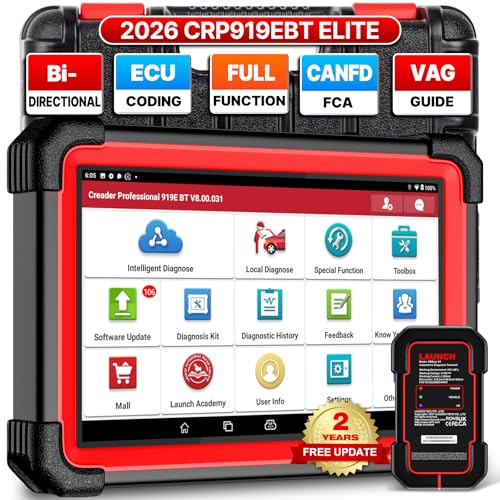
The X431 CRP919EBT is the most advanced model in this comparison. It is designed for users who need full-system diagnosis, wireless operation, and active tests. The listing highlights bidirectional control, ECU coding, CAN FD, DoIP, FCA AutoAuth, VAG guidance, and more than 35 service functions.
Bidirectional testing lets a scanner send selected commands to a vehicle system. This can help a technician test parts such as fans, pumps, or actuators, when the vehicle supports the function. ECU coding is also a powerful feature, but it requires care and correct vehicle coverage. The scanner lists two years of free updates, so buyers should include future update costs in their value calculation.
Pros:
- Full-system scanning reaches beyond standard OBD2
- Wireless design can make vehicle testing easier
- Bidirectional tests support deeper troubleshooting
- ECU coding adds advanced repair capability
- More than 35 service functions are listed
- CAN FD, DoIP, FCA AutoAuth, and VAG guidance add modern coverage
Cons:
- Higher cost than basic Launch readers
- Advanced functions require careful use and skill
- Free updates are listed for two years, not forever
- Support still varies by vehicle make and model
What Amazon Buyers Are Saying
Advanced scanner buyers usually value the full-system coverage, wireless connection, and active tests. They often want a tool that can do more than clear a code. Feedback for this class of scanner can also mention the learning curve, registration steps, and update terms. Users should confirm that a desired coding or bidirectional function works on their exact vehicle before purchase.
My Recommendation
The CRP919EBT is my pick for experienced DIY mechanics, mobile technicians, and small repair shops. It offers the broadest tool set in this group. It is not the best value for a driver who only wants to read a check engine code. For advanced work, however, it may be the strongest Launch OBD2 scanner here.
Launch CRP123 V3.0 Elite Scanner

The original CRP123 V3.0 Elite remains a practical choice for core vehicle diagnosis. It scans the engine, ABS, SRS, and transmission systems. Those four systems cover many of the faults that concern everyday drivers, including airbag and anti-lock brake warnings.
The listed service tools include oil service, throttle relearn, and SAS reset. It also offers lifetime free updates according to the product information. This model does not list the same seven resets or newer feature set as the CRP123I, but its focused design may be easier for a home user to manage.
Pros:
- Scans engine, ABS, SRS, and transmission systems
- More useful than a basic engine-only reader
- Includes oil service and SAS reset functions
- Throttle relearn supports selected maintenance tasks
- Lifetime free update support is listed
- Good fit for common DIY repair needs
Cons:
- Only three reset functions are listed
- Less advanced than newer Elite models
- Coverage can vary across vehicle brands
What Amazon Buyers Are Saying
Buyers often choose this model because it reaches ABS and SRS systems at a lower level than a professional platform. That wider access can make it more useful after a brake or airbag warning. Common concerns for this type of product include vehicle compatibility and limits on special functions. Owners should also understand that reading a fault does not prove which part must be replaced.
My Recommendation
I recommend the CRP123 V3.0 Elite for a driver who wants core four-system coverage and does not need the newest service list. It is a sensible middle ground. Its focused tool set makes it easier to justify than a high-end scanner for many home garages.
Launch AIOBD Elite Bluetooth Scanner

The AIOBD Elite takes a different approach from the handheld scanners above. It uses Bluetooth and works with iOS and Android devices. The product listing highlights AI-powered bidirectional scanning, full-system diagnosis, 15 service resets, AI repair guidance, and FCA AutoAuth support.
This style can suit users who prefer a phone or tablet screen. It may also offer a more flexible way to save reports and view data. The tradeoff is that you must use a compatible mobile device and manage app, Bluetooth, and account steps. As with every bidirectional scanner, the function list depends on the vehicle and the selected test.
Pros:
- Works with both iOS and Android devices
- Bluetooth design reduces cable clutter
- Full-system scanning is listed
- Fifteen service resets cover many maintenance jobs
- AI repair guidance may help explain test results
- Bidirectional features support deeper diagnosis
Cons:
- Requires a compatible phone or tablet
- Wireless setup may take more steps than a wired reader
- App and account functions may change over time
- Advanced tests need careful vehicle compatibility checks
What Amazon Buyers Are Saying
Buyers who like mobile tools often value the wireless connection and larger phone screen. AI guidance and service coverage are also key reasons to consider this model. The main concerns with Bluetooth scanners usually involve pairing, app setup, and device permissions. A buyer who wants a stand-alone tool may prefer a handheld CRP model instead.
My Recommendation
The AIOBD Elite is a good option for a connected DIY owner who prefers mobile technology. It offers a strong feature list and a modern workflow. I would choose it over a handheld unit only if I already felt comfortable using a phone app for vehicle diagnosis.
How to Choose the Best Launch OBD2 Scanner
The best Launch OBD2 scanner depends on your car, repair goals, and comfort level. Do not choose by the number of features alone. A scanner only helps when it supports your vehicle and gives you information you can use. Start with the systems you need to test, then compare service tools, updates, connection type, and total value.
1. Match the Scanner to Your Vehicle Systems
A standard OBD2 reader mainly checks emissions-related engine data. It may read a powertrain code but miss a fault in the ABS, SRS, body, or transmission module. If you only need to diagnose a check engine light, the CR529 or CR329 may be enough.
Choose a multi-system model if you need airbag, brake, or transmission scans. The CRP123 series targets these common systems. A full-system scanner such as the CRP919EBT or AIOBD Elite makes more sense when you work on several vehicle brands.
Always check the exact year, make, model, engine, and region. Coverage can change by vehicle. A listed reset does not mean it works on every car. Some functions also need a stable battery and the right repair conditions.
2. Separate Code Reading from Service and Active Tests
Reading a code is only the first step. A scanner may show a fault number, but it does not automatically prove which part failed. Live data can show sensor values while the engine runs. Freeze-frame data can show the conditions present when the code appeared.
Service resets handle tasks such as oil service, battery registration, steering angle, throttle, brake, and diesel filter functions. These tools can save time after a repair. Yet they need careful use. A reset should follow the correct maintenance work, not replace it.
Bidirectional testing goes further. It lets the scanner send commands to supported vehicle parts. This can help test an actuator or circuit. ECU coding can change vehicle settings. These functions suit trained users more than beginners. If you do not need them, a simpler scanner may offer better value.
3. Compare Updates, Ease of Use, and Total Value
Update terms matter. Some listings promise lifetime updates. Others list a set period, such as two years. Read the current Amazon listing before you buy because terms can change. Also check if a special function needs online access, account registration, or an extra service.
A wired handheld unit is often quick to use. It does not depend on a phone battery or Bluetooth pairing. A wireless scanner can give you a larger screen and easier movement around the car. Your preferred work style should guide the choice.
Finally, consider how often you will use the scanner. A low-cost code reader can be the smart choice for one family car. A multi-system unit can pay off when you own several vehicles or do your own repairs. The best Launch OBD2 scanner is the one that matches your real tasks, not the one with the longest feature list.
Final Verdict: Which Should You Buy?
For most DIY owners, I recommend the Launch CRP123I V3.0 Elite. It offers broad system coverage, seven resets, modern network support, and strong long-term value. Choose the CRP919EBT for advanced bidirectional work, or the CR529 for simple code checks.
The best Launch OBD2 scanner should fit your car and skill level. Confirm compatibility, update terms, and service support before ordering for the best result.
FAQs Of best Launch OBD2 scanner
Which Launch OBD2 scanner is best overall?
The CRP123I V3.0 Elite is the best overall choice for many DIY owners. It combines multi-system scans, seven resets, modern network support, and broad practical coverage.
Can a Launch scanner read ABS and airbag codes?
Some models can. The CRP123 series lists ABS and SRS coverage, while basic readers such as the CR529 focus mainly on standard OBD2 engine codes.
Is a Launch scanner suitable for beginners?
Yes. The CR529 and CR329 are simple choices for beginners. Advanced models work for beginners too, but their extra menus and service tools need more care.
Do Launch OBD2 scanners support all vehicles?
No scanner supports every function on every vehicle. Check the exact year, make, model, engine, and region before purchase. Special services can vary by vehicle.
What is the difference between OBD2 scanning and bidirectional testing?
OBD2 scanning reads vehicle data and fault codes. Bidirectional testing also sends selected commands to supported vehicle systems to help test parts and circuits.