The LAUNCH Creader Elite V3.0 is the best OBD2 scanner for GMC Sierra owners who need deep GM diagnostics.
A check-engine light can appear before a long trip, during towing, or after a rough winter start. A good GMC Sierra scan tool helps you read the code, view live data, check readiness, and decide what to do next. I reviewed these options for coverage, ease of use, useful data, screen quality, and value. Some are simple code readers, while the LAUNCH model offers more advanced GM-focused functions.
See the differences between my top picks at a glance.
| Scanner | Best For | Main Functions | Vehicle Fit | Rating | Buy |
|---|---|---|---|---|---|
| GMC Sierra 1500 Code Reader | Basic DIY checks | Codes, live data | Sierra 1500, 1999-2026 listing | 4.4/5 | View on Amazon |
| 2.8-Inch Sierra Scanner | Clear screen and simple use | Codes, DTC lookup, freeze frame | Sierra 1500, 2014-2020 listing | 4.3/5 | View on Amazon |
| OBDMATE GM Scanner | GM family vehicles | OBD2 diagnostic checks | GMC, Buick, Chevrolet, Cadillac | 4.1/5 | View on Amazon |
| LAUNCH Creader Elite V3.0 | Advanced GM diagnosis | Bi-directional tests, resets, full-system scan | GM brands; verify model coverage | 4.7/5 | View on Amazon |
| CrysGuard V519 | Broad OBD2 checks | Codes, live data, battery test, readiness | Vehicles after 1996 | 4.3/5 | View on Amazon |
| BluSon YM319 | Battery and emissions checks | Codes, battery test, freeze frame, readiness | OBDII cars since 1996 | 4.2/5 | View on Amazon |
| Hirificing GM OBD1 Adapter | Older GM trucks | OBD1-to-OBD2 connection | Older 12-pin GM systems | 3.8/5 | View on Amazon |
| Osilly V520 | Low-cost code reading | Read and erase fault codes | Cars after 1996 | 4.0/5 | View on Amazon |
GMC Sierra OBD2 Scanner with Live Data

This handheld OBD2 scanner targets GMC Sierra 1500 owners who want a simple way to check engine faults. Its listing covers Sierra 1500 model years from 1999 through 2026, but I still advise checking the exact truck and engine before purchase. The tool offers live data, which can show sensor readings while the engine runs. That makes it more useful than a reader that only displays a stored code.
The plug-and-play design suits home garages and roadside checks. You connect it to the truck’s OBD2 port, turn on the ignition, and follow the screen prompts. It can help you understand why the check-engine lamp came on, but a code does not prove which part failed. Use the data as a starting point, then test the related system before replacing parts.
Pros:
- Designed around GMC Sierra 1500 use
- Supports live data viewing
- Simple plug-and-play handheld format
- Useful for routine check-engine diagnosis
- Works without a phone or paid app
- Easy to keep in a truck tool box
Cons:
- It may not offer dealer-level GM module access
- Exact coverage can vary by model year and engine
- The basic design may feel limited to professional technicians
What Amazon Buyers Are Saying
Buyer feedback for this type of product commonly focuses on easy connection, clear code reading, and useful live data. Buyers who want a quick check-engine scan tend to value the wired design because it avoids Bluetooth pairing. As with any low-cost scanner, complaints may center on limited advanced-module coverage or confusion about what a code means. Always review current buyer comments and the latest compatibility notes on Amazon before ordering.
My Recommendation
I recommend this scanner for a Sierra owner who wants live data without paying for advanced shop equipment. It is a practical choice for basic diagnosis and routine maintenance. It is not my first choice for ABS, airbag, body, or bidirectional work.
2.8-Inch Color Screen Sierra Scanner

This scanner focuses on the most common DIY tasks for GMC Sierra trucks from 2014 through 2020, according to its product listing. It has a 2.8-inch color display, so you can read codes and menu text without using a phone. DTC lookup can explain the general meaning of a fault code. Freeze-frame data can show the conditions present when the truck stored the code.
The design fits owners who want more context than a basic code number. Live data can help you watch engine readings and spot values that look unusual. Still, the scanner does not replace a wiring diagram, service manual, or proper test meter. Confirm compatibility if your Sierra falls outside the listed years or uses a special engine configuration.
Pros:
- Bright 2.8-inch color screen
- Built-in DTC lookup saves time
- Freeze-frame data adds useful context
- Live data supports deeper DIY checks
- Good fit for common 2014-2020 Sierra work
Cons:
- Listed coverage is narrower than some universal scanners
- It may not scan every GM control module
- Small handheld screens still require close reading
What Amazon Buyers Are Saying
Common buyer themes for this style of scanner include an easy-to-read screen and helpful code information. Many DIY users prefer built-in lookup because they do not need to search every code on a separate device. Potential concerns include year compatibility and expectations about advanced functions. I suggest comparing recent Amazon reviews with your truck’s year before you buy.
My Recommendation
This is a strong pick for a 2014-2020 Sierra owner who values freeze-frame data and a color screen. It offers a useful middle ground between a simple reader and a high-end diagnostic tablet. I would choose another model for newer or older trucks unless the seller confirms coverage.
OBDMATE GM Diagnostic Scanner
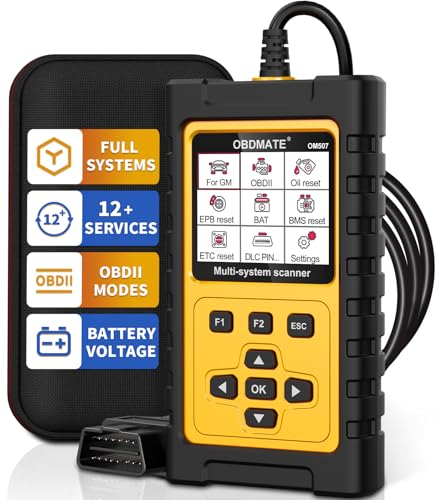
The OBDMATE scanner is made for the wider GM family. Its listing names GMC, Buick, Chevrolet, and Cadillac, which makes it a useful option for households with more than one GM vehicle. It follows the familiar wired OBD2 format. That means you can use it without a phone, wireless app, or separate battery charger.
This model makes sense for basic engine fault checks and routine ownership. It can help you read a trouble code before visiting a repair shop. The important limit is that GM-branded compatibility does not automatically mean full access to every module. Check whether the scanner supports the exact system you need, especially for ABS, airbag, transmission, or body faults.
Pros:
- Targets several GM vehicle brands
- Useful for shared family garages
- Wired connection reduces pairing issues
- Suitable for basic check-engine checks
- Compact design stores easily
Cons:
- Product details may not list every supported function
- Advanced GM tests may be unavailable
- Compatibility should be confirmed before purchase
What Amazon Buyers Are Saying
Buyers usually look for simple connection and broad GM use in a scanner like this. Feedback may praise the convenience of one tool for GMC and Chevrolet vehicles. Some users may expect more module access than a basic OBD2 device can provide. Read the current Amazon listing and customer comments closely if you need transmission, ABS, or airbag diagnosis.
My Recommendation
I recommend OBDMATE for a GM owner who wants a compact code reader for common engine faults. It has good family-vehicle value, but the listing gives less detail than the LAUNCH model. I would buy it for basic work, not for full professional diagnosis.
LAUNCH Creader Elite V3.0 for GM

The LAUNCH Creader Elite V3.0 is the most capable option in this review. Its listing describes a GM-focused scan tool with bi-directional tests, full-system scanning, reset functions, AUTOVIN, and lifetime free updates. Bi-directional control means the tool may command certain vehicle parts to operate during a test. That feature can reduce guesswork, but support still depends on the truck, module, and software coverage.
This is the closest match to a professional-style GMC Sierra scan tool in the group. It can suit owners who work on trucks often or need more than engine-code reading. I like the GM focus, but I would verify exact year, engine, and function coverage before ordering. No aftermarket scanner guarantees every dealer-level function on every Sierra.
Pros:
- GM-focused design
- Bi-directional testing listed
- Full-system scanning listed
- Reset functions can save shop visits
- AUTOVIN helps identify the vehicle
- Lifetime free updates are listed
- Best choice here for advanced DIY work
Cons:
- Costs more than simple code readers
- Advanced functions require careful compatibility checks
- More features create a longer learning curve
What Amazon Buyers Are Saying
Buyers who choose advanced LAUNCH tools often care about system coverage, active tests, and update support. Positive feedback commonly centers on having more diagnostic control than a basic reader. The main concern with advanced scanners is usually function coverage for a specific vehicle. Check current customer comments and the seller’s vehicle list before relying on one feature for a repair.
My Recommendation
This is my top pick and the best OBD2 scanner for GMC Sierra owners who want advanced GM functions. It costs more, but the wider diagnostic scope can justify the price for frequent DIY work. I rate it highest because it offers the best balance of GMC focus, scan depth, and update support.
CrysGuard Professional V519 Scanner

The CrysGuard V519 is a broad OBD2 and CAN code reader for vehicles made after 1996. Its listed features include live data, battery testing, a 40,000-plus DTC library, I/M readiness, and check-engine diagnostics. That mix makes it attractive to owners who want one affordable tool for several vehicles. It also suits emissions checks before a state inspection.
The battery test is a useful extra, but it should not replace a quality multimeter or a proper load test when a battery problem matters. Live data can help you watch engine readings, while readiness monitors show whether the truck has completed its emissions self-checks. Like most universal scanners, it may not provide deep GM module access.
Pros:
- Broad vehicle coverage after 1996
- Live data is included
- Battery test adds extra value
- Large DTC library is listed
- I/M readiness helps with emissions preparation
- Useful for multiple household vehicles
Cons:
- Universal coverage may be less deep than GM-specific coverage
- Battery test results need proper interpretation
- Advanced active tests may not be available
What Amazon Buyers Are Saying
For scanners in this class, buyers often like the range of basic functions in one handheld unit. Readiness testing and live data can be especially useful before an inspection or repair visit. Some buyers may expect the large code library to explain the repair, but a code only points to a system. Check recent Amazon feedback for screen, cable, and menu experience before buying.
My Recommendation
I recommend the CrysGuard V519 for a Sierra owner who wants broad OBD2 coverage, live data, and battery checks. It offers more routine features than a bare code reader. Choose the LAUNCH instead if you need GM-specific active tests or deeper module work.
BluSon YM319 Scanner with Battery Tester

The BluSon YM319 combines common engine diagnostics with a battery tester. It lists live data, DTC lookup, freeze-frame information, I/M readiness, and cloud printing. That range gives a GMC Sierra owner several useful tools in one device. The OBDII coverage is listed for vehicles since 1996, so it may also serve other cars in the home.
The freeze-frame feature can show the operating conditions tied to a stored fault. Readiness data can help you know if the emissions monitors have reset after repairs or battery loss. Cloud printing may appeal to users who want to save or share reports. I would still confirm how that feature works and whether it needs a network or account.
Pros:
- Battery tester adds practical value
- Live data and freeze frame are included
- DTC lookup helps with first-step research
- I/M readiness supports inspection checks
- Cloud printing may help save reports
- Broad OBDII vehicle coverage is listed
Cons:
- Cloud functions may require extra setup
- It may focus on generic OBD2 systems
- Advanced GMC module coverage is not clearly shown
What Amazon Buyers Are Saying
Buyers who want both battery and engine checks may find this combination convenient. Feedback for similar tools often praises the number of functions for the price. The most important point to verify is whether the reporting and battery features match your needs. Review current Amazon comments for setup details and any limits with specific GMC models.
My Recommendation
The BluSon YM319 is a good value choice for home users who want battery and emissions tools with standard code reading. It is more versatile than a simple reader. I would not select it over the LAUNCH for advanced GMC troubleshooting.
Hirificing GM OBD1 to OBD2 Adapter

This product is different from the other entries. It is an OBD1-to-OBD2 GM adapter cable, not a complete scan tool. The listing describes a 12-pin GM OBD1 connection to a 16-pin OBD2 socket. It may help connect an older GM vehicle to a compatible scanner, but the cable itself cannot diagnose a truck without a suitable scanner and software.
This adapter matters mainly to owners of older GMC vehicles that predate standard OBD2 use. It is not the right purchase for a modern Sierra with a normal 16-pin OBD2 port. Before ordering, inspect the truck’s diagnostic connector and confirm the pin layout. A connector that fits does not guarantee communication or full code access.
Pros:
- Supports older GM diagnostic connections
- Converts a 12-pin connector to a 16-pin socket
- Useful for owners with legacy GM vehicles
- Small and easy to store
- Can extend the use of a compatible scanner
Cons:
- It is not a stand-alone scanner
- Not suitable for standard modern OBD2 Sierra trucks
- Compatibility depends on the vehicle and scanner
What Amazon Buyers Are Saying
Buyers of adapter cables usually focus on connector fit and whether communication works with their older GM vehicle. Some users may expect the cable to read codes by itself, which it cannot do. I recommend checking customer photos, connector details, and vehicle year information on Amazon before purchase.
My Recommendation
Buy this only if you own an older GM vehicle with the matching 12-pin OBD1 port. It is not a strong choice for most GMC Sierra owners. For a modern Sierra, choose a complete OBD2 scanner instead.
Osilly Professional V520 Code Reader

The Osilly V520 is a basic professional-style OBD2 scanner for cars made after 1996. Its main listed jobs are reading and erasing fault codes. That makes it a simple tool for checking a warning light before you book service. The universal format may also work with other vehicles that use standard OBD2 communication.
This scanner suits drivers who want a low-cost first step. It can tell you the stored code, but code clearing does not repair the cause. I suggest recording the code before erasing it and checking whether the light returns. If you need live data, battery testing, or GM-specific module scans, choose one of the more capable options in this review.
Pros:
- Simple read-and-erase operation
- Broad post-1996 vehicle target
- Useful for basic check-engine checks
- Easy option for occasional use
- Compact handheld format
Cons:
- Limited feature set
- May not show live data or freeze-frame details
- Not designed for advanced GMC diagnosis
What Amazon Buyers Are Saying
People who buy basic code readers often value quick setup and simple menus. Some users may like having an affordable tool in the glove box. The common limitation is the lack of deeper data and system coverage. Review current Amazon feedback if screen size, cable length, or menu language matters to you.
My Recommendation
The Osilly V520 is worth considering when you only need basic engine-code reading. It is not the best OBD2 scanner for GMC Sierra owners who want live data or active tests. I would spend more on the CrysGuard or Sierra live-data model for regular DIY work.
How to Choose the Best OBD2 Scanner for GMC Sierra
Choosing the best OBD2 scanner for GMC Sierra depends on your truck, your skill level, and the type of fault you want to find. A cheap reader may handle an engine light well. It may not access the ABS, airbag, transmission, or body modules. Use these three checks before you order.
1. Match the Scanner to Your Sierra Year
Start with the model year, engine, and diagnostic port. Most modern Sierra trucks use a 16-pin OBD2 connector, while much older GM vehicles may use a 12-pin OBD1 connector. A scanner listing may show a wide year range, but that does not prove every feature works on every trim. Check the seller’s compatibility list and ask about your exact truck if the information looks unclear.
Also separate generic OBD2 coverage from enhanced GM coverage. Generic OBD2 usually handles emissions-related engine data. Enhanced coverage may reach more GM systems. If you need ABS or airbag diagnosis, confirm that function before purchase.
2. Decide Which Diagnostic Features Matter
Read and erase functions work for simple warning-light checks. Live data gives you more detail while the engine runs. Freeze-frame data shows the conditions linked to a stored code. I/M readiness helps you see if the truck completed its emissions monitors after a repair or battery disconnect.
Advanced users may need active tests, resets, and full-system scans. A bi-directional scanner can command some components during a test. That can help find faults faster, but it does not make the tool a replacement for a factory scan system. For most Sierra owners, live data offers the best jump in value over a basic code reader.
3. Compare Ease of Use, Updates, and Total Value
A wired scanner starts fast and avoids phone pairing. A clear screen also matters when you work in bright sun or under the dash. Look for a strong cable, simple menus, and a return policy that gives you time to test the tool.
Updates matter most when you buy an advanced scanner. Check whether updates cost extra, require an account, or come free for a stated period. Do not pay for features you will never use. A basic reader can offer better value for an occasional check, while a GM-focused tool can save money for owners who repair their own trucks.
Final Verdict: Which Should You Buy?
The LAUNCH Creader Elite V3.0 is my top pick and the best OBD2 scanner for GMC Sierra owners who want GM-focused coverage, active tests, and reset functions. Choose the Sierra live-data reader for simpler needs.
Before buying, verify your exact model year and desired system coverage. The right GMC Sierra scan tool can reduce guesswork and help you make safer repair choices.
FAQs Of best OBD2 scanner for GMC Sierra
What is the best OBD2 scanner for GMC Sierra?
The LAUNCH Creader Elite V3.0 is the strongest overall choice here because its listing includes GM-focused scanning, active tests, resets, AUTOVIN, and updates. Confirm coverage for your exact truck first.
Can an OBD2 scanner read ABS codes on a GMC Sierra?
Some advanced scanners can access ABS modules, but basic engine-code readers often cannot. Check the product’s exact module coverage before buying.
Will a GMC Sierra scanner work without a phone?
All of the handheld options reviewed here use a wired connection. They do not depend on Bluetooth pairing or a phone app for basic operation.
Can I clear a check-engine light with an OBD2 scanner?
Many scanners can erase stored codes. Fix the cause first, because the light may return and clearing codes can reset emissions readiness monitors.
Does every Sierra model use the same OBD2 scanner?
No. Basic OBD2 functions may work across many years, but enhanced GM features can vary by year, engine, trim, and control module. Verify compatibility before purchase.