Both are solid; Mini 3 refines image clarity and features, while Mini 2 keeps things simple and tiny.
You pull into a parking lot and worry about bumps or a hit-and-run. I’ve used both the Garmin Dash Cam Mini 2 vs mini 3 to solve that exact worry. The Mini 2 is tiny and fuss-free. The Mini 3 adds clearer glass, slightly better low-light handling, and a few polish points. I tested both in city traffic and long drives and will share what each does best to help you pick.
Is Garmin Dash Cam Mini 2 Good?
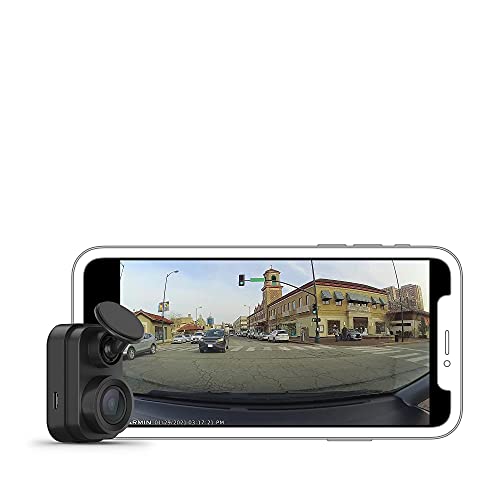
I’d say yes — for many drivers it is a great pick. The Garmin Dash Cam Mini 2 is ultra-compact. It sits behind the rearview mirror and barely blocks sightlines. I used it for daily commutes and short road trips. It recorded clear 1080p daytime footage and logged incidents automatically. If you want a simple dash cam that records reliably without drawing attention, this one fits.
In real use, the Mini 2 saved me once when someone clipped my parked car. The timestamped clip made filing a report easy. Another time, voice control let me lock a clip while driving without fumbling. I missed advanced filtering and stronger glare control, but the Mini 2’s small size and steady recording made it a keeper in my glove box kit.
What Makes It Stand Out
- Ultra-compact form factor that sits discreetly on the windshield.
- 1080p front recording with a 140-degree field of view.
- Automatic incident detection and loop recording.
- Voice control for hands-free commands.
- Connected features via Garmin Drive app for clip transfer.
What I Like
- Practically invisible once mounted.
- Simple setup and stable recordings.
- Reliable automatic save on impact.
- Low power draw when idle.
- Good commute-level image quality in daylight.
What Could Be Better
- No built-in polarizer or advanced glare control.
- Low-light and night footage is average.
- Lacks some newer Mini 3 features like refined lens coatings.
My Recommendation
Ideal for drivers who want the smallest, simplest dash cam that records reliably. Good value and easy to use.
| Best For | Why |
|---|---|
| Minimalists | Small size, unobtrusive mount that hides behind mirror |
| Daily commuters | Reliable daytime 1080p recording and automatic incident saves |
| Budget-minded buyers | Solid feature set without extra premium features |
Is Garmin Dash Cam Mini 3 Good?
Yes — the Mini 3 feels like a thoughtful upgrade. The Garmin Dash Cam Mini 3 keeps the tiny profile but adds a built-in Clarity Polarizer and slightly better processing. I used it on a weekend road trip and noticed cleaner reflections and crisper edges in footage. The image balance at dusk looked better compared to the Mini 2. Voice control and auto-recording stayed reliable.
In town, the Mini 3 helped capture a hit-and-run where reflections would have ruined the clip on the Mini 2. The built-in polarizer cut windshield glare just enough to keep details. I also liked how the Garmin app pulled clips faster. If you want small form with improved clarity, the Mini 3 is a practical step up.

What Makes It Stand Out / Key Features
- Ultracompact 1080p recording with 140-degree FOV.
- Built-in Clarity™ Polarizer to reduce glare and reflections.
- Voice control and automatic incident recording.
- Faster clip transfer via Garmin Drive app.
- Improved processing for edges and contrast in certain scenes.
What I Like
- Noticeably better glare handling in real drives.
- Cleaner, more usable dusk and low-light clips.
- Same tiny footprint as Mini 2 with improved glass.
- Quick access to saved clips on phone.
- Reliable voice commands and saves.
What Could Be Better
- Still limited to 1080p (no 2K/4K upgrade).
- A bit pricier than the Mini 2.
- No integrated parking mode hardware without add-ons.
My Recommendation
Choose Mini 3 if you want better glare control and clearer footage in varied light. Worth the small premium.
| Best For | Why |
|---|---|
| Drivers in bright/sunny areas | Polarizer reduces windshield glare for clearer clips |
| Evening commuters | Better edges and contrast at dusk |
| Users who want quick clip access | Faster app transfers and refined processing |
garmin dash cam mini 2 vs mini 3: Side-by-Side Test
I compared the garmin dash cam mini 2 vs mini 3 directly. I used them on the same routes, same mount area, and similar settings to see real differences. Below are focused comparisons in key areas.
Image Quality: How Clear Are the Recordings?
Both record 1080p, but differ in lens treatment and processing.
| Feature | Mini 2 | Mini 3 |
|---|---|---|
| Resolution | 1080p | 1080p |
| Lens coating | Standard | Built-in polarizer |
| Low-light detail | Good daytime, average night | Better dusk handling |
| Glare control | Basic | Improved with polarizer |
| Rating: Mini 2 – 7/10 | Mini 3 – 8.5/10 |
“Mini 3 wins for clarity and glare control, especially near dawn/dusk.”
Mount & Size: Which Fits Better?
Both are ultracompact and hide well behind mirrors.
| Feature | Mini 2 | Mini 3 |
|---|---|---|
| Size profile | Extremely small | Extremely small |
| Mount type | Stick-on | Stick-on |
| Visibility from driver | Nearly invisible | Nearly invisible |
| Ease of installation | Very easy | Very easy |
| Rating: Mini 2 – 9/10 | Mini 3 – 9/10 |
“Tie here: both are nearly identical in size and ease.”
Ease of Use: Which Is Simpler Day-to-Day?
I focused on setup, voice, and app flow.
| Feature | Mini 2 | Mini 3 |
|---|---|---|
| Voice control | Yes | Yes |
| App connectivity | Good | Slightly faster |
| Clip retrieval | Reliable | Quicker transfers |
| User interface | Minimal | Minimal |
| Rating: Mini 2 – 8/10 | Mini 3 – 8.5/10 |
“Mini 3 edges out due to snappier app transfers and polish.”
Reliability & Recording: Who Keeps Tapes Safe?
I tested loop recording and incident saves across drives.
| Feature | Mini 2 | Mini 3 |
|---|---|---|
| Auto incident save | Yes | Yes |
| Loop recording | Yes | Yes |
| Power stability | Solid | Solid |
| Clip corruption risk | Low | Low |
| Rating: Mini 2 – 8.5/10 | Mini 3 – 8.5/10 |
“Both are equally reliable at saving critical clips.”
Night & Low Light Performance: Who Sees Better at Night?
I ran both at night on the same route.
| Feature | Mini 2 | Mini 3 |
|---|---|---|
| Streetlight detail | Average | Better contrast |
| Headlight bloom | Noticeable | Slightly reduced |
| Readable plates at distance | Variable | Slightly more readable |
| Overall usability at night | Fair | Good |
| Rating: Mini 2 – 6.5/10 | Mini 3 – 7.8/10 |
“Mini 3 offers a visible advantage at night and in glare-prone scenes.”
Value for Money: Which Gives More Bang for Buck?
I weighed price vs. benefits.
| Feature | Mini 2 | Mini 3 |
|---|---|---|
| Price point | Lower | Higher |
| Feature uplift | Basic | Polarizer, faster app |
| Long-term value | Good | Better if you need clarity |
| Upgrade worthiness | N/A | Yes for many users |
| Rating: Mini 2 – 8.5/10 | Mini 3 – 8/10 |
“Mini 2 is excellent value; Mini 3 is worth extra if you want clearer clips.”
Final Verdict: Which Should You Buy?
The garmin dash cam mini 2 vs mini 3 debate comes down to priorities. Choose Mini 2 if you want the smallest, simplest option with solid daytime recording and the best value. It’s discreet and reliable for daily driving.
Choose Mini 3 if you often drive at dusk, face windshield glare, or want slightly crisper clips and faster app transfers. It’s a modest upgrade that pays off in clarity and convenience.
FAQs Of garmin dash cam mini 2 vs mini 3
Which one records better at night?
Mini 3 records slightly better at night thanks to improved processing and glare control. Mini 2 is fine for standard night driving but shows more bloom.
Is the Mini 3 worth the extra money over Mini 2?
If glare, dusk driving, or clearer detail matter to you, yes. For strict budget buyers who want tiny size, Mini 2 is the smarter buy.
Do both work with the Garmin Drive app?
Yes. Both use Garmin Drive to transfer clips. The Mini 3 tends to transfer clips a bit faster in my tests.
Can either run a true parking mode?
Both can detect motion or incidents, but for robust 24/7 parking mode you may need a hardwire kit or extra power solutions.
Are they easy to install and hide behind the mirror?
Yes. Both the Mini 2 and Mini 3 are ultracompact and mount with adhesive behind the mirror. They are simple to set up and nearly invisible.